- Authors

- Name
- Youngju Kim
- @fjvbn20031
引言
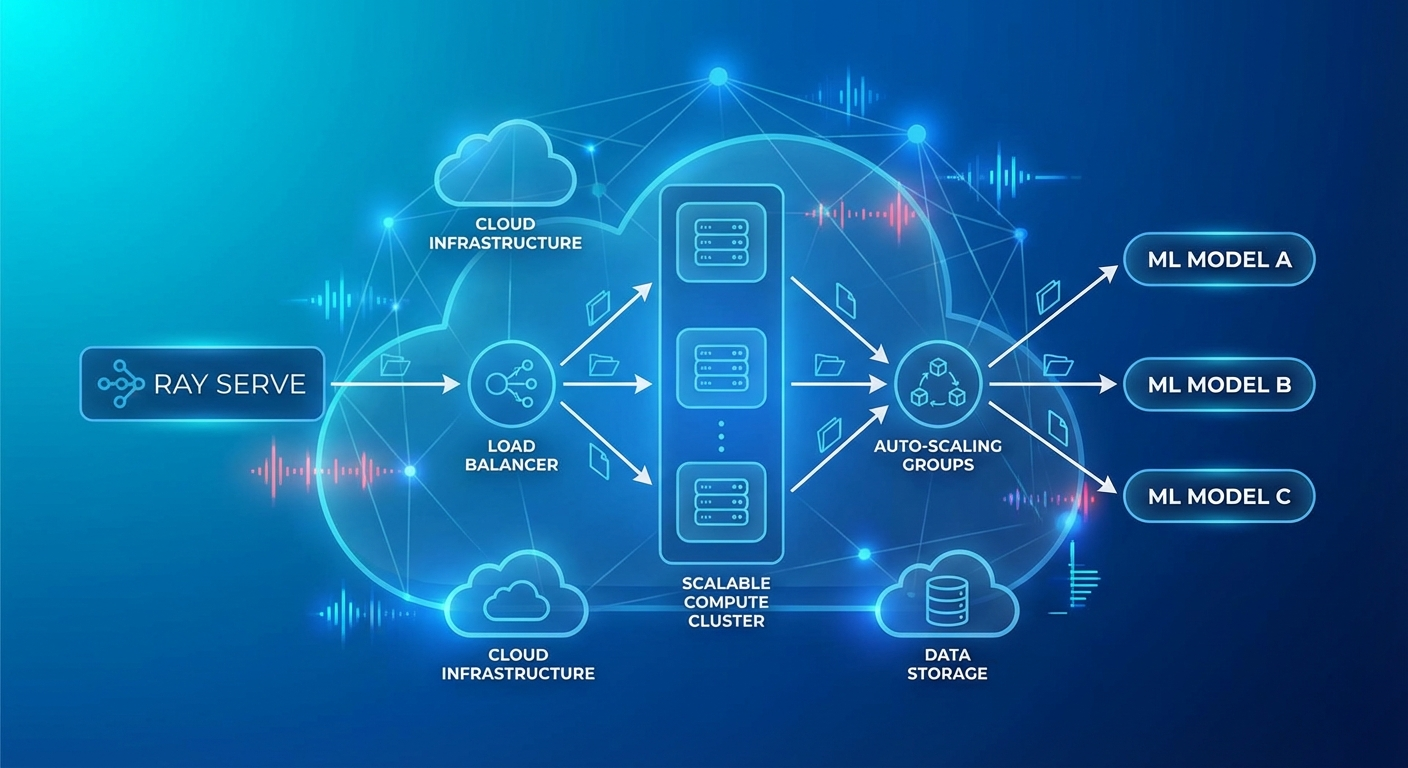
把 ML/LLM 模型部署到生产环境时,最大的挑战是可扩展性与复杂流水线的管理。单一模型的服务很简单,但真实服务往往需要预处理 → 模型推理 → 后处理 → 重排序这样的多步骤流水线。
Ray Serve 是构建在 Ray 之上的可扩展模型服务框架,可以用原生 Python 代码来搭建复杂的服务流水线。
Ray Serve 核心概念
Deployment
from ray import serve
import ray

# 连接 Ray 集群
ray.init()

# 最简单的 Deployment
@serve.deployment
class HelloModel:
    def __call__(self, request):
        return {"message": "Hello from Ray Serve!"}

# 部署
app = HelloModel.bind()
serve.run(app, route_prefix="/hello")
Deployment 配置
@serve.deployment(
    num_replicas=3,                    # 副本数
    max_ongoing_requests=100,          # 每个副本的最大并发请求数
    ray_actor_options={
        "num_cpus": 2,
        "num_gpus": 1,
        "memory": 4 * 1024**3,        # 4GB
    },
    health_check_period_s=10,
    health_check_timeout_s=30,
    graceful_shutdown_wait_loop_s=2,
    graceful_shutdown_timeout_s=20,
)
class MLModel:
    def __init__(self, model_path: str):
        self.model = self.load_model(model_path)

    def load_model(self, path):
        import torch
        return torch.load(path)

    async def __call__(self, request):
        data = await request.json()
        prediction = self.model.predict(data["features"])
        return {"prediction": prediction.tolist()}
自动伸缩
@serve.deployment(
    autoscaling_config={
        "min_replicas": 1,
        "max_replicas": 10,
        "initial_replicas": 2,
        "target_ongoing_requests": 5,  # 每个副本的目标并发请求数
        "upscale_delay_s": 30,
        "downscale_delay_s": 300,
        "upscaling_factor": 1.5,       # 扩容倍数
        "downscaling_factor": 0.7,     # 缩容倍数
        "smoothing_factor": 0.5,
        "metrics_interval_s": 10,
    }
)
class AutoScaledModel:
    def __init__(self):
        from transformers import pipeline
        self.classifier = pipeline("sentiment-analysis")

    async def __call__(self, request):
        data = await request.json()
        result = self.classifier(data["text"])
        return result
LLM 服务(vLLM 集成)
from ray import serve
from ray.serve.llm import LLMServer, LLMConfig

# 使用 Ray Serve LLM 模块(vLLM 后端)
llm_config = LLMConfig(
    model="meta-llama/Llama-3.1-8B-Instruct",
    tensor_parallel_size=1,
    max_model_len=8192,
    gpu_memory_utilization=0.9,
)

# 自动生成 OpenAI 兼容端点
app = LLMServer.bind(llm_config)
serve.run(app)
自定义 LLM 服务
@serve.deployment(
    ray_actor_options={"num_gpus": 1},
    autoscaling_config={
        "min_replicas": 1,
        "max_replicas": 4,
        "target_ongoing_requests": 3,
    },
)
class CustomLLMDeployment:
    def __init__(self):
        from vllm import LLM, SamplingParams
        self.llm = LLM(
            model="meta-llama/Llama-3.1-8B-Instruct",
            dtype="auto",
            max_model_len=4096,
            gpu_memory_utilization=0.85,
        )
        self.default_params = SamplingParams(
            temperature=0.7,
            top_p=0.9,
            max_tokens=1024,
        )

    async def __call__(self, request):
        data = await request.json()
        prompt = data["prompt"]
        params = SamplingParams(
            temperature=data.get("temperature", 0.7),
            max_tokens=data.get("max_tokens", 1024),
        )

        outputs = self.llm.generate([prompt], params)
        return {
            "text": outputs[0].outputs[0].text,
            "tokens": len(outputs[0].outputs[0].token_ids),
        }
多模型流水线
@serve.deployment(num_replicas=2, ray_actor_options={"num_cpus": 1})
class Preprocessor:
    """文本预处理"""
    def __init__(self):
        from transformers import AutoTokenizer
        self.tokenizer = AutoTokenizer.from_pretrained("bert-base-uncased")

    async def preprocess(self, text: str) -> dict:
        # 语言检测、归一化、分词
        cleaned = text.strip().lower()
        tokens = self.tokenizer.encode(cleaned, max_length=512, truncation=True)
        return {"text": cleaned, "tokens": tokens, "length": len(tokens)}


@serve.deployment(ray_actor_options={"num_gpus": 1})
class SentimentModel:
    """情感分析模型"""
    def __init__(self):
        from transformers import pipeline
        self.model = pipeline(
            "sentiment-analysis",
            model="nlptown/bert-base-multilingual-uncased-sentiment",
            device=0
        )

    async def predict(self, text: str) -> dict:
        result = self.model(text)[0]
        return {"label": result["label"], "score": result["score"]}


@serve.deployment(ray_actor_options={"num_gpus": 1})
class SummaryModel:
    """摘要模型"""
    def __init__(self):
        from transformers import pipeline
        self.model = pipeline("summarization", device=0)

    async def summarize(self, text: str) -> str:
        if len(text.split()) < 30:
            return text
        result = self.model(text, max_length=100, min_length=30)
        return result[0]["summary_text"]


@serve.deployment
class Pipeline:
    """编排器 — 组合多个模型"""
    def __init__(self, preprocessor, sentiment, summary):
        self.preprocessor = preprocessor
        self.sentiment = sentiment
        self.summary = summary

    async def __call__(self, request):
        data = await request.json()
        text = data["text"]

        # 预处理
        processed = await self.preprocessor.preprocess.remote(text)

        # 并行推理
        sentiment_future = self.sentiment.predict.remote(text)
        summary_future = self.summary.summarize.remote(text)

        sentiment_result = await sentiment_future
        summary_result = await summary_future

        return {
            "original_length": processed["length"],
            "sentiment": sentiment_result,
            "summary": summary_result,
        }


# 流水线组成(DAG)
preprocessor = Preprocessor.bind()
sentiment = SentimentModel.bind()
summary = SummaryModel.bind()
app = Pipeline.bind(preprocessor, sentiment, summary)

serve.run(app, route_prefix="/analyze")
批量推理
@serve.deployment(
    ray_actor_options={"num_gpus": 1},
)
class BatchedModel:
    def __init__(self):
        from transformers import pipeline
        self.model = pipeline("text-classification", device=0)

    @serve.batch(max_batch_size=32, batch_wait_timeout_s=0.1)
    async def __call__(self, texts: list[str]) -> list[dict]:
        """
        Ray Serve 会自动把单个请求汇总成批次
        最多 32 个,或等待 0.1 秒后执行批次
        """
        results = self.model(texts)
        return results
多节点部署
# 大型模型(跨多个 GPU/节点部署)
@serve.deployment(
    ray_actor_options={
        "num_gpus": 4,  # 使用 4 个 GPU
    },
    placement_group_strategy="STRICT_PACK",  # 部署在同一节点
)
class LargeModel:
    def __init__(self):
        from vllm import LLM
        self.llm = LLM(
            model="meta-llama/Llama-3.1-70B-Instruct",
            tensor_parallel_size=4,
        )
Kubernetes 部署(KubeRay)
# Ray Cluster 定义
apiVersion: ray.io/v1
kind: RayService
metadata:
  name: llm-service
spec:
  serveConfigV2: |
    applications:
      - name: llm-app
        import_path: serve_app:app
        runtime_env:
          pip:
            - vllm>=0.6.0
            - transformers
        deployments:
          - name: LLMDeployment
            num_replicas: 2
            ray_actor_options:
              num_gpus: 1
            autoscaling_config:
              min_replicas: 1
              max_replicas: 4

  rayClusterConfig:
    headGroupSpec:
      rayStartParams:
        dashboard-host: '0.0.0.0'
      template:
        spec:
          containers:
            - name: ray-head
              image: rayproject/ray-ml:2.40.0-py310-gpu
              resources:
                limits:
                  cpu: '4'
                  memory: '16Gi'
              ports:
                - containerPort: 6379
                - containerPort: 8265
                - containerPort: 8000

    workerGroupSpecs:
      - groupName: gpu-workers
        replicas: 2
        minReplicas: 1
        maxReplicas: 4
        rayStartParams: {}
        template:
          spec:
            containers:
              - name: ray-worker
                image: rayproject/ray-ml:2.40.0-py310-gpu
                resources:
                  limits:
                    cpu: '8'
                    memory: '32Gi'
                    nvidia.com/gpu: 1
监控
# Ray Dashboard: http://localhost:8265
# Serve 指标: http://localhost:8000/-/metrics

# Prometheus 指标
# ray_serve_deployment_request_counter
# ray_serve_deployment_error_counter
# ray_serve_deployment_processing_latency_ms
# ray_serve_deployment_replica_starts
# ray_serve_num_ongoing_requests
# Grafana 仪表盘查询
panels:
  - title: 'Request Latency (p99)'
    query: |
      histogram_quantile(0.99,
        rate(ray_serve_deployment_processing_latency_ms_bucket[5m])
      )
  - title: 'Throughput (req/s)'
    query: |
      rate(ray_serve_deployment_request_counter[1m])
  - title: 'Active Replicas'
    query: |
      ray_serve_deployment_replica_healthy_total
A/B 测试
import random

@serve.deployment
class ABRouter:
    def __init__(self, model_a, model_b, traffic_split=0.9):
        self.model_a = model_a  # 稳定版本
        self.model_b = model_b  # 实验版本
        self.split = traffic_split

    async def __call__(self, request):
        if random.random() < self.split:
            return await self.model_a.__call__.remote(request)
        else:
            return await self.model_b.__call__.remote(request)


model_v1 = StableModel.bind()
model_v2 = ExperimentalModel.bind()
app = ABRouter.bind(model_v1, model_v2, traffic_split=0.95)
测验
Q1. Ray Serve 的 Deployment 是什么?
它是包装单个 ML 模型或业务逻辑的可扩展单元,副本数、GPU 分配、自动伸缩等都可以独立配置。
Q2. Ray Serve 中多模型流水线的优势是什么?
把每个模型拆分成独立的 Deployment,可以分别伸缩,并以 DAG 的形式自由组合并行/串行处理。
Q3. @serve.batch 装饰器的作用是什么?
它会自动把单个请求汇总成批次处理,从而提高 GPU 利用率、最大化吞吐量,可以通过 max_batch_size 和 timeout 来控制。
Q4. target_ongoing_requests 这个自动伸缩配置项的含义是什么?
它是每个副本的目标并发处理请求数,超过这个值就扩容,低于这个值就缩容。
Q5. KubeRay 的 RayService 资源起什么作用?
它会在 Kubernetes 上自动创建 Ray 集群,并部署/管理 Ray Serve 应用,同时也负责 Worker 节点的自动伸缩。
Q6. placement_group_strategy 中 STRICT_PACK 的含义是什么?
它强制让所有 GPU 都部署在同一台物理节点上,用于像 Tensor Parallelism 这样需要 GPU 间高速通信的场景。
Q7. Ray Serve 与直接用 Flask/FastAPI 做服务相比,区别是什么?
Ray Serve 原生支持分布式计算、自动伸缩、GPU 管理、批处理和多模型流水线;而 Flask/FastAPI 更适合单进程的服务。
总结
Ray Serve 是一个强大的框架,仅凭 Python 代码就能搭建并扩展复杂的 ML/LLM 服务流水线。vLLM 集成让 LLM 服务变得简单,而通过 KubeRay 实现的 Kubernetes 原生部署,也让生产环境的运维变得容易。