- Authors

- Name
- Youngju Kim
- @fjvbn20031
- 들어가며
- Ray Serve 핵심 개념
- LLM 서빙 (vLLM 통합)
- 멀티모델 파이프라인
- 배치 추론
- 멀티노드 배포
- Kubernetes 배포 (KubeRay)
- 모니터링
- A/B 테스트
- 퀴즈
- 마무리
- 참고 자료
들어가며
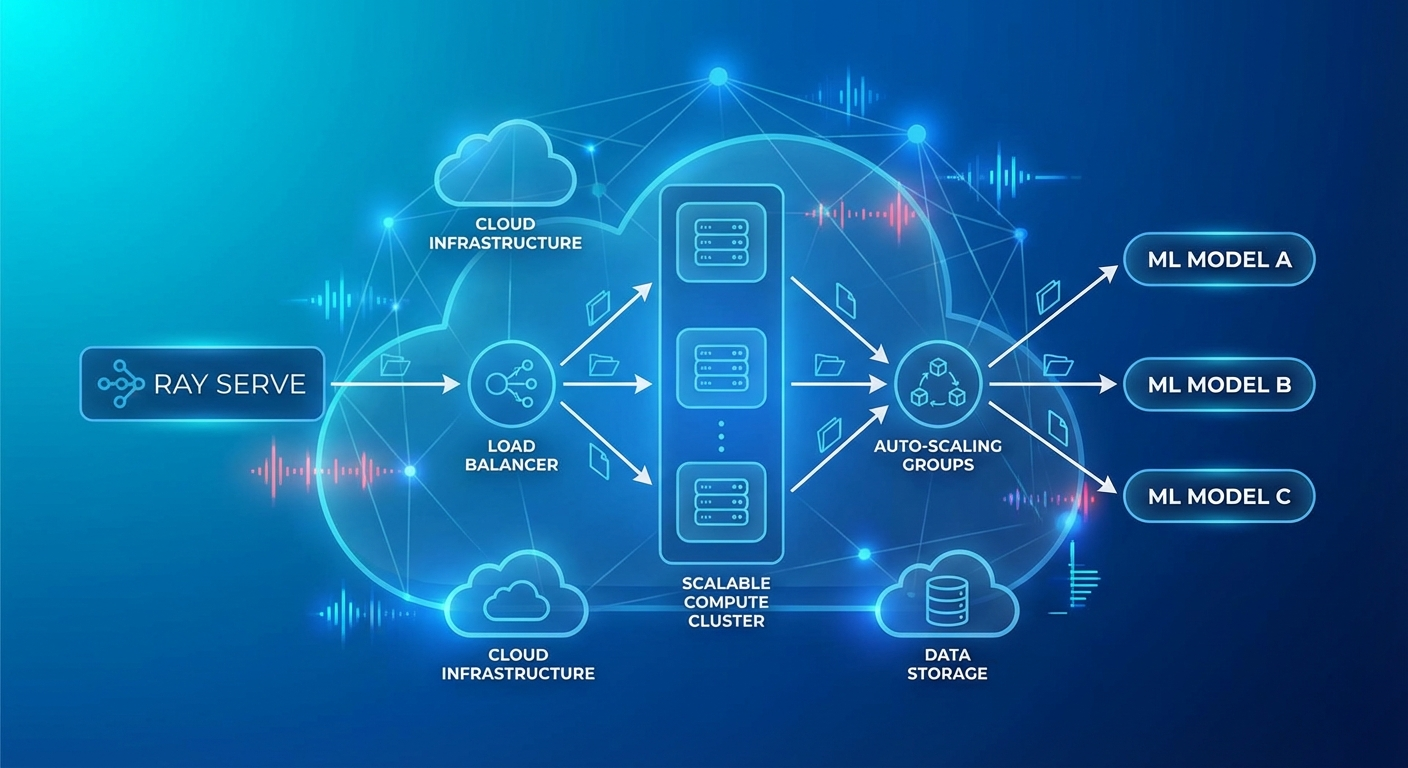
ML/LLM 모델을 프로덕션에 배포할 때 가장 큰 과제는 확장성과 복잡한 파이프라인 관리입니다. 단일 모델 서빙은 간단하지만, 실제 서비스는 전처리 → 모델 추론 → 후처리 → 재랭킹 같은 멀티스텝 파이프라인이 필요합니다.
Ray Serve는 Ray 위에 구축된 확장 가능한 모델 서빙 프레임워크로, Python 네이티브 코드로 복잡한 서빙 파이프라인을 구성할 수 있습니다.
Ray Serve 핵심 개념
Deployment
from ray import serve
import ray

# Ray 클러스터 연결
ray.init()

# 가장 간단한 Deployment
@serve.deployment
class HelloModel:
    def __call__(self, request):
        return {"message": "Hello from Ray Serve!"}

# 배포
app = HelloModel.bind()
serve.run(app, route_prefix="/hello")
Deployment 설정
@serve.deployment(
    num_replicas=3,                    # 복제본 수
    max_ongoing_requests=100,          # 복제본당 최대 동시 요청
    ray_actor_options={
        "num_cpus": 2,
        "num_gpus": 1,
        "memory": 4 * 1024**3,        # 4GB
    },
    health_check_period_s=10,
    health_check_timeout_s=30,
    graceful_shutdown_wait_loop_s=2,
    graceful_shutdown_timeout_s=20,
)
class MLModel:
    def __init__(self, model_path: str):
        self.model = self.load_model(model_path)

    def load_model(self, path):
        import torch
        return torch.load(path)

    async def __call__(self, request):
        data = await request.json()
        prediction = self.model.predict(data["features"])
        return {"prediction": prediction.tolist()}
오토스케일링
@serve.deployment(
    autoscaling_config={
        "min_replicas": 1,
        "max_replicas": 10,
        "initial_replicas": 2,
        "target_ongoing_requests": 5,  # 복제본당 목표 동시 요청
        "upscale_delay_s": 30,
        "downscale_delay_s": 300,
        "upscaling_factor": 1.5,       # 스케일 업 배수
        "downscaling_factor": 0.7,     # 스케일 다운 배수
        "smoothing_factor": 0.5,
        "metrics_interval_s": 10,
    }
)
class AutoScaledModel:
    def __init__(self):
        from transformers import pipeline
        self.classifier = pipeline("sentiment-analysis")

    async def __call__(self, request):
        data = await request.json()
        result = self.classifier(data["text"])
        return result
LLM 서빙 (vLLM 통합)
from ray import serve
from ray.serve.llm import LLMServer, LLMConfig

# Ray Serve LLM 모듈 사용 (vLLM 백엔드)
llm_config = LLMConfig(
    model="meta-llama/Llama-3.1-8B-Instruct",
    tensor_parallel_size=1,
    max_model_len=8192,
    gpu_memory_utilization=0.9,
)

# OpenAI 호환 엔드포인트 자동 생성
app = LLMServer.bind(llm_config)
serve.run(app)
커스텀 LLM 서빙
@serve.deployment(
    ray_actor_options={"num_gpus": 1},
    autoscaling_config={
        "min_replicas": 1,
        "max_replicas": 4,
        "target_ongoing_requests": 3,
    },
)
class CustomLLMDeployment:
    def __init__(self):
        from vllm import LLM, SamplingParams
        self.llm = LLM(
            model="meta-llama/Llama-3.1-8B-Instruct",
            dtype="auto",
            max_model_len=4096,
            gpu_memory_utilization=0.85,
        )
        self.default_params = SamplingParams(
            temperature=0.7,
            top_p=0.9,
            max_tokens=1024,
        )

    async def __call__(self, request):
        data = await request.json()
        prompt = data["prompt"]
        params = SamplingParams(
            temperature=data.get("temperature", 0.7),
            max_tokens=data.get("max_tokens", 1024),
        )

        outputs = self.llm.generate([prompt], params)
        return {
            "text": outputs[0].outputs[0].text,
            "tokens": len(outputs[0].outputs[0].token_ids),
        }
멀티모델 파이프라인
@serve.deployment(num_replicas=2, ray_actor_options={"num_cpus": 1})
class Preprocessor:
    """텍스트 전처리"""
    def __init__(self):
        from transformers import AutoTokenizer
        self.tokenizer = AutoTokenizer.from_pretrained("bert-base-uncased")

    async def preprocess(self, text: str) -> dict:
        # 언어 감지, 정규화, 토큰화
        cleaned = text.strip().lower()
        tokens = self.tokenizer.encode(cleaned, max_length=512, truncation=True)
        return {"text": cleaned, "tokens": tokens, "length": len(tokens)}


@serve.deployment(ray_actor_options={"num_gpus": 1})
class SentimentModel:
    """감성 분석 모델"""
    def __init__(self):
        from transformers import pipeline
        self.model = pipeline(
            "sentiment-analysis",
            model="nlptown/bert-base-multilingual-uncased-sentiment",
            device=0
        )

    async def predict(self, text: str) -> dict:
        result = self.model(text)[0]
        return {"label": result["label"], "score": result["score"]}


@serve.deployment(ray_actor_options={"num_gpus": 1})
class SummaryModel:
    """요약 모델"""
    def __init__(self):
        from transformers import pipeline
        self.model = pipeline("summarization", device=0)

    async def summarize(self, text: str) -> str:
        if len(text.split()) < 30:
            return text
        result = self.model(text, max_length=100, min_length=30)
        return result[0]["summary_text"]


@serve.deployment
class Pipeline:
    """오케스트레이터 — 여러 모델 조합"""
    def __init__(self, preprocessor, sentiment, summary):
        self.preprocessor = preprocessor
        self.sentiment = sentiment
        self.summary = summary

    async def __call__(self, request):
        data = await request.json()
        text = data["text"]

        # 전처리
        processed = await self.preprocessor.preprocess.remote(text)

        # 병렬 추론
        sentiment_future = self.sentiment.predict.remote(text)
        summary_future = self.summary.summarize.remote(text)

        sentiment_result = await sentiment_future
        summary_result = await summary_future

        return {
            "original_length": processed["length"],
            "sentiment": sentiment_result,
            "summary": summary_result,
        }


# 파이프라인 구성 (DAG)
preprocessor = Preprocessor.bind()
sentiment = SentimentModel.bind()
summary = SummaryModel.bind()
app = Pipeline.bind(preprocessor, sentiment, summary)

serve.run(app, route_prefix="/analyze")
배치 추론
@serve.deployment(
    ray_actor_options={"num_gpus": 1},
)
class BatchedModel:
    def __init__(self):
        from transformers import pipeline
        self.model = pipeline("text-classification", device=0)

    @serve.batch(max_batch_size=32, batch_wait_timeout_s=0.1)
    async def __call__(self, texts: list[str]) -> list[dict]:
        """
        Ray Serve가 자동으로 개별 요청을 배치로 모음
        최대 32개, 또는 0.1초 대기 후 배치 실행
        """
        results = self.model(texts)
        return results
멀티노드 배포
# 대형 모델 (여러 GPU/노드에 걸쳐 배포)
@serve.deployment(
    ray_actor_options={
        "num_gpus": 4,  # 4 GPU 사용
    },
    placement_group_strategy="STRICT_PACK",  # 같은 노드에 배치
)
class LargeModel:
    def __init__(self):
        from vllm import LLM
        self.llm = LLM(
            model="meta-llama/Llama-3.1-70B-Instruct",
            tensor_parallel_size=4,
        )
Kubernetes 배포 (KubeRay)
# Ray Cluster 정의
apiVersion: ray.io/v1
kind: RayService
metadata:
  name: llm-service
spec:
  serveConfigV2: |
    applications:
      - name: llm-app
        import_path: serve_app:app
        runtime_env:
          pip:
            - vllm>=0.6.0
            - transformers
        deployments:
          - name: LLMDeployment
            num_replicas: 2
            ray_actor_options:
              num_gpus: 1
            autoscaling_config:
              min_replicas: 1
              max_replicas: 4

  rayClusterConfig:
    headGroupSpec:
      rayStartParams:
        dashboard-host: '0.0.0.0'
      template:
        spec:
          containers:
            - name: ray-head
              image: rayproject/ray-ml:2.40.0-py310-gpu
              resources:
                limits:
                  cpu: '4'
                  memory: '16Gi'
              ports:
                - containerPort: 6379
                - containerPort: 8265
                - containerPort: 8000

    workerGroupSpecs:
      - groupName: gpu-workers
        replicas: 2
        minReplicas: 1
        maxReplicas: 4
        rayStartParams: {}
        template:
          spec:
            containers:
              - name: ray-worker
                image: rayproject/ray-ml:2.40.0-py310-gpu
                resources:
                  limits:
                    cpu: '8'
                    memory: '32Gi'
                    nvidia.com/gpu: 1
모니터링
# Ray Dashboard: http://localhost:8265
# Serve 메트릭: http://localhost:8000/-/metrics

# Prometheus 메트릭
# ray_serve_deployment_request_counter
# ray_serve_deployment_error_counter
# ray_serve_deployment_processing_latency_ms
# ray_serve_deployment_replica_starts
# ray_serve_num_ongoing_requests
# Grafana 대시보드 쿼리
panels:
  - title: 'Request Latency (p99)'
    query: |
      histogram_quantile(0.99,
        rate(ray_serve_deployment_processing_latency_ms_bucket[5m])
      )
  - title: 'Throughput (req/s)'
    query: |
      rate(ray_serve_deployment_request_counter[1m])
  - title: 'Active Replicas'
    query: |
      ray_serve_deployment_replica_healthy_total
A/B 테스트
import random

@serve.deployment
class ABRouter:
    def __init__(self, model_a, model_b, traffic_split=0.9):
        self.model_a = model_a  # 안정 버전
        self.model_b = model_b  # 실험 버전
        self.split = traffic_split

    async def __call__(self, request):
        if random.random() < self.split:
            return await self.model_a.__call__.remote(request)
        else:
            return await self.model_b.__call__.remote(request)


model_v1 = StableModel.bind()
model_v2 = ExperimentalModel.bind()
app = ABRouter.bind(model_v1, model_v2, traffic_split=0.95)
퀴즈
Q1. Ray Serve의 Deployment란?
단일 ML 모델이나 비즈니스 로직을 감싸는 확장 가능한 단위입니다. 복제본 수, GPU 할당, 오토스케일링 등을 독립적으로 설정할 수 있습니다.
Q2. Ray Serve에서 멀티모델 파이프라인의 장점은?
각 모델을 독립적인 Deployment로 분리하여 개별적으로 스케일링하고, DAG 형태로 병렬/순차 처리를 자유롭게 구성할 수 있습니다.
Q3. @serve.batch 데코레이터의 역할은?
개별 요청을 자동으로 모아서 배치로 처리합니다. GPU 활용률을 높이고 처리량을 극대화합니다. max_batch_size와 timeout으로 제어합니다.
Q4. target_ongoing_requests 오토스케일링 설정의 의미는?
복제본당 목표 동시 처리 요청 수입니다. 이 값을 초과하면 스케일 업, 미만이면 스케일 다운합니다.
Q5. KubeRay의 RayService 리소스는 어떤 역할을 하나요?
Kubernetes에서 Ray 클러스터를 자동 생성하고, Ray Serve 애플리케이션을 배포/관리합니다. Worker 노드 오토스케일링도 처리합니다.
Q6. placement_group_strategy의 STRICT_PACK 의미는?
모든 GPU가 같은 물리 노드에 배치되도록 강제합니다. Tensor Parallelism처럼 GPU 간 고속 통신이 필요한 경우에 사용합니다.
Q7. Ray Serve vs 직접 Flask/FastAPI 서빙의 차이는?
Ray Serve는 분산 컴퓨팅, 오토스케일링, GPU 관리, 배치 처리, 멀티모델 파이프라인을 네이티브로 지원합니다. Flask/FastAPI는 단일 프로세스 서빙에 적합합니다.
마무리
Ray Serve는 복잡한 ML/LLM 서빙 파이프라인을 Python 코드만으로 구성하고 확장할 수 있는 강력한 프레임워크입니다. vLLM 통합으로 LLM 서빙이 간편해졌고, KubeRay를 통한 Kubernetes 네이티브 배포로 프로덕션 운영도 용이합니다.