- Authors
- Name
- Introduction
- Ray Serve Core Concepts
- LLM Serving (vLLM Integration)
- Multi-Model Pipeline
- Batch Inference
- Multi-Node Deployment
- Kubernetes Deployment (KubeRay)
- Monitoring
- A/B Testing
- Quiz
- Conclusion
- References
Introduction
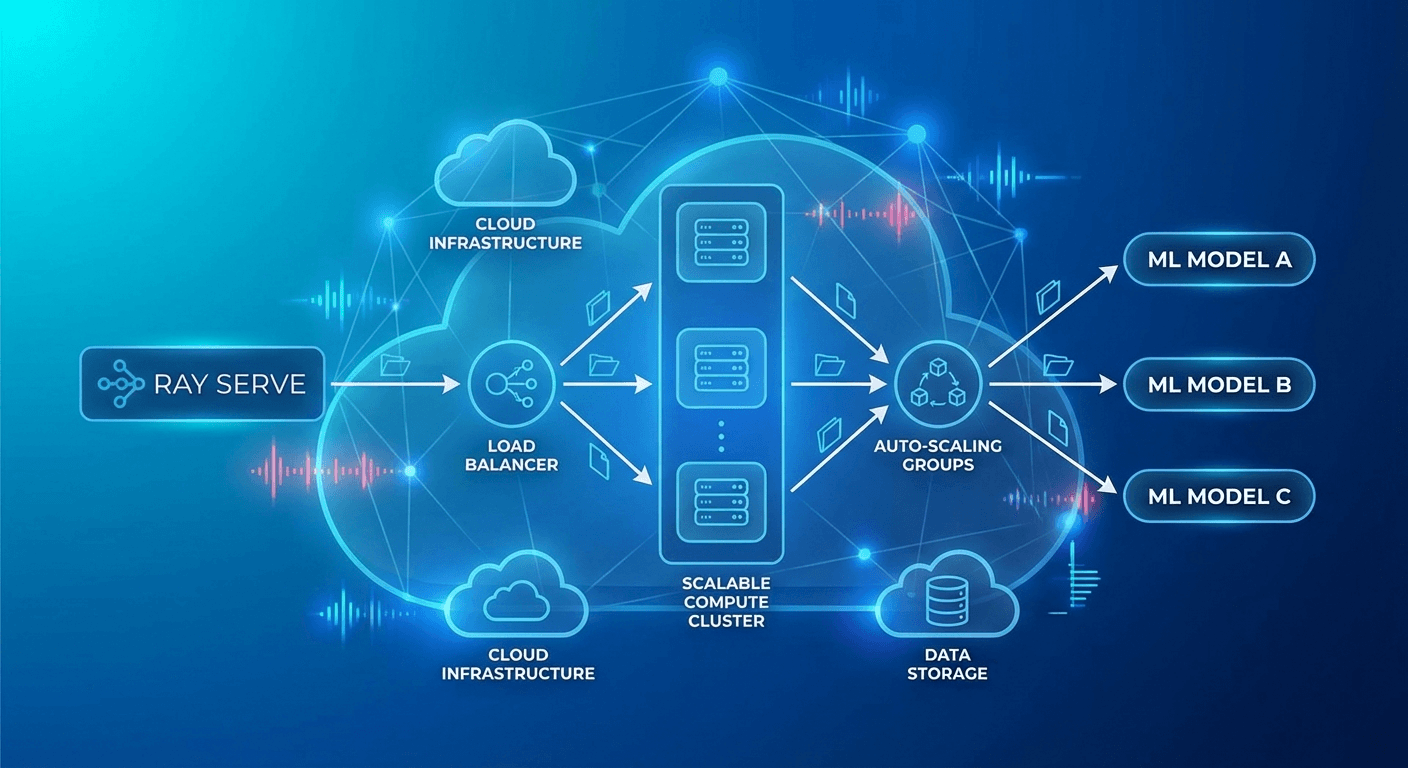
When deploying ML/LLM models to production, the biggest challenges are scalability and complex pipeline management. Serving a single model is straightforward, but real-world services require multi-step pipelines such as preprocessing, model inference, post-processing, and re-ranking.
Ray Serve is a scalable model serving framework built on top of Ray that lets you compose complex serving pipelines using native Python code.
Ray Serve Core Concepts
Deployment
from ray import serve
import ray

# Connect to Ray cluster
ray.init()

# Simplest Deployment
@serve.deployment
class HelloModel:
    def __call__(self, request):
        return {"message": "Hello from Ray Serve!"}

# Deploy
app = HelloModel.bind()
serve.run(app, route_prefix="/hello")
Deployment Configuration
@serve.deployment(
    num_replicas=3,                    # Number of replicas
    max_ongoing_requests=100,          # Max concurrent requests per replica
    ray_actor_options={
        "num_cpus": 2,
        "num_gpus": 1,
        "memory": 4 * 1024**3,        # 4GB
    },
    health_check_period_s=10,
    health_check_timeout_s=30,
    graceful_shutdown_wait_loop_s=2,
    graceful_shutdown_timeout_s=20,
)
class MLModel:
    def __init__(self, model_path: str):
        self.model = self.load_model(model_path)

    def load_model(self, path):
        import torch
        return torch.load(path)

    async def __call__(self, request):
        data = await request.json()
        prediction = self.model.predict(data["features"])
        return {"prediction": prediction.tolist()}
Autoscaling
@serve.deployment(
    autoscaling_config={
        "min_replicas": 1,
        "max_replicas": 10,
        "initial_replicas": 2,
        "target_ongoing_requests": 5,  # Target concurrent requests per replica
        "upscale_delay_s": 30,
        "downscale_delay_s": 300,
        "upscaling_factor": 1.5,       # Scale-up multiplier
        "downscaling_factor": 0.7,     # Scale-down multiplier
        "smoothing_factor": 0.5,
        "metrics_interval_s": 10,
    }
)
class AutoScaledModel:
    def __init__(self):
        from transformers import pipeline
        self.classifier = pipeline("sentiment-analysis")

    async def __call__(self, request):
        data = await request.json()
        result = self.classifier(data["text"])
        return result
LLM Serving (vLLM Integration)
from ray import serve
from ray.serve.llm import LLMServer, LLMConfig

# Using Ray Serve LLM module (vLLM backend)
llm_config = LLMConfig(
    model="meta-llama/Llama-3.1-8B-Instruct",
    tensor_parallel_size=1,
    max_model_len=8192,
    gpu_memory_utilization=0.9,
)

# Automatically generates OpenAI-compatible endpoints
app = LLMServer.bind(llm_config)
serve.run(app)
Custom LLM Serving
@serve.deployment(
    ray_actor_options={"num_gpus": 1},
    autoscaling_config={
        "min_replicas": 1,
        "max_replicas": 4,
        "target_ongoing_requests": 3,
    },
)
class CustomLLMDeployment:
    def __init__(self):
        from vllm import LLM, SamplingParams
        self.llm = LLM(
            model="meta-llama/Llama-3.1-8B-Instruct",
            dtype="auto",
            max_model_len=4096,
            gpu_memory_utilization=0.85,
        )
        self.default_params = SamplingParams(
            temperature=0.7,
            top_p=0.9,
            max_tokens=1024,
        )

    async def __call__(self, request):
        data = await request.json()
        prompt = data["prompt"]
        params = SamplingParams(
            temperature=data.get("temperature", 0.7),
            max_tokens=data.get("max_tokens", 1024),
        )

        outputs = self.llm.generate([prompt], params)
        return {
            "text": outputs[0].outputs[0].text,
            "tokens": len(outputs[0].outputs[0].token_ids),
        }
Multi-Model Pipeline
@serve.deployment(num_replicas=2, ray_actor_options={"num_cpus": 1})
class Preprocessor:
    """Text preprocessing"""
    def __init__(self):
        from transformers import AutoTokenizer
        self.tokenizer = AutoTokenizer.from_pretrained("bert-base-uncased")

    async def preprocess(self, text: str) -> dict:
        # Language detection, normalization, tokenization
        cleaned = text.strip().lower()
        tokens = self.tokenizer.encode(cleaned, max_length=512, truncation=True)
        return {"text": cleaned, "tokens": tokens, "length": len(tokens)}


@serve.deployment(ray_actor_options={"num_gpus": 1})
class SentimentModel:
    """Sentiment analysis model"""
    def __init__(self):
        from transformers import pipeline
        self.model = pipeline(
            "sentiment-analysis",
            model="nlptown/bert-base-multilingual-uncased-sentiment",
            device=0
        )

    async def predict(self, text: str) -> dict:
        result = self.model(text)[0]
        return {"label": result["label"], "score": result["score"]}


@serve.deployment(ray_actor_options={"num_gpus": 1})
class SummaryModel:
    """Summarization model"""
    def __init__(self):
        from transformers import pipeline
        self.model = pipeline("summarization", device=0)

    async def summarize(self, text: str) -> str:
        if len(text.split()) < 30:
            return text
        result = self.model(text, max_length=100, min_length=30)
        return result[0]["summary_text"]


@serve.deployment
class Pipeline:
    """Orchestrator — combines multiple models"""
    def __init__(self, preprocessor, sentiment, summary):
        self.preprocessor = preprocessor
        self.sentiment = sentiment
        self.summary = summary

    async def __call__(self, request):
        data = await request.json()
        text = data["text"]

        # Preprocessing
        processed = await self.preprocessor.preprocess.remote(text)

        # Parallel inference
        sentiment_future = self.sentiment.predict.remote(text)
        summary_future = self.summary.summarize.remote(text)

        sentiment_result = await sentiment_future
        summary_result = await summary_future

        return {
            "original_length": processed["length"],
            "sentiment": sentiment_result,
            "summary": summary_result,
        }


# Pipeline composition (DAG)
preprocessor = Preprocessor.bind()
sentiment = SentimentModel.bind()
summary = SummaryModel.bind()
app = Pipeline.bind(preprocessor, sentiment, summary)

serve.run(app, route_prefix="/analyze")
Batch Inference
@serve.deployment(
    ray_actor_options={"num_gpus": 1},
)
class BatchedModel:
    def __init__(self):
        from transformers import pipeline
        self.model = pipeline("text-classification", device=0)

    @serve.batch(max_batch_size=32, batch_wait_timeout_s=0.1)
    async def __call__(self, texts: list[str]) -> list[dict]:
        """
        Ray Serve automatically batches individual requests.
        Up to 32 requests, or executes the batch after 0.1 second wait.
        """
        results = self.model(texts)
        return results
Multi-Node Deployment
# Large model (deployed across multiple GPUs/nodes)
@serve.deployment(
    ray_actor_options={
        "num_gpus": 4,  # Use 4 GPUs
    },
    placement_group_strategy="STRICT_PACK",  # Place on the same node
)
class LargeModel:
    def __init__(self):
        from vllm import LLM
        self.llm = LLM(
            model="meta-llama/Llama-3.1-70B-Instruct",
            tensor_parallel_size=4,
        )
Kubernetes Deployment (KubeRay)
# Ray Cluster definition
apiVersion: ray.io/v1
kind: RayService
metadata:
  name: llm-service
spec:
  serveConfigV2: |
    applications:
      - name: llm-app
        import_path: serve_app:app
        runtime_env:
          pip:
            - vllm>=0.6.0
            - transformers
        deployments:
          - name: LLMDeployment
            num_replicas: 2
            ray_actor_options:
              num_gpus: 1
            autoscaling_config:
              min_replicas: 1
              max_replicas: 4

  rayClusterConfig:
    headGroupSpec:
      rayStartParams:
        dashboard-host: '0.0.0.0'
      template:
        spec:
          containers:
            - name: ray-head
              image: rayproject/ray-ml:2.40.0-py310-gpu
              resources:
                limits:
                  cpu: '4'
                  memory: '16Gi'
              ports:
                - containerPort: 6379
                - containerPort: 8265
                - containerPort: 8000

    workerGroupSpecs:
      - groupName: gpu-workers
        replicas: 2
        minReplicas: 1
        maxReplicas: 4
        rayStartParams: {}
        template:
          spec:
            containers:
              - name: ray-worker
                image: rayproject/ray-ml:2.40.0-py310-gpu
                resources:
                  limits:
                    cpu: '8'
                    memory: '32Gi'
                    nvidia.com/gpu: 1
Monitoring
# Ray Dashboard: http://localhost:8265
# Serve metrics: http://localhost:8000/-/metrics

# Prometheus metrics
# ray_serve_deployment_request_counter
# ray_serve_deployment_error_counter
# ray_serve_deployment_processing_latency_ms
# ray_serve_deployment_replica_starts
# ray_serve_num_ongoing_requests
# Grafana dashboard queries
panels:
  - title: 'Request Latency (p99)'
    query: |
      histogram_quantile(0.99,
        rate(ray_serve_deployment_processing_latency_ms_bucket[5m])
      )
  - title: 'Throughput (req/s)'
    query: |
      rate(ray_serve_deployment_request_counter[1m])
  - title: 'Active Replicas'
    query: |
      ray_serve_deployment_replica_healthy_total
A/B Testing
import random

@serve.deployment
class ABRouter:
    def __init__(self, model_a, model_b, traffic_split=0.9):
        self.model_a = model_a  # Stable version
        self.model_b = model_b  # Experimental version
        self.split = traffic_split

    async def __call__(self, request):
        if random.random() < self.split:
            return await self.model_a.__call__.remote(request)
        else:
            return await self.model_b.__call__.remote(request)


model_v1 = StableModel.bind()
model_v2 = ExperimentalModel.bind()
app = ABRouter.bind(model_v1, model_v2, traffic_split=0.95)
Quiz
Q1. What is a Deployment in Ray Serve?
A scalable unit that wraps a single ML model or business logic. You can independently configure the number of replicas, GPU allocation, autoscaling, and more.
Q2. What are the advantages of multi-model pipelines in Ray Serve?
Each model is separated into an independent Deployment that can be scaled individually, and you can freely compose parallel/sequential processing in a DAG structure.
Q3. What does the @serve.batch decorator do?
It automatically collects individual requests and processes them as a batch. This maximizes GPU utilization and throughput. It is controlled via max_batch_size and timeout.
Q4. What does the target_ongoing_requests autoscaling setting mean?
It is the target number of concurrent requests per replica. When this value is exceeded, the system scales up; when it falls below, it scales down.
Q5. What role does KubeRay's RayService resource play?
It automatically creates a Ray cluster on Kubernetes and deploys/manages Ray Serve applications. It also handles worker node autoscaling.
Q6. What does STRICT_PACK mean in placement_group_strategy?
It forces all GPUs to be placed on the same physical node. This is used when high-speed inter-GPU communication is required, such as with Tensor Parallelism.
Q7. How does Ray Serve differ from serving directly with Flask/FastAPI?
Ray Serve natively supports distributed computing, autoscaling, GPU management, batch processing, and multi-model pipelines. Flask/FastAPI is better suited for single-process serving.
Conclusion
Ray Serve is a powerful framework that lets you compose and scale complex ML/LLM serving pipelines using nothing but Python code. LLM serving has become straightforward with vLLM integration, and production operations are simplified through Kubernetes-native deployment via KubeRay.