- Authors
- Name
- はじめに
- Ray Serveの基本概念
- LLMサービング(vLLM統合)
- マルチモデルパイプライン
- バッチ推論
- マルチノードデプロイ
- Kubernetesデプロイ(KubeRay)
- モニタリング
- A/Bテスト
- クイズ
- まとめ
- 参考資料
はじめに
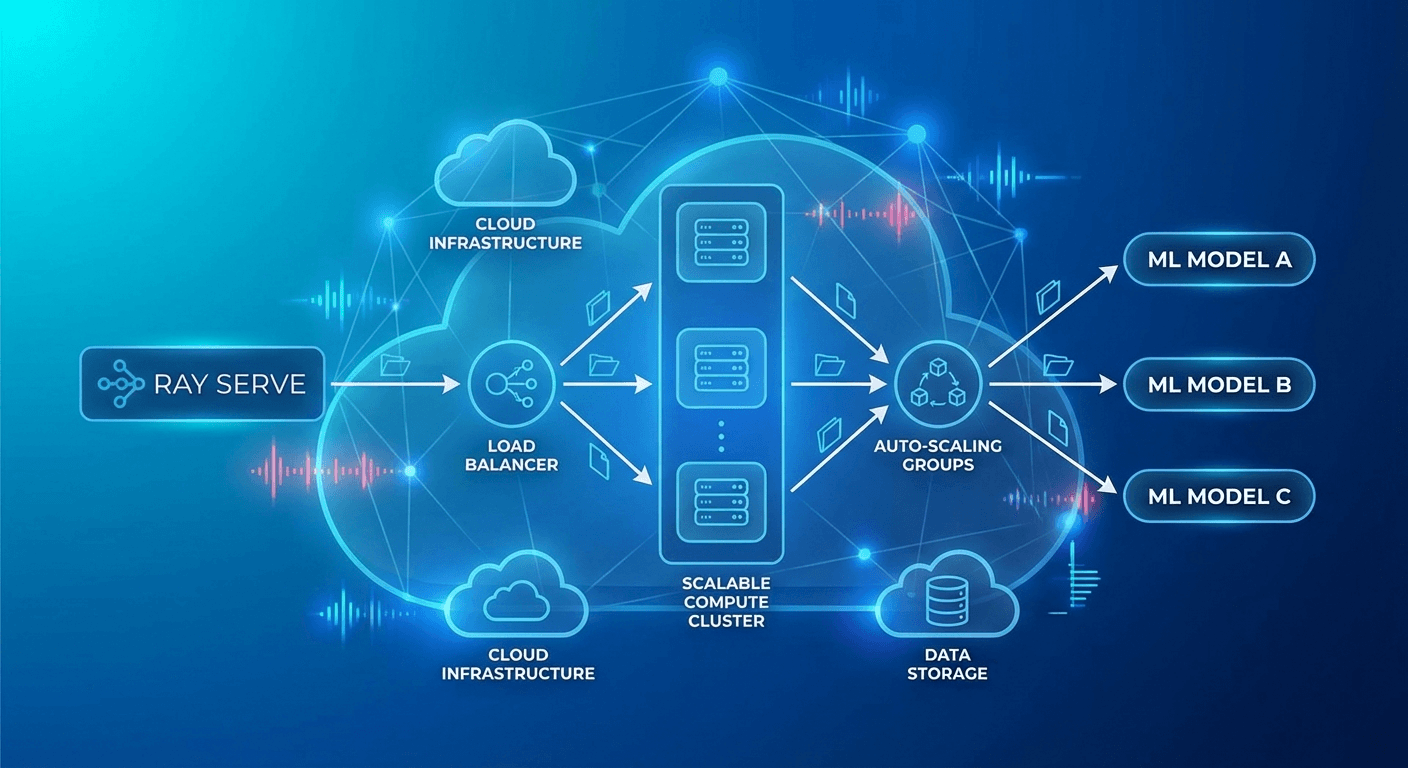
ML/LLMモデルをプロダクションにデプロイする際の最大の課題は、スケーラビリティと複雑なパイプライン管理です。単一モデルのサービングはシンプルですが、実際のサービスでは前処理 → モデル推論 → 後処理 → リランキングといったマルチステップパイプラインが必要です。
Ray ServeはRay上に構築されたスケーラブルなモデルサービングフレームワークで、PythonネイティブコードでA複雑なサービングパイプラインを構成できます。
Ray Serveの基本概念
Deployment
from ray import serve
import ray

# Rayクラスターに接続
ray.init()

# 最もシンプルなDeployment
@serve.deployment
class HelloModel:
    def __call__(self, request):
        return {"message": "Hello from Ray Serve!"}

# デプロイ
app = HelloModel.bind()
serve.run(app, route_prefix="/hello")
Deployment設定
@serve.deployment(
    num_replicas=3,                    # レプリカ数
    max_ongoing_requests=100,          # レプリカあたりの最大同時リクエスト数
    ray_actor_options={
        "num_cpus": 2,
        "num_gpus": 1,
        "memory": 4 * 1024**3,        # 4GB
    },
    health_check_period_s=10,
    health_check_timeout_s=30,
    graceful_shutdown_wait_loop_s=2,
    graceful_shutdown_timeout_s=20,
)
class MLModel:
    def __init__(self, model_path: str):
        self.model = self.load_model(model_path)

    def load_model(self, path):
        import torch
        return torch.load(path)

    async def __call__(self, request):
        data = await request.json()
        prediction = self.model.predict(data["features"])
        return {"prediction": prediction.tolist()}
オートスケーリング
@serve.deployment(
    autoscaling_config={
        "min_replicas": 1,
        "max_replicas": 10,
        "initial_replicas": 2,
        "target_ongoing_requests": 5,  # レプリカあたりの目標同時リクエスト数
        "upscale_delay_s": 30,
        "downscale_delay_s": 300,
        "upscaling_factor": 1.5,       # スケールアップ倍率
        "downscaling_factor": 0.7,     # スケールダウン倍率
        "smoothing_factor": 0.5,
        "metrics_interval_s": 10,
    }
)
class AutoScaledModel:
    def __init__(self):
        from transformers import pipeline
        self.classifier = pipeline("sentiment-analysis")

    async def __call__(self, request):
        data = await request.json()
        result = self.classifier(data["text"])
        return result
LLMサービング(vLLM統合)
from ray import serve
from ray.serve.llm import LLMServer, LLMConfig

# Ray Serve LLMモジュール使用(vLLMバックエンド)
llm_config = LLMConfig(
    model="meta-llama/Llama-3.1-8B-Instruct",
    tensor_parallel_size=1,
    max_model_len=8192,
    gpu_memory_utilization=0.9,
)

# OpenAI互換エンドポイントを自動生成
app = LLMServer.bind(llm_config)
serve.run(app)
カスタムLLMサービング
@serve.deployment(
    ray_actor_options={"num_gpus": 1},
    autoscaling_config={
        "min_replicas": 1,
        "max_replicas": 4,
        "target_ongoing_requests": 3,
    },
)
class CustomLLMDeployment:
    def __init__(self):
        from vllm import LLM, SamplingParams
        self.llm = LLM(
            model="meta-llama/Llama-3.1-8B-Instruct",
            dtype="auto",
            max_model_len=4096,
            gpu_memory_utilization=0.85,
        )
        self.default_params = SamplingParams(
            temperature=0.7,
            top_p=0.9,
            max_tokens=1024,
        )

    async def __call__(self, request):
        data = await request.json()
        prompt = data["prompt"]
        params = SamplingParams(
            temperature=data.get("temperature", 0.7),
            max_tokens=data.get("max_tokens", 1024),
        )

        outputs = self.llm.generate([prompt], params)
        return {
            "text": outputs[0].outputs[0].text,
            "tokens": len(outputs[0].outputs[0].token_ids),
        }
マルチモデルパイプライン
@serve.deployment(num_replicas=2, ray_actor_options={"num_cpus": 1})
class Preprocessor:
    """テキスト前処理"""
    def __init__(self):
        from transformers import AutoTokenizer
        self.tokenizer = AutoTokenizer.from_pretrained("bert-base-uncased")

    async def preprocess(self, text: str) -> dict:
        # 言語検出、正規化、トークン化
        cleaned = text.strip().lower()
        tokens = self.tokenizer.encode(cleaned, max_length=512, truncation=True)
        return {"text": cleaned, "tokens": tokens, "length": len(tokens)}


@serve.deployment(ray_actor_options={"num_gpus": 1})
class SentimentModel:
    """感情分析モデル"""
    def __init__(self):
        from transformers import pipeline
        self.model = pipeline(
            "sentiment-analysis",
            model="nlptown/bert-base-multilingual-uncased-sentiment",
            device=0
        )

    async def predict(self, text: str) -> dict:
        result = self.model(text)[0]
        return {"label": result["label"], "score": result["score"]}


@serve.deployment(ray_actor_options={"num_gpus": 1})
class SummaryModel:
    """要約モデル"""
    def __init__(self):
        from transformers import pipeline
        self.model = pipeline("summarization", device=0)

    async def summarize(self, text: str) -> str:
        if len(text.split()) < 30:
            return text
        result = self.model(text, max_length=100, min_length=30)
        return result[0]["summary_text"]


@serve.deployment
class Pipeline:
    """オーケストレーター — 複数モデルの組み合わせ"""
    def __init__(self, preprocessor, sentiment, summary):
        self.preprocessor = preprocessor
        self.sentiment = sentiment
        self.summary = summary

    async def __call__(self, request):
        data = await request.json()
        text = data["text"]

        # 前処理
        processed = await self.preprocessor.preprocess.remote(text)

        # 並列推論
        sentiment_future = self.sentiment.predict.remote(text)
        summary_future = self.summary.summarize.remote(text)

        sentiment_result = await sentiment_future
        summary_result = await summary_future

        return {
            "original_length": processed["length"],
            "sentiment": sentiment_result,
            "summary": summary_result,
        }


# パイプライン構成(DAG)
preprocessor = Preprocessor.bind()
sentiment = SentimentModel.bind()
summary = SummaryModel.bind()
app = Pipeline.bind(preprocessor, sentiment, summary)

serve.run(app, route_prefix="/analyze")
バッチ推論
@serve.deployment(
    ray_actor_options={"num_gpus": 1},
)
class BatchedModel:
    def __init__(self):
        from transformers import pipeline
        self.model = pipeline("text-classification", device=0)

    @serve.batch(max_batch_size=32, batch_wait_timeout_s=0.1)
    async def __call__(self, texts: list[str]) -> list[dict]:
        """
        Ray Serveが個別リクエストを自動的にバッチにまとめる。
        最大32件、または0.1秒待機後にバッチ実行。
        """
        results = self.model(texts)
        return results
マルチノードデプロイ
# 大規模モデル(複数GPU/ノードにまたがるデプロイ)
@serve.deployment(
    ray_actor_options={
        "num_gpus": 4,  # 4 GPU使用
    },
    placement_group_strategy="STRICT_PACK",  # 同一ノードに配置
)
class LargeModel:
    def __init__(self):
        from vllm import LLM
        self.llm = LLM(
            model="meta-llama/Llama-3.1-70B-Instruct",
            tensor_parallel_size=4,
        )
Kubernetesデプロイ(KubeRay)
# Ray Cluster定義
apiVersion: ray.io/v1
kind: RayService
metadata:
  name: llm-service
spec:
  serveConfigV2: |
    applications:
      - name: llm-app
        import_path: serve_app:app
        runtime_env:
          pip:
            - vllm>=0.6.0
            - transformers
        deployments:
          - name: LLMDeployment
            num_replicas: 2
            ray_actor_options:
              num_gpus: 1
            autoscaling_config:
              min_replicas: 1
              max_replicas: 4

  rayClusterConfig:
    headGroupSpec:
      rayStartParams:
        dashboard-host: '0.0.0.0'
      template:
        spec:
          containers:
            - name: ray-head
              image: rayproject/ray-ml:2.40.0-py310-gpu
              resources:
                limits:
                  cpu: '4'
                  memory: '16Gi'
              ports:
                - containerPort: 6379
                - containerPort: 8265
                - containerPort: 8000

    workerGroupSpecs:
      - groupName: gpu-workers
        replicas: 2
        minReplicas: 1
        maxReplicas: 4
        rayStartParams: {}
        template:
          spec:
            containers:
              - name: ray-worker
                image: rayproject/ray-ml:2.40.0-py310-gpu
                resources:
                  limits:
                    cpu: '8'
                    memory: '32Gi'
                    nvidia.com/gpu: 1
モニタリング
# Ray Dashboard: http://localhost:8265
# Serveメトリクス: http://localhost:8000/-/metrics

# Prometheusメトリクス
# ray_serve_deployment_request_counter
# ray_serve_deployment_error_counter
# ray_serve_deployment_processing_latency_ms
# ray_serve_deployment_replica_starts
# ray_serve_num_ongoing_requests
# Grafanaダッシュボードクエリ
panels:
  - title: 'Request Latency (p99)'
    query: |
      histogram_quantile(0.99,
        rate(ray_serve_deployment_processing_latency_ms_bucket[5m])
      )
  - title: 'Throughput (req/s)'
    query: |
      rate(ray_serve_deployment_request_counter[1m])
  - title: 'Active Replicas'
    query: |
      ray_serve_deployment_replica_healthy_total
A/Bテスト
import random

@serve.deployment
class ABRouter:
    def __init__(self, model_a, model_b, traffic_split=0.9):
        self.model_a = model_a  # 安定版
        self.model_b = model_b  # 実験版
        self.split = traffic_split

    async def __call__(self, request):
        if random.random() < self.split:
            return await self.model_a.__call__.remote(request)
        else:
            return await self.model_b.__call__.remote(request)


model_v1 = StableModel.bind()
model_v2 = ExperimentalModel.bind()
app = ABRouter.bind(model_v1, model_v2, traffic_split=0.95)
クイズ
Q1. Ray ServeのDeploymentとは?
単一のMLモデルやビジネスロジックをラップするスケーラブルな単位です。レプリカ数、GPU割り当て、オートスケーリングなどを個別に設定できます。
Q2. Ray Serveでのマルチモデルパイプラインの利点は?
各モデルを独立したDeploymentに分離して個別にスケーリングでき、DAG形式で並列・逐次処理を自由に構成できます。
Q3. @serve.batchデコレーターの役割は?
個別リクエストを自動的にまとめてバッチ処理します。GPU使用率を高め、スループットを最大化します。max_batch_sizeとtimeoutで制御します。
Q4. target_ongoing_requestsオートスケーリング設定の意味は?
レプリカあたりの目標同時処理リクエスト数です。この値を超えるとスケールアップし、下回るとスケールダウンします。
Q5. KubeRayのRayServiceリソースはどのような役割を果たしますか?
Kubernetes上でRayクラスターを自動作成し、Ray Serveアプリケーションをデプロイ・管理します。Workerノードのオートスケーリングも処理します。
Q6. placement_group_strategyのSTRICT_PACKの意味は?
すべてのGPUが同一物理ノードに配置されるよう強制します。Tensor Parallelismのように GPU間の高速通信が必要な場合に使用します。
Q7. Ray Serve vs Flask/FastAPIでの直接サービングの違いは?
Ray Serveは分散コンピューティング、オートスケーリング、GPU管理、バッチ処理、マルチモデルパイプラインをネイティブでサポートします。Flask/FastAPIは単一プロセスのサービングに適しています。
まとめ
Ray Serveは、複雑なML/LLMサービングパイプラインをPythonコードだけで構成・拡張できる強力なフレームワークです。vLLM統合によりLLMサービングが簡便になり、KubeRayを通じたKubernetesネイティブデプロイでプロダクション運用も容易です。