- Authors
- Name
- Introduction
- Redis Cluster Architecture
- Building a 6-Node Redis Cluster
- Cluster Operations
- Automatic Failover
- Monitoring
- Troubleshooting
- Conclusion
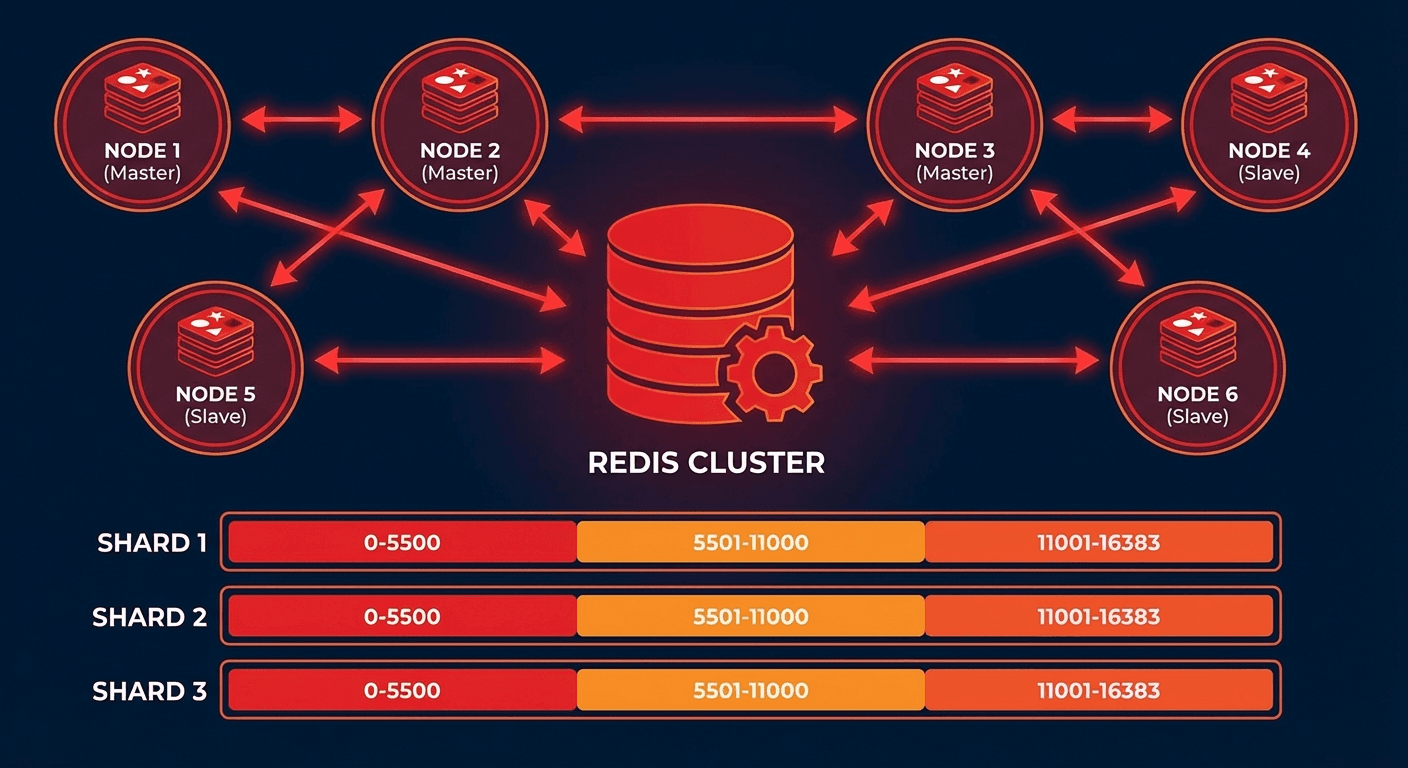
Introduction
A single Redis instance has limits in terms of memory and throughput. Redis Cluster is a native clustering solution that automatically distributes (shards) data across multiple nodes and provides automatic failover when nodes go down.
In this article, we will understand the Redis Cluster architecture and walk through the setup and operations step by step.
Redis Cluster Architecture
Hash Slots
Redis Cluster uses 16,384 hash slots to distribute data:
# Calculating the hash slot for a key
# HASH_SLOT = CRC16(key) % 16384

# Example: 3 master nodes
# Node A: Slots 0 ~ 5460
# Node B: Slots 5461 ~ 10922
# Node C: Slots 10923 ~ 16383
Cluster Topology
# Minimum recommended configuration: 3 Masters + 3 Replicas = 6 nodes
#
# Master A (Slots 0-5460)     ←→  Replica A'
# Master B (Slots 5461-10922)  ←→  Replica B'
# Master C (Slots 10923-16383) ←→  Replica C'
#
# When a Master goes down, its Replica is automatically promoted
Building a 6-Node Redis Cluster
Setup with Docker Compose
# docker-compose.yml
version: '3.8'

services:
  redis-node-1:
    image: redis:7.4
    container_name: redis-node-1
    ports:
      - '7001:7001'
      - '17001:17001'
    volumes:
      - ./redis-node-1:/data
    command: >
      redis-server
      --port 7001
      --cluster-enabled yes
      --cluster-config-file nodes.conf
      --cluster-node-timeout 5000
      --appendonly yes
      --protected-mode no
      --bind 0.0.0.0
    networks:
      redis-cluster:
        ipv4_address: 172.20.0.11

  redis-node-2:
    image: redis:7.4
    container_name: redis-node-2
    ports:
      - '7002:7002'
      - '17002:17002'
    volumes:
      - ./redis-node-2:/data
    command: >
      redis-server
      --port 7002
      --cluster-enabled yes
      --cluster-config-file nodes.conf
      --cluster-node-timeout 5000
      --appendonly yes
      --protected-mode no
      --bind 0.0.0.0
    networks:
      redis-cluster:
        ipv4_address: 172.20.0.12

  redis-node-3:
    image: redis:7.4
    container_name: redis-node-3
    ports:
      - '7003:7003'
      - '17003:17003'
    volumes:
      - ./redis-node-3:/data
    command: >
      redis-server
      --port 7003
      --cluster-enabled yes
      --cluster-config-file nodes.conf
      --cluster-node-timeout 5000
      --appendonly yes
      --protected-mode no
      --bind 0.0.0.0
    networks:
      redis-cluster:
        ipv4_address: 172.20.0.13

  redis-node-4:
    image: redis:7.4
    container_name: redis-node-4
    ports:
      - '7004:7004'
      - '17004:17004'
    volumes:
      - ./redis-node-4:/data
    command: >
      redis-server
      --port 7004
      --cluster-enabled yes
      --cluster-config-file nodes.conf
      --cluster-node-timeout 5000
      --appendonly yes
      --protected-mode no
      --bind 0.0.0.0
    networks:
      redis-cluster:
        ipv4_address: 172.20.0.14

  redis-node-5:
    image: redis:7.4
    container_name: redis-node-5
    ports:
      - '7005:7005'
      - '17005:17005'
    volumes:
      - ./redis-node-5:/data
    command: >
      redis-server
      --port 7005
      --cluster-enabled yes
      --cluster-config-file nodes.conf
      --cluster-node-timeout 5000
      --appendonly yes
      --protected-mode no
      --bind 0.0.0.0
    networks:
      redis-cluster:
        ipv4_address: 172.20.0.15

  redis-node-6:
    image: redis:7.4
    container_name: redis-node-6
    ports:
      - '7006:7006'
      - '17006:17006'
    volumes:
      - ./redis-node-6:/data
    command: >
      redis-server
      --port 7006
      --cluster-enabled yes
      --cluster-config-file nodes.conf
      --cluster-node-timeout 5000
      --appendonly yes
      --protected-mode no
      --bind 0.0.0.0
    networks:
      redis-cluster:
        ipv4_address: 172.20.0.16

networks:
  redis-cluster:
    driver: bridge
    ipam:
      config:
        - subnet: 172.20.0.0/24
# Start containers
docker compose up -d

# Create cluster (3 masters + 3 replicas)
docker exec -it redis-node-1 redis-cli --cluster create \
  172.20.0.11:7001 172.20.0.12:7002 172.20.0.13:7003 \
  172.20.0.14:7004 172.20.0.15:7005 172.20.0.16:7006 \
  --cluster-replicas 1 --cluster-yes

# Check cluster status
docker exec -it redis-node-1 redis-cli -p 7001 cluster info
docker exec -it redis-node-1 redis-cli -p 7001 cluster nodes
Setup on Bare Metal / VM
# Install Redis (Ubuntu)
sudo apt update && sudo apt install -y redis-server

# Create configuration file for each node
cat > /etc/redis/redis-7001.conf << 'EOF'
port 7001
cluster-enabled yes
cluster-config-file nodes-7001.conf
cluster-node-timeout 5000
appendonly yes
appendfilename "appendonly-7001.aof"
dbfilename dump-7001.rdb
dir /var/lib/redis/7001
logfile /var/log/redis/redis-7001.log
pidfile /var/run/redis/redis-7001.pid
protected-mode no
bind 0.0.0.0

# Memory settings
maxmemory 4gb
maxmemory-policy allkeys-lru

# Performance tuning
tcp-backlog 511
timeout 0
tcp-keepalive 300
EOF

# Create directory
sudo mkdir -p /var/lib/redis/7001
sudo chown redis:redis /var/lib/redis/7001

# Start service
sudo redis-server /etc/redis/redis-7001.conf --daemonize yes

# After starting all 6 nodes, create the cluster
redis-cli --cluster create \
  192.168.1.1:7001 192.168.1.2:7002 192.168.1.3:7003 \
  192.168.1.4:7004 192.168.1.5:7005 192.168.1.6:7006 \
  --cluster-replicas 1
Cluster Operations
Reading and Writing Data
# Connect in cluster mode (-c flag)
redis-cli -c -h 172.20.0.11 -p 7001

# MOVED redirections are handled automatically
172.20.0.11:7001> SET user:1000 "Kim Youngju"
-> Redirected to slot [3817] located at 172.20.0.11:7001
OK

172.20.0.11:7001> SET user:2000 "Park Minho"
-> Redirected to slot [8234] located at 172.20.0.12:7002
OK
Storing in the Same Slot with Hash Tags
# Only the {user:1000} part is used for hash calculation
SET {user:1000}.profile "Kim Youngju"
SET {user:1000}.email "youngju@example.com"
SET {user:1000}.settings "{\"theme\":\"dark\"}"

# Stored in the same slot, so MGET is possible
MGET {user:1000}.profile {user:1000}.email
Python Client
from redis.cluster import RedisCluster

# Connect to cluster
rc = RedisCluster(
    startup_nodes=[
        {"host": "172.20.0.11", "port": 7001},
        {"host": "172.20.0.12", "port": 7002},
        {"host": "172.20.0.13", "port": 7003},
    ],
    decode_responses=True,
    skip_full_coverage_check=True
)

# Basic operations
rc.set("user:1000", "Kim Youngju")
print(rc.get("user:1000"))

# Pipeline (only for keys in the same slot)
pipe = rc.pipeline()
pipe.set("{user:1000}.name", "Kim Youngju")
pipe.set("{user:1000}.age", "30")
pipe.get("{user:1000}.name")
results = pipe.execute()
print(results)

# Cluster info
print(rc.cluster_info())
Adding / Removing Nodes
# Add a new master node
redis-cli --cluster add-node 172.20.0.17:7007 172.20.0.11:7001

# Rebalance slots
redis-cli --cluster rebalance 172.20.0.11:7001

# Add a replica to the new node
redis-cli --cluster add-node 172.20.0.18:7008 172.20.0.11:7001 \
  --cluster-slave --cluster-master-id <master-node-id>

# Remove a node (first move slots to another node)
redis-cli --cluster reshard 172.20.0.11:7001 \
  --cluster-from <removing-node-id> \
  --cluster-to <target-node-id> \
  --cluster-slots 5461 \
  --cluster-yes

redis-cli --cluster del-node 172.20.0.11:7001 <removing-node-id>
Automatic Failover
Failover Process
# 1. Master A failure detected (after cluster-node-timeout seconds)
# 2. Replica A' requests votes from other Masters
# 3. If a majority of Masters approve, Replica A' is promoted to Master
# 4. New Master A' takes over the original slots

# Failover test
docker stop redis-node-1

# Check status (Replica promoted to Master)
docker exec -it redis-node-2 redis-cli -p 7002 cluster nodes
Manual Failover
# Execute on Replica (graceful failover)
redis-cli -h 172.20.0.14 -p 7004 CLUSTER FAILOVER

# Force failover (when Master is down)
redis-cli -h 172.20.0.14 -p 7004 CLUSTER FAILOVER FORCE
Monitoring
Key Metrics
# Check cluster status
redis-cli -p 7001 cluster info
# cluster_state:ok
# cluster_slots_assigned:16384
# cluster_slots_ok:16384
# cluster_known_nodes:6

# Memory usage per node
redis-cli -p 7001 info memory
# used_memory_human:1.5G
# maxmemory_human:4.0G

# Check slot distribution
redis-cli --cluster check 172.20.0.11:7001
Monitoring with Prometheus + Grafana
# docker-compose.monitoring.yml
services:
  redis-exporter:
    image: oliver006/redis_exporter:latest
    environment:
      - REDIS_ADDR=redis://172.20.0.11:7001
      - REDIS_CLUSTER=true
    ports:
      - '9121:9121'
# prometheus.yml
scrape_configs:
  - job_name: 'redis-cluster'
    static_configs:
      - targets: ['redis-exporter:9121']
# Key Grafana dashboard queries
# Commands per second
rate(redis_commands_processed_total[5m])

# Memory usage percentage
redis_memory_used_bytes / redis_memory_max_bytes * 100

# Number of keys
redis_db_keys

# Connected clients
redis_connected_clients

# Replication lag
redis_replication_offset
Troubleshooting
CROSSSLOT Error
# Error: CROSSSLOT Keys in request don't hash to the same slot
# Cause: Using keys from different slots in MGET, MSET, etc.

# Solution: Use Hash Tags
MGET {order:1}.items {order:1}.total  # OK (same slot)
MGET order:1 order:2                  # ERROR (potentially different slots)
Cluster State Recovery
# When cluster state is fail
redis-cli --cluster fix 172.20.0.11:7001

# When slots are missing
redis-cli --cluster fix 172.20.0.11:7001 --cluster-fix-with-unreachable-masters
Conclusion
Key points for Redis Cluster operations:
- Minimum 6 nodes: 3 Masters + 3 Replicas for high availability
- Leverage Hash Tags: Place related keys in the same slot
- Automatic failover: Auto-recovery based on the cluster-node-timeout setting
- Resharding: Redistribute slots when adding/removing nodes
- Monitoring: Continuous monitoring with Prometheus + redis_exporter
Quiz (7 Questions)
Q1. How many hash slots does Redis Cluster have? 16,384
Q2. What is the formula for calculating a key's hash slot? CRC16(key) % 16384
Q3. What is the role of Hash Tags? Only the string inside curly braces is used for hash calculation, placing related keys in the same slot.
Q4. What is required for a Replica to be promoted to Master during automatic failover? A majority vote (approval) from the Masters is required.
Q5. What causes a CROSSSLOT error and how do you fix it? It occurs when keys from different slots are used in a single command. Fix by placing keys in the same slot using Hash Tags.
Q6. What is the role of cluster-node-timeout? The time to detect a node failure. If a node does not respond within this time, it is considered failed.
Q7. What must be done before removing a node? Reshard the slots from the node being removed to other nodes.