- 들어가며
- Redis Cluster 아키텍처
- 6노드 Redis Cluster 구축
- 클러스터 설정 파라미터와 기본값
- 클러스터 운영
- MOVED와 ASK — 리다이렉션의 두 가지 의미
- 리샤딩 실전 워크스루
- 자동 페일오버
- 페일오버 타임라인 — 실제로 무슨 일이 일어나나
- 일관성 경계 — Redis Cluster가 잃을 수 있는 쓰기
- 모니터링
- 트러블슈팅
- 실패 사례와 함정
- 언제 Redis Cluster를 쓰지 않나
- 참고 자료
- 마무리
- 퀴즈
들어가며
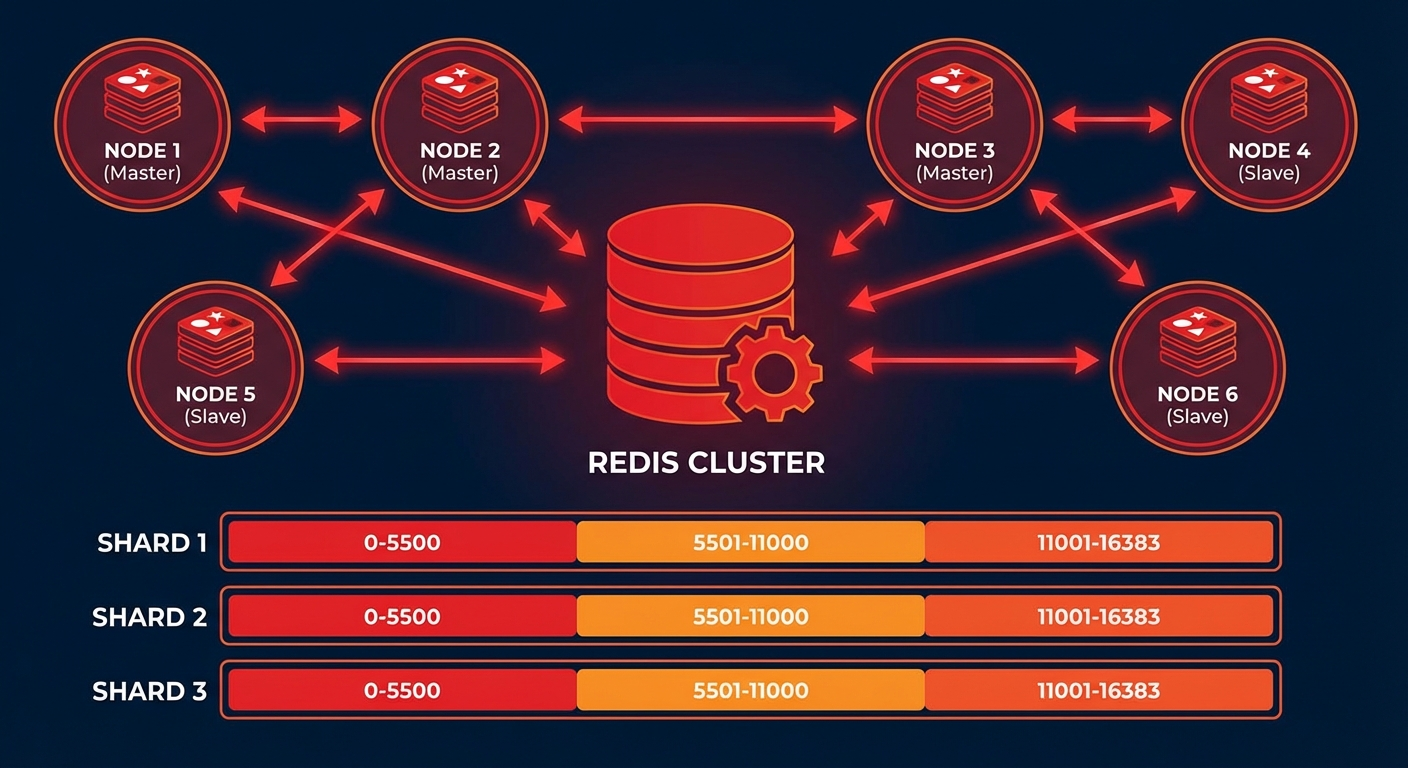
단일 Redis 인스턴스는 메모리와 처리량에 한계가 있습니다. Redis Cluster는 데이터를 여러 노드에 자동으로 분산(샤딩)하고, 노드 장애 시 자동 페일오버를 제공하는 네이티브 클러스터링 솔루션입니다.
이 글에서는 Redis Cluster의 아키텍처를 이해하고, 실제 구축부터 운영까지 단계별로 살펴봅니다.
이 글이 기준으로 삼는 버전
이 글의 명령어와 설정 기본값은 모두 Redis 7.4 오픈소스 배포판을 기준으로 합니다. 아래 docker compose 예시가 redis:7.4 이미지를 고정해서 쓰는 것과 같은 버전입니다.
클러스터 관련 명령 이름과 설정 기본값은 메이저 버전마다 달라집니다. 예를 들어 슬롯 맵을 읽는 CLUSTER SLOTS는 공식 스펙 문서에서 이미 deprecated로 표시되어 있고, 새 클라이언트는 CLUSTER SHARDS를 쓰도록 안내됩니다. 다른 메이저 버전을 쓰고 있다면 명령 이름과 기본값을 반드시 그 버전 문서에서 다시 확인하세요. 이 글에서 숫자로 못 박은 기본값은 아래 "클러스터 설정 파라미터와 기본값" 절에 전부 출처와 함께 모아 두었습니다.
Redis Cluster 아키텍처
해시 슬롯 (Hash Slots)
Redis Cluster는 16,384개의 해시 슬롯을 사용하여 데이터를 분산합니다:
# 키의 해시 슬롯 계산
# HASH_SLOT = CRC16(key) % 16384

# 예시: 3개 마스터 노드
# Node A: 슬롯 0 ~ 5460
# Node B: 슬롯 5461 ~ 10922
# Node C: 슬롯 10923 ~ 16383
클러스터 토폴로지
# 최소 권장 구성: 3 Master + 3 Replica = 6 노드
#
# Master A (슬롯 0-5460)    ←→  Replica A'
# Master B (슬롯 5461-10922) ←→  Replica B'
# Master C (슬롯 10923-16383) ←→  Replica C'
#
# 각 Master가 다운되면 해당 Replica가 자동 승격
6노드 Redis Cluster 구축
Docker Compose로 구축
# docker-compose.yml
version: '3.8'

services:
  redis-node-1:
    image: redis:7.4
    container_name: redis-node-1
    ports:
      - '7001:7001'
      - '17001:17001'
    volumes:
      - ./redis-node-1:/data
    command: >
      redis-server
      --port 7001
      --cluster-enabled yes
      --cluster-config-file nodes.conf
      --cluster-node-timeout 5000
      --appendonly yes
      --protected-mode no
      --bind 0.0.0.0
    networks:
      redis-cluster:
        ipv4_address: 172.20.0.11

  redis-node-2:
    image: redis:7.4
    container_name: redis-node-2
    ports:
      - '7002:7002'
      - '17002:17002'
    volumes:
      - ./redis-node-2:/data
    command: >
      redis-server
      --port 7002
      --cluster-enabled yes
      --cluster-config-file nodes.conf
      --cluster-node-timeout 5000
      --appendonly yes
      --protected-mode no
      --bind 0.0.0.0
    networks:
      redis-cluster:
        ipv4_address: 172.20.0.12

  redis-node-3:
    image: redis:7.4
    container_name: redis-node-3
    ports:
      - '7003:7003'
      - '17003:17003'
    volumes:
      - ./redis-node-3:/data
    command: >
      redis-server
      --port 7003
      --cluster-enabled yes
      --cluster-config-file nodes.conf
      --cluster-node-timeout 5000
      --appendonly yes
      --protected-mode no
      --bind 0.0.0.0
    networks:
      redis-cluster:
        ipv4_address: 172.20.0.13

  redis-node-4:
    image: redis:7.4
    container_name: redis-node-4
    ports:
      - '7004:7004'
      - '17004:17004'
    volumes:
      - ./redis-node-4:/data
    command: >
      redis-server
      --port 7004
      --cluster-enabled yes
      --cluster-config-file nodes.conf
      --cluster-node-timeout 5000
      --appendonly yes
      --protected-mode no
      --bind 0.0.0.0
    networks:
      redis-cluster:
        ipv4_address: 172.20.0.14

  redis-node-5:
    image: redis:7.4
    container_name: redis-node-5
    ports:
      - '7005:7005'
      - '17005:17005'
    volumes:
      - ./redis-node-5:/data
    command: >
      redis-server
      --port 7005
      --cluster-enabled yes
      --cluster-config-file nodes.conf
      --cluster-node-timeout 5000
      --appendonly yes
      --protected-mode no
      --bind 0.0.0.0
    networks:
      redis-cluster:
        ipv4_address: 172.20.0.15

  redis-node-6:
    image: redis:7.4
    container_name: redis-node-6
    ports:
      - '7006:7006'
      - '17006:17006'
    volumes:
      - ./redis-node-6:/data
    command: >
      redis-server
      --port 7006
      --cluster-enabled yes
      --cluster-config-file nodes.conf
      --cluster-node-timeout 5000
      --appendonly yes
      --protected-mode no
      --bind 0.0.0.0
    networks:
      redis-cluster:
        ipv4_address: 172.20.0.16

networks:
  redis-cluster:
    driver: bridge
    ipam:
      config:
        - subnet: 172.20.0.0/24
# 컨테이너 시작
docker compose up -d

# 클러스터 생성 (3 master + 3 replica)
docker exec -it redis-node-1 redis-cli --cluster create \
  172.20.0.11:7001 172.20.0.12:7002 172.20.0.13:7003 \
  172.20.0.14:7004 172.20.0.15:7005 172.20.0.16:7006 \
  --cluster-replicas 1 --cluster-yes

# 클러스터 상태 확인
docker exec -it redis-node-1 redis-cli -p 7001 cluster info
docker exec -it redis-node-1 redis-cli -p 7001 cluster nodes
베어메탈/VM에서 구축
# Redis 설치 (Ubuntu)
sudo apt update && sudo apt install -y redis-server

# 노드별 설정 파일 생성
cat > /etc/redis/redis-7001.conf << 'EOF'
port 7001
cluster-enabled yes
cluster-config-file nodes-7001.conf
cluster-node-timeout 5000
appendonly yes
appendfilename "appendonly-7001.aof"
dbfilename dump-7001.rdb
dir /var/lib/redis/7001
logfile /var/log/redis/redis-7001.log
pidfile /var/run/redis/redis-7001.pid
protected-mode no
bind 0.0.0.0

# 메모리 설정
maxmemory 4gb
maxmemory-policy allkeys-lru

# 성능 튜닝
tcp-backlog 511
timeout 0
tcp-keepalive 300
EOF

# 디렉토리 생성
sudo mkdir -p /var/lib/redis/7001
sudo chown redis:redis /var/lib/redis/7001

# 서비스 시작
sudo redis-server /etc/redis/redis-7001.conf --daemonize yes

# 6개 노드 모두 시작 후 클러스터 생성
redis-cli --cluster create \
  192.168.1.1:7001 192.168.1.2:7002 192.168.1.3:7003 \
  192.168.1.4:7004 192.168.1.5:7005 192.168.1.6:7006 \
  --cluster-replicas 1
클러스터 설정 파라미터와 기본값
클러스터 동작을 좌우하는 설정은 몇 개 되지 않습니다. 앞의 compose 파일은 cluster-node-timeout 5000을 명시적으로 지정했는데, 이건 배포판 기본값이 아니라 예시에서 일부러 낮춘 값입니다. 아래 기본값은 Redis 7.4의 redis.conf 주석에 적힌 값이고, 모두 주석 처리된 상태로 배포됩니다. 즉 설정 파일에 직접 쓰지 않으면 이 값이 적용됩니다.
- cluster-node-timeout — 기본값 15000(ms). 노드가 이 시간보다 오래 응답하지 않으면 장애 상태로 간주합니다. 문서 표현대로 "다른 내부 시간 제한 대부분이 이 값의 배수"라서, 이 값 하나가 페일오버 전체 속도를 결정합니다.
- cluster-replica-validity-factor — 기본값 10. 레플리카의 데이터가 너무 오래되면 페일오버를 포기하게 만드는 계수입니다. 마스터와 마지막으로 통신한 뒤 경과 시간이 노드 타임아웃과 이 계수의 곱에
repl-ping-replica-period를 더한 값을 넘으면 그 레플리카는 승격을 시도조차 하지 않습니다. 문서가 든 예시로는 노드 타임아웃 30초, 계수 10, ping 주기 기본 10초일 때 310초입니다. 0으로 두면 데이터가 아무리 오래됐어도 항상 승격을 시도합니다. - cluster-migration-barrier — 기본값 1. 레플리카가 하나도 없는 고아 마스터로 다른 레플리카가 옮겨 가려면, 원래 마스터에 정상 레플리카가 최소 몇 개 남아 있어야 하는지를 정합니다. 1이면 "다른 정상 레플리카가 최소 하나 남을 때만 옮긴다"는 뜻입니다.
- cluster-allow-replica-migration — 기본값 yes. 위의 자동 이동 자체를 켜고 끕니다. no로 두면 고아 마스터로의 이동과 비어 버린 마스터에서의 이동이 모두 꺼집니다.
- cluster-require-full-coverage — 기본값 yes. 슬롯이 하나라도 담당 노드 없이 비면 클러스터 전체가 질의를 거부합니다. no로 두면 아직 커버되는 키 공간에 대한 질의는 계속 받습니다. 뒤에 나오는
CLUSTERDOWN진단이 결국 이 설정 이야기입니다. - cluster-replica-no-failover — 기본값 no. yes로 두면 레플리카가 자동 페일오버를 시도하지 않습니다. 수동 페일오버는 여전히 가능합니다. 멀티 DC에서 한쪽을 절대 승격시키고 싶지 않을 때 쓰는 스위치입니다.
- cluster-allow-reads-when-down — 기본값 no. yes로 두면 클러스터가 down 상태여도 자기가 담당한다고 믿는 슬롯의 읽기는 계속 처리합니다. 캐시처럼 장애 중 일관성을 포기해도 되는 용도를 위한 옵션입니다.
여기 없는 값을 튜닝해야 한다면 추측하지 말고 사용 중인 버전의 redis.conf 주석을 직접 읽으세요. 이 파일은 배포판마다 함께 딸려 오고, 각 옵션의 기본값이 주석에 그대로 적혀 있습니다.
클러스터 운영
데이터 읽기/쓰기
# 클러스터 모드로 접속 (-c 플래그)
redis-cli -c -h 172.20.0.11 -p 7001

# MOVED 리다이렉션 자동 처리
172.20.0.11:7001> SET user:1000 "Kim Youngju"
-> Redirected to slot [3817] located at 172.20.0.11:7001
OK

172.20.0.11:7001> SET user:2000 "Park Minho"
-> Redirected to slot [8234] located at 172.20.0.12:7002
OK
Hash Tag로 같은 슬롯에 저장
# {user:1000} 부분만 해시 계산에 사용됨
SET {user:1000}.profile "Kim Youngju"
SET {user:1000}.email "youngju@example.com"
SET {user:1000}.settings "{\"theme\":\"dark\"}"

# 같은 슬롯에 저장되므로 MGET 가능
MGET {user:1000}.profile {user:1000}.email
Python 클라이언트
from redis.cluster import RedisCluster

# 클러스터 연결
rc = RedisCluster(
    startup_nodes=[
        {"host": "172.20.0.11", "port": 7001},
        {"host": "172.20.0.12", "port": 7002},
        {"host": "172.20.0.13", "port": 7003},
    ],
    decode_responses=True,
    skip_full_coverage_check=True
)

# 기본 작업
rc.set("user:1000", "Kim Youngju")
print(rc.get("user:1000"))

# 파이프라인 (같은 슬롯의 키만)
pipe = rc.pipeline()
pipe.set("{user:1000}.name", "Kim Youngju")
pipe.set("{user:1000}.age", "30")
pipe.get("{user:1000}.name")
results = pipe.execute()
print(results)

# 클러스터 정보
print(rc.cluster_info())
노드 추가/제거
# 새 마스터 노드 추가
redis-cli --cluster add-node 172.20.0.17:7007 172.20.0.11:7001

# 슬롯 리밸런싱
redis-cli --cluster rebalance 172.20.0.11:7001

# 새 노드에 레플리카 추가
redis-cli --cluster add-node 172.20.0.18:7008 172.20.0.11:7001 \
  --cluster-slave --cluster-master-id <master-node-id>

# 노드 제거 (먼저 슬롯을 다른 노드로 이동)
redis-cli --cluster reshard 172.20.0.11:7001 \
  --cluster-from <removing-node-id> \
  --cluster-to <target-node-id> \
  --cluster-slots 5461 \
  --cluster-yes

redis-cli --cluster del-node 172.20.0.11:7001 <removing-node-id>
MOVED와 ASK — 리다이렉션의 두 가지 의미
Redis Cluster에서 가장 많이 오해받는 지점입니다. 두 응답 모두 "다른 노드로 가라"는 뜻이지만, 클라이언트가 해야 할 일이 정반대입니다.
MOVED — 슬롯 주인이 영구히 바뀌었다
노드는 요청받은 키의 해시 슬롯을 자기가 담당하지 않으면 내부 슬롯-노드 맵을 보고 MOVED 에러를 돌려줍니다. 스펙 문서의 예시는 이렇습니다.
GET x
-MOVED 3999 127.0.0.1:6381
에러에는 키의 해시 슬롯 번호(3999)와, 그 질의를 처리할 수 있는 인스턴스의 엔드포인트와 포트가 들어 있습니다. 엔드포인트는 IP일 수도, 호스트명일 수도, 비어 있을 수도 있습니다. 비어 있으면 "포트만 바꿔서 지금과 같은 엔드포인트로 다시 보내라"는 뜻입니다.
MOVED를 받은 클라이언트는 슬롯 맵을 갱신해야 합니다. 스펙은 슬롯 하나만 고치기보다 CLUSTER SHARDS로 전체 맵을 다시 읽는 편을 권합니다. 리다이렉션이 발생했다는 건 보통 슬롯 하나가 아니라 여러 슬롯이 한꺼번에 재구성됐다는 신호이기 때문입니다. 레플리카가 마스터로 승격되면 그 마스터가 담당하던 슬롯 전부가 한 번에 재배치됩니다.
ASK — 이 키 하나만, 이번 요청만
슬롯이 마이그레이션 중일 때 나옵니다. 원본 노드에 슬롯이 MIGRATING으로 표시되면, 그 노드는 해당 슬롯 질의를 받되 키가 실제로 존재할 때만 처리합니다. 없으면 마이그레이션 대상 노드로 ASK 리다이렉션을 보냅니다. 대상 노드는 슬롯이 IMPORTING 상태이므로, ASKING 명령이 먼저 오지 않은 질의는 원래 주인에게 MOVED로 되돌려 보냅니다.
스펙이 정리한 클라이언트 쪽 ASK 처리 규칙은 세 줄입니다.
- 리다이렉트된 그 질의 하나만 지정된 노드로 보내고, 이후 질의는 계속 원래 노드로 보낸다.
- 리다이렉트된 질의는
ASKING명령으로 시작한다. - 로컬 슬롯 맵을 아직 갱신하지 않는다.
ASKING은 클라이언트에 일회성 플래그를 세워, IMPORTING 상태 슬롯에 대한 질의를 강제로 처리하게 만듭니다. 딱 한 번짜리입니다.
ASK를 MOVED처럼 다루면 무슨 일이 생기나
슬롯 맵이 사실과 어긋납니다. 마이그레이션이 끝나기 전인데도 클라이언트는 그 슬롯을 대상 노드 소유로 기록해 버립니다. 그 상태로 다음 요청을 대상 노드에 바로 보내면 ASKING을 앞세우지 않았으므로, 대상 노드는 MOVED로 원래 주인을 다시 가리킵니다.
데이터가 깨지지는 않습니다. 스펙이 명시하듯 ASKING 요구가 바로 그 안전장치입니다. 대신 대가를 치릅니다. 그 슬롯의 모든 요청이 왕복을 한 번 더 하게 되고, 클라이언트 맵은 마이그레이션이 끝날 때까지 두 노드 사이를 계속 오갑니다. 트래픽이 많은 슬롯을 옮기는 중이라면 이 추가 왕복이 지연 시간 그래프에 그대로 나타납니다. 마이그레이션이 끝나면 원본 노드가 MOVED를 보내 주고, 그때 비로소 맵을 영구히 갱신하면 됩니다.
redis-cli -c는 이 두 가지를 알아서 처리합니다. 직접 클라이언트를 만들 게 아니라면 라이브러리를 믿으면 되고, 대신 라이브러리가 두 응답을 구분하는지는 확인할 가치가 있습니다. 스펙은 ASK를 처리하지 못하는 클라이언트를 "완전한 Redis Cluster 클라이언트가 아니다"라고 잘라 말합니다.
리샤딩 실전 워크스루
슬롯을 옮기는 작업은 노드 추가, 노드 제거, 리밸런싱이 모두 같은 연산으로 추상화되어 있습니다. 스펙 표현대로 "해시 슬롯을 한 노드에서 다른 노드로 옮기는 것" 하나뿐입니다.
1단계 — 옮기기 전에 상태를 찍어 둔다
redis-cli --cluster check 127.0.0.1:7000

# 노드 ID는 여기서 확인합니다
redis-cli -p 7000 cluster nodes | grep myself
# 예시 출력 (스펙 문서의 형태)
97a3a64667477371c4479320d683e4c8db5858b1 :0 myself,master - 0 0 0 connected 0-5460

[OK] All 16384 slots covered
[OK] All 16384 slots covered는 16384개 슬롯 각각을 담당하는 마스터가 최소 하나씩 있다는 뜻입니다. 이 줄이 안 나오면 리샤딩을 시작하지 마세요. 이미 깨진 클러스터에서 슬롯을 옮기면 원인을 구분하기 어려워집니다.
2단계 — 리샤딩 실행
redis-cli --cluster reshard 127.0.0.1:7000
노드 하나만 지정하면 나머지는 redis-cli가 알아서 찾습니다. 대화형으로 세 가지를 묻습니다.
How many slots do you want to move (from 1 to 16384)?
그다음 슬롯을 받을 대상 노드의 노드 ID를 묻고, 마지막으로 어느 노드들에서 가져올지 묻습니다. 여기서 all이라고 답하면 나머지 모든 마스터에서 조금씩 가져옵니다. 확정하면 옮기는 슬롯마다 메시지가 한 줄씩 나오고, 실제로 옮겨지는 키 하나마다 점이 하나씩 찍힙니다.
자동화하려면 비대화형 형태를 씁니다.
redis-cli --cluster reshard <host>:<port> \
  --cluster-from <node-id> \
  --cluster-to <node-id> \
  --cluster-slots <number of slots> \
  --cluster-yes
--cluster-yes는 프롬프트에 자동으로 yes를 답하게 합니다. 환경 변수 REDISCLI_CLUSTER_YES로도 켤 수 있습니다.
3단계 — 옮기는 동안 내부에서 벌어지는 일
슬롯 8을 A에서 B로 옮긴다고 하면 redis-cli는 이런 순서로 움직입니다.
# B에게: 이 슬롯을 A로부터 받아 오는 중이다
CLUSTER SETSLOT 8 IMPORTING A

# A에게: 이 슬롯을 B로 넘기는 중이다
CLUSTER SETSLOT 8 MIGRATING B

# A에서 슬롯 8에 든 키를 count개씩 꺼내서
CLUSTER GETKEYSINSLOT slot count

# 원자적으로 옮긴다
MIGRATE target_host target_port "" target_database id timeout KEYS key1 key2 ...

# 다 옮기면 양쪽(그리고 보통 나머지 노드 전부)에 정상 상태를 알린다
CLUSTER SETSLOT <slot> NODE <node-id>
MIGRATE는 대상 인스턴스에 붙어 직렬화된 키를 보내고, OK를 받으면 자기 쪽 키를 지웁니다. 옮기는 아주 짧은 순간 양쪽 인스턴스가 잠기므로 경쟁 상태가 생기지 않습니다. 외부 클라이언트 입장에서 키는 언제나 A 아니면 B, 정확히 한 곳에만 존재합니다.
읽기와 쓰기가 계속 되는 이유가 여기 있습니다. 다른 노드들은 여전히 슬롯 8을 A로 안내하고, A에 아직 남아 있는 키는 A가 처리하며, A에 없는 키는 ASK로 B에게 넘겨집니다. 그래서 새 키가 A에 더 생기지 않으면서도 요청은 끊기지 않습니다.
다만 다중 키 명령은 예외입니다. 마이그레이션 중이라도 대상 키가 전부 존재하고 전부 같은 슬롯이면(원본이든 대상이든 한쪽에 몰려 있으면) 정상 동작합니다. 하지만 키 일부가 없거나 원본과 대상에 흩어져 있으면 -TRYAGAIN 에러가 납니다. 클라이언트는 잠시 뒤 재시도하거나 에러를 그대로 올려야 합니다. 마이그레이션이 끝나면 그 슬롯의 다중 키 연산은 다시 정상으로 돌아옵니다.
4단계 — 끝나면 다시 확인
redis-cli --cluster check 127.0.0.1:7000
슬롯은 여전히 전부 커버되어야 하고, 대상 노드의 슬롯 수만 늘어나 있어야 합니다. 문서의 예시에서는 1000개 슬롯을 옮긴 뒤 127.0.0.1:7000이 6461개 근처를 담당하게 됩니다. 이 확인을 건너뛰면, 중간에 끊긴 마이그레이션 때문에 슬롯이 MIGRATING/IMPORTING에 걸린 채로 남아 나중에 CLUSTERDOWN으로 돌아옵니다.
자동 페일오버
페일오버 동작 과정
# 1. Master A 다운 감지 (cluster-node-timeout 초 후)
# 2. Replica A'가 다른 Master들에게 투표 요청
# 3. 과반수 Master가 승인하면 Replica A'가 Master로 승격
# 4. 새 Master A'가 기존 슬롯 담당

# 페일오버 테스트
docker stop redis-node-1

# 상태 확인 (Replica가 Master로 승격됨)
docker exec -it redis-node-2 redis-cli -p 7002 cluster nodes
수동 페일오버
# Replica에서 실행 (graceful failover)
redis-cli -h 172.20.0.14 -p 7004 CLUSTER FAILOVER

# 강제 페일오버 (Master가 다운된 경우)
redis-cli -h 172.20.0.14 -p 7004 CLUSTER FAILOVER FORCE
페일오버 타임라인 — 실제로 무슨 일이 일어나나
위의 4단계 요약은 맞지만 너무 성깁니다. 장애 시간을 계산하려면 각 단계가 무엇에 얼마나 묶여 있는지를 알아야 합니다. 아래는 클러스터 스펙 문서의 장애 감지 및 레플리카 선출 절차를 순서대로 옮긴 것입니다. 편의상 cluster-node-timeout 값을 노드 타임아웃이라고 부르겠습니다.
1. 마스터가 응답을 멈춘다. 다른 노드들은 이미 보낸 ping에 대한 응답을 기다리는 상태가 됩니다. 노드 타임아웃의 절반이 지나면 노드들은 상대와 연결을 다시 맺으려 시도합니다. 끊어진 TCP 커넥션 때문에 생기는 오탐을 줄이기 위한 장치입니다.
2. PFAIL 표시. 노드 타임아웃을 넘겨도 응답이 없으면 그 노드를 PFAIL(possible failure)로 표시합니다. 마스터든 레플리카든 상대 종류에 상관없이 표시할 수 있습니다. 중요한 건 PFAIL이 각 노드의 로컬 판단일 뿐이라는 점입니다. 이것만으로는 아무 일도 일어나지 않습니다.
3. gossip으로 PFAIL이 FAIL로 승격된다. 모든 노드는 하트비트에 자기가 아는 노드 몇 개의 상태를 실어 보냅니다. 어떤 노드 A가 B를 PFAIL로 보고 있고, 과반수의 마스터가 같은 B에 대해 PFAIL 또는 FAIL을 신고한 사실을 A가 gossip으로 수집하면 승격 조건이 성립합니다. 이 신고들은 노드 타임아웃에 유효성 계수를 곱한 시간 안에 들어온 것만 인정되고, 현재 구현에서 그 계수는 2입니다. 즉 노드 타임아웃의 두 배 창 안에서 모인 신고만 셉니다. 조건이 맞으면 A는 B를 FAIL로 표시하고, 도달 가능한 모든 노드에 FAIL 메시지를 직접 보냅니다.
4. 레플리카가 잠시 기다린다. 마스터가 FAIL이 되어도 레플리카는 곧바로 선거를 시작하지 않습니다. 스펙에 적힌 지연 계산식은 이렇습니다.
DELAY = 500 milliseconds + random delay between 0 and 500 milliseconds +
        REPLICA_RANK * 1000 milliseconds.
고정된 500ms는 FAIL 상태가 클러스터 전체에 퍼질 시간을 벌어 줍니다. 아직 FAIL을 모르는 마스터는 투표를 거부하기 때문입니다. 랜덤 지연은 레플리카들이 동시에 선거를 시작하지 않게 흩뜨립니다. REPLICA_RANK는 복제 오프셋이 가장 앞선 레플리카가 0, 그다음이 1인 식으로 매겨지므로, 데이터가 가장 최신인 레플리카가 먼저 나섭니다. 순위는 강제되지 않아서, 앞 순위가 실패하면 뒤 순위가 곧이어 시도합니다.
5. 투표 요청. 레플리카는 자기 currentEpoch를 1 올리고 모든 마스터에게 FAILOVER_AUTH_REQUEST를 브로드캐스트합니다. 응답은 노드 타임아웃의 두 배, 단 최소 2초 동안 기다립니다.
6. 과반수 승인. 마스터들이 FAILOVER_AUTH_ACK로 답하고 과반수가 모이면 당선입니다. 마스터는 한 에포크에 한 번만 투표하고, 같은 마스터의 다른 레플리카에게는 노드 타임아웃의 두 배 동안 다시 투표하지 않습니다. 과반수를 못 모으면 선거는 중단되고, 노드 타임아웃의 네 배(최소 4초) 뒤에 다시 시도합니다.
7. 승격과 전파. 당선된 레플리카는 기존 어떤 마스터보다 큰 새 configEpoch를 얻고, 자신을 마스터로 광고하면서 담당 슬롯 집합을 함께 실어 보냅니다. 재구성 속도를 위해 pong 패킷을 클러스터 전체에 브로드캐스트합니다. 다른 노드들은 같은 슬롯을 더 큰 configEpoch로 주장하는 새 마스터를 보고 설정을 갱신합니다.
클라이언트가 각 단계에서 보는 것
- 1~3단계: 그 슬롯으로 가는 요청은 타임아웃이나 커넥션 에러로 실패합니다. MOVED는 오지 않습니다. 슬롯 주인이 바뀐 게 아니라 그냥 죽어 있는 상태이기 때문입니다.
- 클러스터가 fail로 판단된 동안:
cluster-require-full-coverage가 기본값 yes이므로 커버되지 않는 슬롯이 생기면 클러스터가 질의를 거부합니다. - 7단계 이후: 클라이언트가 옛 마스터 주소를 계속 쓰고 있으면 MOVED로 새 마스터를 가리켜 줍니다. 슬롯 맵을 다시 읽으면 그 시점부터 정상입니다.
그래서 창은 얼마나 되나
문서는 다수파 쪽 클러스터가 노드 타임아웃 시간 + 레플리카가 선출되어 페일오버를 마치는 데 필요한 몇 초 뒤에 다시 가용해진다고 적고, 페일오버 자체는 보통 1~2초 안에 끝난다고 덧붙입니다. 즉 실질적인 하한이 cluster-node-timeout + 수 초입니다. 기본값 15000ms를 그대로 쓰면 15초 이상이고, 예시 compose가 5000ms로 낮춘 이유가 바로 이것입니다.
그렇다고 무한정 낮출 수는 없습니다. 스펙은 노드 타임아웃이 네트워크 왕복 시간에 비해 충분히 커야 이 메커니즘이 작동한다고 못 박습니다. 값이 작으면 잠깐의 지연도 PFAIL로 읽혀서, 장애가 없는데도 페일오버가 일어납니다. 페일오버는 공짜가 아니고 아래에서 볼 쓰기 손실 창을 동반하므로, 불필요한 페일오버는 그 자체가 사고입니다.
일관성 경계 — Redis Cluster가 잃을 수 있는 쓰기
이 절이 없으면 이 글은 정직하지 않습니다. Redis Cluster는 노드 간 복제를 비동기로 하고, 충돌 해소 규칙은 스펙 표현 그대로 "last failover wins"입니다. 즉 마지막에 선출된 마스터의 데이터셋이 결국 나머지를 덮어씁니다. 그래서 ack된 쓰기가 사라질 수 있는 창이 두 개 존재합니다.
창 1 — 비동기 복제 창
마스터는 클라이언트에게 OK를 돌려주는 일과 레플리카로 쓰기를 전파하는 일을 거의 동시에 합니다. 마스터가 전파 전에 죽고, 레플리카가 승격될 만큼 오래 도달 불가능하면 그 쓰기는 영원히 사라집니다. 스펙은 이걸 관찰하기는 어렵지만 "실제 세계의 장애 모드"라고 명시합니다.
이 창의 길이는 설정으로 없앨 수 없습니다. 비동기 복제의 정의 그 자체이기 때문입니다.
창 2 — 파티션된 마스터 창
마스터가 네트워크 분단으로 다수파와 끊겼는데 클라이언트는 여전히 그 마스터에 붙어 있는 상황입니다. 다수파 쪽에서 레플리카가 승격되면, 소수파 마스터가 그동안 받은 쓰기는 전부 버려집니다.
다행히 이 창에는 상한이 있습니다. 마스터가 페일오버되려면 과반수 마스터가 최소 노드 타임아웃만큼 그 마스터에 도달하지 못해야 합니다. 그 전에 분단이 복구되면 잃는 쓰기는 없습니다. 그리고 소수파 쪽 마스터는 다수파와 노드 타임아웃 동안 연락이 닿지 않으면 스스로 쓰기를 거부하기 시작합니다. 그래서 잃을 수 있는 쓰기의 최대 창이 노드 타임아웃으로 묶입니다. 그 시간이 지나면 소수파는 아예 가용하지 않으므로, 더 받지도 잃지도 않습니다.
이론적으로 하나 더 있습니다. 페일오버된 옛 마스터가 분단에서 돌아왔는데 클라이언트의 라우팅 테이블이 아직 낡아서 옛 마스터에 쓰는 경우입니다. 스펙은 이 모드가 일어나기 어렵다고 봅니다. 다수파와 충분히 오래 통신하지 못한 마스터는 이미 쓰기를 거부하고 있고, 분단이 복구된 뒤에도 설정 변경이 전파될 때까지 잠시 더 거부하기 때문입니다.
가용성도 확률 문제입니다
마스터 N대에 각각 레플리카 하나인 구성에서, 노드 하나가 분리되는 동안은 다수파가 계속 가용합니다. 두 개가 분리되면 가용할 확률은 1-(1/(N*2-1))입니다. 마스터 5대짜리 클러스터라면 두 노드가 떨어져 나갔을 때 클러스터가 죽을 확률이 약 11.11%입니다. 노드를 늘린다고 이 확률이 0이 되지는 않습니다.
WAIT는 어디까지 해 주나
WAIT numreplicas timeout은 현재 커넥션에서 앞서 보낸 모든 쓰기가 최소 numreplicas개의 레플리카에 전달되고 확인될 때까지 블록합니다. 타임아웃(밀리초)에 도달하면 그 수를 못 채워도 반환합니다. 반환값은 성공이든 타임아웃이든 실제로 확인한 레플리카 수이므로, 클라이언트가 그 값이 요구한 수 이상인지 직접 검사해야 합니다. MULTI 안이나 스크립트처럼 블로킹이 허용되지 않는 문맥에서는 블록하지 않고 즉시 현재 수를 돌려줍니다. 타임아웃 0은 무한 대기입니다.
보장하지 않는 것이 더 중요합니다. 문서는 WAIT가 Redis를 강한 일관성 저장소로 만들지는 않는다고 분명히 적습니다. 쓰기가 하나 이상의 레플리카로 전달됐다면 페일오버 때 그 쓰기를 가진 레플리카가 승격될 가능성이 높아질 뿐 보장되지는 않습니다. Sentinel과 Cluster 모두 최선 노력으로 가장 나은 레플리카를 고르려 할 뿐이고, 문서 표현 그대로 여러 레플리카에 동기적으로 복제된 쓰기도 여전히 잃을 수 있습니다.
정리하면 WAIT는 창을 좁히는 도구지 없애는 도구가 아닙니다. 잃으면 안 되는 데이터가 있다면 그 데이터의 원본은 Redis가 아니어야 합니다.
모니터링
핵심 메트릭
# 클러스터 상태 확인
redis-cli -p 7001 cluster info
# cluster_state:ok
# cluster_slots_assigned:16384
# cluster_slots_ok:16384
# cluster_known_nodes:6

# 노드별 메모리 사용량
redis-cli -p 7001 info memory
# used_memory_human:1.5G
# maxmemory_human:4.0G

# 슬롯 분배 확인
redis-cli --cluster check 172.20.0.11:7001
Prometheus + Grafana 모니터링
# docker-compose.monitoring.yml
services:
  redis-exporter:
    image: oliver006/redis_exporter:latest
    environment:
      - REDIS_ADDR=redis://172.20.0.11:7001
      - REDIS_CLUSTER=true
    ports:
      - '9121:9121'
# prometheus.yml
scrape_configs:
  - job_name: 'redis-cluster'
    static_configs:
      - targets: ['redis-exporter:9121']
# 주요 Grafana 대시보드 쿼리
# 초당 명령 수
rate(redis_commands_processed_total[5m])

# 메모리 사용률
redis_memory_used_bytes / redis_memory_max_bytes * 100

# 키 수
redis_db_keys

# 연결된 클라이언트 수
redis_connected_clients

# 복제 지연
redis_replication_offset
트러블슈팅
CROSSSLOT 에러
# 에러: CROSSSLOT Keys in request don't hash to the same slot
# 원인: MGET, MSET 등에서 다른 슬롯의 키를 사용

# 해결: Hash Tag 사용
MGET {order:1}.items {order:1}.total  # OK (같은 슬롯)
MGET order:1 order:2                  # ERROR (다른 슬롯 가능)
클러스터 상태 복구
# 클러스터 상태가 fail인 경우
redis-cli --cluster fix 172.20.0.11:7001

# 슬롯이 누락된 경우
redis-cli --cluster fix 172.20.0.11:7001 --cluster-fix-with-unreachable-masters
실패 사례와 함정
증상부터 시작해서 진단 순서를 따라가는 방식으로 정리합니다. 실제로 새벽에 알람을 받았을 때 필요한 건 개념 설명이 아니라 순서입니다.
1. CLUSTERDOWN Hash slot not served
증상: 특정 키에 대한 명령이 CLUSTERDOWN Hash slot not served로 실패합니다. 어떤 키는 되고 어떤 키는 안 되는 것처럼 보이기도 하고, 전부 안 되기도 합니다.
진단 순서:
redis-cli -p 7001 cluster info를 봅니다.cluster_state:fail이면 클러스터가 스스로 질의를 거부하는 중입니다.cluster_slots_assigned가 16384보다 작으면 주인 없는 슬롯이 있다는 뜻입니다.redis-cli --cluster check로 어느 슬롯이 비어 있는지 확인합니다.[OK] All 16384 slots covered가 안 나오면 여기서 원인이 드러납니다.- 원인을 둘로 나눕니다. 마스터가 죽었는데 레플리카 승격이 안 된 것인지, 리샤딩이 중간에 끊겨 슬롯이 MIGRATING/IMPORTING 상태로 남은 것인지.
cluster nodes출력에서 슬롯 옆에 마이그레이션 표시가 남아 있으면 후자입니다. - 후자라면
redis-cli --cluster fix로 정리합니다. 전자라면 왜 승격이 안 됐는지를 봐야 합니다. 남은 마스터가 과반수가 아니거나, 레플리카가cluster-replica-validity-factor조건에 걸려 승격을 포기했거나,cluster-replica-no-failover가 켜져 있는 경우입니다.
주의: 이 에러의 근본 원인은 cluster-require-full-coverage가 기본값 yes라는 데 있습니다. 캐시 용도라 부분 가용성이 낫다면 no로 바꿀 수 있지만, 그건 "빠진 슬롯을 포기하고 나머지만 서비스한다"는 선택이지 데이터가 돌아온다는 뜻이 아닙니다. 설정으로 증상만 지우고 원인을 남기는 흔한 실수입니다.
2. 클라이언트 라이브러리를 올린 뒤 CROSSSLOT이 쏟아진다
증상: 코드는 그대로인데 라이브러리 업그레이드 후 CROSSSLOT Keys in request don't hash to the same slot이 나기 시작합니다. 보통은 예전 라이브러리가 다중 키 명령을 몰래 쪼개서 보내 주던 것을, 새 버전이 스펙대로 그냥 서버에 넘기면서 드러납니다.
진단 순서: 실패하는 명령이 다중 키 명령인지(MGET, MSET, SUNION 등), 여러 키를 건드리는 Lua 스크립트인지, MULTI 트랜잭션인지 먼저 분류합니다. 셋 다 같은 제약을 받습니다.
설계 관점의 결론이 진짜 핵심입니다. 스펙은 해시 태그를 쓰면 다중 키 연산이 가능하다고 말하는데, 뒤집으면 해시 태그 없이는 불가능하다는 뜻입니다. 다중 키 명령, Lua 스크립트, 트랜잭션이 전부 한 슬롯 안으로 제한됩니다. 그래서 해시 태그는 에러가 났을 때 꺼내는 우회책이 아니라, 어떤 키들이 반드시 같은 슬롯에 살아야 하는지를 정하는 스키마 결정입니다. 키 이름 규칙을 설계할 때 정해야 하고, 나중에 바꾸려면 키를 전부 다시 쓰는 마이그레이션이 됩니다.
리샤딩 중이라면 같은 슬롯이어도 -TRYAGAIN이 날 수 있다는 점도 기억해 두세요. 키 일부가 아직 원본에, 일부가 대상에 있는 순간이 존재합니다.
3. 노드 하나만 뜨겁다 — 핫 슬롯
증상: 리밸런싱을 했는데도 노드 하나만 CPU와 초당 명령 수가 튀고 나머지는 한가합니다. 노드를 추가해도 그대로입니다.
진단 순서:
- 노드별 초당 명령 수를 비교합니다. 앞의 Grafana 쿼리를 인스턴스 라벨로 쪼개서 보면 한 인스턴스만 솟아 있는 게 바로 보입니다.
- 그 노드가 담당하는 슬롯 범위를
cluster nodes로 확인합니다. - 키 이름 규칙에서 해시 태그를 어떻게 잡았는지 봅니다. 큰 테넌트 하나를 통째로 한 태그에 묶었다면, 그 테넌트 트래픽 전부가 슬롯 하나로 갑니다.
왜 리샤딩으로 안 고쳐지나: 슬롯은 쪼갤 수 없기 때문입니다. 리샤딩은 슬롯 단위로 옮기는 작업이지 슬롯 내부를 나누는 작업이 아닙니다. 뜨거운 슬롯을 다른 노드로 옮기면 뜨거운 노드가 바뀔 뿐입니다. 고치려면 태그를 더 잘게 나눠야 하고, 그건 키 이름을 바꾸는 일이므로 데이터 마이그레이션입니다. 해시 태그 설계를 처음에 신중하게 해야 하는 이유가 여기 있습니다.
4. Python 예시의 skip_full_coverage_check는 지금 인자가 아닙니다
위쪽 Python 클라이언트 예시에 있는 skip_full_coverage_check는 예전 redis-py-cluster 패키지에서 쓰던 인자입니다. 현재 redis-py의 RedisCluster에는 그 이름의 인자가 없습니다. 대응되는 인자는 require_full_coverage이고, 의미도 방향이 반대입니다.
require_full_coverage=True(기본값): 모든 슬롯이 커버되어야 클러스터 클라이언트를 만듭니다. 커버되지 않으면RedisClusterException이 납니다.require_full_coverage=False: 전체 커버리지를 요구하지 않습니다. 다만 슬롯이 다 커버되지 않은 상태에서 노드 중 하나라도cluster-require-full-coverage yes이면, 키 기반 명령에서 서버가ClusterDownError를 던집니다.
즉 클라이언트 옵션으로 서버 설정을 이길 수 없습니다. 위 예시를 지금 버전에 맞게 고치면 이렇게 됩니다.
from redis.cluster import ClusterNode, RedisCluster

rc = RedisCluster(
    startup_nodes=[
        ClusterNode("172.20.0.11", 7001),
        ClusterNode("172.20.0.12", 7002),
        ClusterNode("172.20.0.13", 7003),
    ],
    decode_responses=True,
    # 기본값 True. 슬롯이 다 커버되지 않아도 접속하려면 False.
    # 단, 서버의 cluster-require-full-coverage 가 yes면 키 명령은 여전히 실패합니다.
    require_full_coverage=True,
)

rc.set("user:1000", "Kim Youngju")
print(rc.get("user:1000"))
라이브러리 인자 이름은 이렇게 조용히 바뀝니다. 블로그 예시를 그대로 붙여 넣기 전에 사용 중인 버전의 문서에서 인자 이름을 한 번 확인하는 습관이 시간을 아껴 줍니다.
언제 Redis Cluster를 쓰지 않나
Redis Cluster의 진짜 비용은 노드 수나 운영 난이도가 아니라 애플리케이션 코드에 영구히 남는 제약 입니다. 아래에 해당한다면 도입을 다시 생각해 볼 값어치가 있습니다.
- 단일 Redis + 레플리카로 충분한 경우. 데이터가 한 대 메모리에 들어가고 처리량도 한 대로 감당된다면, 클러스터는 가용성을 조금 올리는 대가로 다중 키 제약을 영구히 떠안는 거래입니다. 대부분의 서비스가 여기에 해당합니다.
- 액세스 패턴이 다중 키 위주인 경우. MGET/MSET, 여러 키를 건드리는 Lua,
MULTI트랜잭션이 코드 전반에 깔려 있다면 클러스터로 옮기는 순간 전부 슬롯 경계를 지키도록 다시 써야 합니다. 이건 설정 변경이 아니라 리팩터링입니다. - 사실은 내구성 있는 저장소가 필요한데 Redis를 그 용도로 쓰고 있는 경우. 위에서 본 두 개의 손실 창은 클러스터가 고쳐 주지 않습니다. 오히려 자동 페일오버가 자주 일어나는 만큼 그 창을 더 자주 마주치게 됩니다.
- 큰 네트워크 분단에서도 가용해야 하는 경우. 문서는 Redis Cluster가 "클러스터 내 몇 개 노드의 장애는 견디도록 설계됐지만, 큰 네트워크 스플릿 상황에서 가용성이 필요한 애플리케이션에는 적합한 해법이 아니다"라고 직접 적고 있습니다.
반대로 데이터가 한 대에 안 들어가거나, 단일 노드 처리량이 한계이거나, 마스터 장애 시 사람이 개입하지 않고 몇 초 안에 복구되어야 한다면 클러스터가 맞는 답입니다. 그때는 위의 제약을 알고 선택하는 것이니까요.
참고 자료
- Redis cluster specification — https://redis.io/docs/latest/operate/oss_and_stack/reference/cluster-spec/ (2026-08-16 확인)
- Scale with Redis Cluster — https://redis.io/docs/latest/operate/oss_and_stack/management/scaling/ (2026-08-16 확인)
- Redis 7.4 redis.conf, 클러스터 설정 기본값 — https://raw.githubusercontent.com/redis/redis/7.4/redis.conf (2026-08-16 확인)
- WAIT 명령 — https://redis.io/docs/latest/commands/wait/ (2026-08-16 확인)
- redis-py 연결 문서, RedisCluster 인자 — https://redis.readthedocs.io/en/stable/connections.html (2026-08-16 확인)
마무리
Redis Cluster 운영의 핵심:
- 최소 6노드: 3 Master + 3 Replica로 고가용성 확보
- Hash Tag 활용: 관련 키를 같은 슬롯에 배치
- 자동 페일오버: cluster-node-timeout 설정에 따라 자동 복구
- 리샤딩: 노드 추가/제거 시 슬롯 재분배
- 모니터링: Prometheus + redis_exporter로 상시 감시
📝 퀴즈 (7문제)
Q1. Redis Cluster의 해시 슬롯 개수는? 16,384개
Q2. 키의 해시 슬롯을 계산하는 공식은? CRC16(key) % 16384
Q3. Hash Tag의 역할은? 중괄호 안의 문자열만 해시 계산에 사용하여 관련 키를 같은 슬롯에 배치
Q4. 자동 페일오버 시 Replica가 Master로 승격되려면? 과반수 Master의 투표(승인)가 필요
Q5. CROSSSLOT 에러의 원인과 해결법은? 다른 슬롯의 키를 한 명령에서 사용할 때 발생. Hash Tag로 같은 슬롯에 배치하여 해결
Q6. cluster-node-timeout의 역할은? 노드 장애를 감지하는 시간. 이 시간 동안 응답이 없으면 장애로 판단
Q7. 노드 제거 시 먼저 해야 하는 작업은? 해당 노드의 슬롯을 다른 노드로 리샤딩(reshard)
퀴즈
Q1: MOVED와 ASK의 차이는 무엇이고, 클라이언트는 각각 어떻게 반응해야 하나요?
MOVED는 슬롯의 주인이 영구히 바뀌었다는 뜻이므로 클라이언트는 슬롯 맵을 갱신해야 합니다. ASK는
슬롯이 마이그레이션 중이고 그 키가 이미 대상 노드로 옮겨졌다는 뜻이므로, ASKING을 앞세워 그 요청
하나만 대상 노드로 보내고 슬롯 맵은 갱신하지 않습니다.
Q2: cluster-node-timeout의 기본값은 얼마이고, 페일오버 시간에 어떻게 반영되나요?
Redis 7.4 redis.conf 기준 기본값은 15000ms입니다. 클러스터 내부의 다른 시간 제한 대부분이 이 값의
배수로 계산되므로, 다수파가 다시 가용해지는 시간은 대략 이 값에 레플리카 선출과 승격에 필요한 몇
초를 더한 값이 하한입니다.
Q3: 비동기 복제 때문에 생기는 쓰기 손실 창 두 가지를 설명하세요.
첫째, 마스터가 클라이언트에 응답을 돌려준 뒤 레플리카로 전파하기 전에 죽는 경우입니다. 둘째,
분단된 소수파 마스터가 계속 쓰기를 받다가 다수파에서 페일오버가 일어나 그 쓰기들이 버려지는
경우이며, 소수파는 노드 타임아웃이 지나면 스스로 쓰기를 거부하므로 이 창의 상한은 노드
타임아웃입니다.
Q4: WAIT 명령은 무엇을 보장하고 무엇을 보장하지 않나요?
앞서 보낸 쓰기가 지정한 수의 레플리카에 전달되고 확인될 때까지 블록하며, 실제로 확인한 레플리카
수를 반환합니다. 다만 문서는 WAIT가 Redis를 강한 일관성 저장소로 만들지 않으며 여러 레플리카에
복제된 쓰기도 여전히 잃을 수 있다고 명시합니다.
Q5: 해시 태그를 너무 굵게 잡아 생긴 핫 슬롯이 왜 리샤딩으로 해결되지 않나요?
슬롯은 쪼갤 수 없기 때문입니다. 리샤딩은 슬롯 단위로 옮기는 작업이라 뜨거운 슬롯을 옮기면 뜨거운
노드만 바뀝니다. 태그를 더 잘게 나누려면 키 이름을 바꿔야 하므로 데이터 마이그레이션이 됩니다.
현재 단락 (1/394)
단일 Redis 인스턴스는 메모리와 처리량에 한계가 있습니다. **Redis Cluster**는 데이터를 여러 노드에 자동으로 분산(샤딩)하고, 노드 장애 시 자동 페일오버를 제공...