- Authors
- Name
Overview
Spark performs data I/O in memory rather than on disk, so there is no need to store intermediate results on HDFS. This allows significant time savings on I/O, which is advertised as being up to 100 times faster. spark3.3.1-cluster-overview
Spark provides the following 4 types of Cluster Managers:
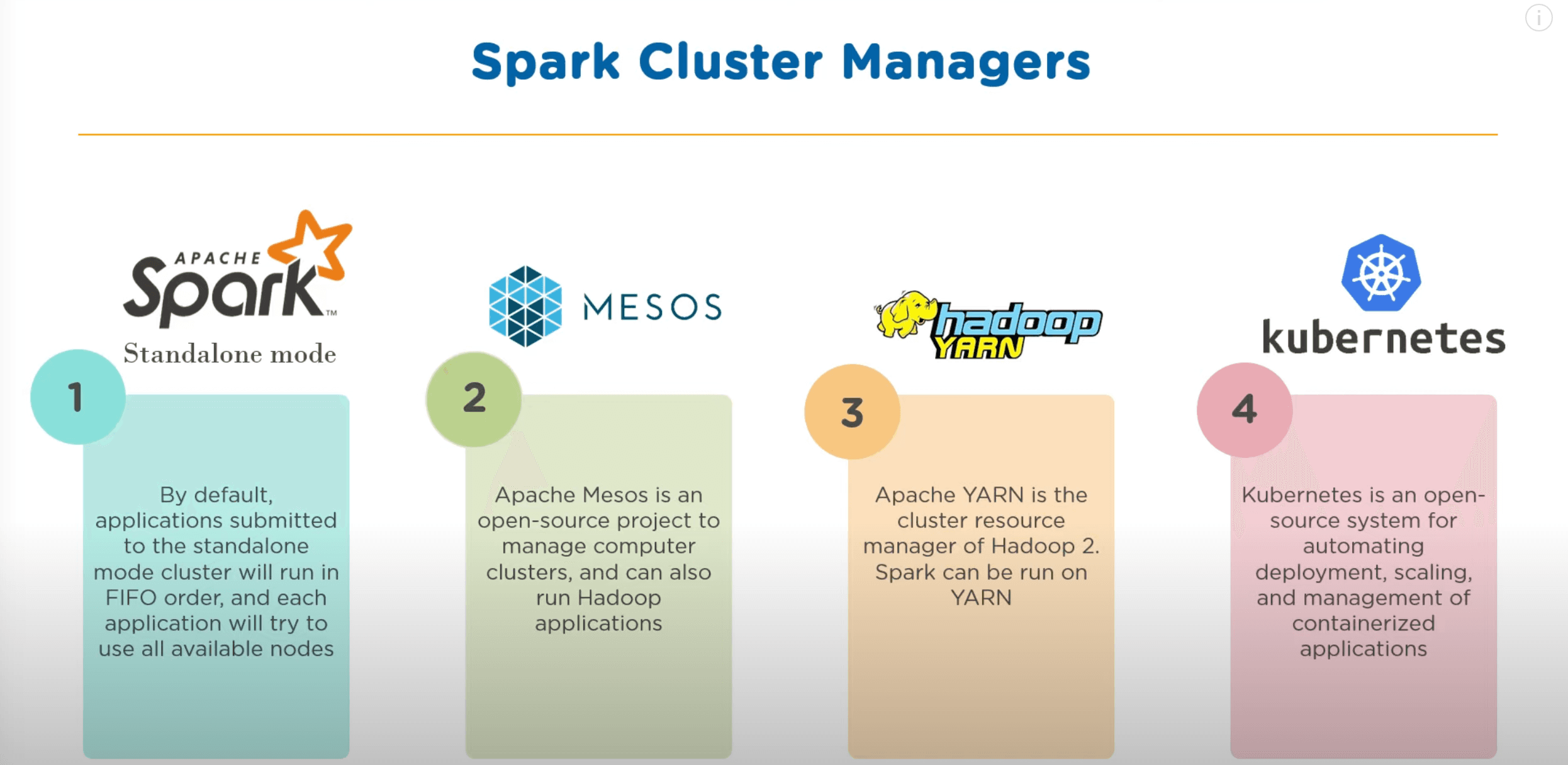
Among these, I will install Spark using the existing Hadoop YARN.
- Install
- Starting Spark History Server
- Running pyspark
- Comparing Hive with MapReduce vs SparkSQL
- Reference
Install
To run Spark in Standalone mode, Spark must be installed on all nodes. However, with Spark on YARN, you only need to install it on a single client node. The installed Hadoop version is 3.3.4, and the Spark version is 3.3.1.
DownLoad
I installed Spark on the node where the NameNode is running.
wget https://dlcdn.apache.org/spark/spark-3.3.1/spark-3.3.1-bin-hadoop3.tgz
tar -zxvf spark-3.3.1-bin-hadoop3.tgz
Then, move the binary files to an appropriate location. In my case, I moved them to /usr/local/spark.
cp -R spark-3.3.1-bin-hadoop3 /usr/local/spark
Configuration Settings
~/.bashrc
Add the following content.
export SPARK_HOME=/usr/local/spark
PATH=$PATH:$SPARK_HOME/bin
To reload environment variables, run source ~/.bashrc.
When you download the binary files, there are files ending with .template under $SPARK_HOME/conf. Copy them as shown below and configure them.
spark-env.sh
root@ubuntu01:/usr/local/spark/conf# ls
fairscheduler.xml.template  log4j2.properties.template  metrics.properties.template  spark-defaults.conf.template  spark-env.sh.template  workers.template
root@ubuntu01:/usr/local/spark/conf# cp spark-env.sh.template spark-env.sh
Add the following content.
# Options read in any cluster manager using HDFS
# - HADOOP_CONF_DIR, to point Spark towards Hadoop configuration files
export HADOOP_CONF_DIR=$HADOOP_HOME/etc/hadoop
# Options read in YARN client/cluster mode
# - YARN_CONF_DIR, to point Spark towards YARN configuration files when you use YARN
export YARN_CONF_DIR=$HADOOP_HOME/etc/hadoop
spark-defaults.conf
spark.history.fs.logDirectory   hdfs:///sparklog
spark.eventLog.dir               hdfs:///sparklog
spark.eventLog.enabled           true
spark.history.provider           org.apache.spark.deploy.history.FsHistoryProvider
Starting Spark History Server
/usr/local/spark/sbin# ./start-history-server.sh
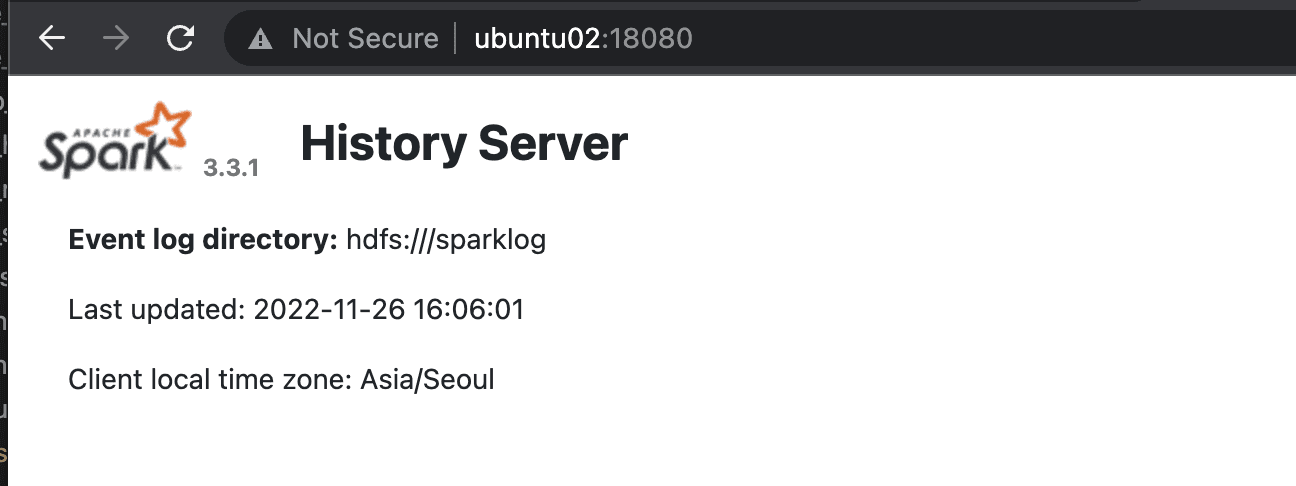
Verify that the history server is running on port 18080 as shown below.
Running pyspark
Run the following example that calculates pi to verify that Spark runs correctly through YARN.
root@ubuntu01:/usr/local/spark/examples/src/main/python# spark-submit --master yarn --deploy-mode cluster pi.py
If the execution result appears as shown below, the installation was successful.
22/11/26 03:09:49 WARN NativeCodeLoader: Unable to load native-hadoop library for your platform... using builtin-java classes where applicable
22/11/26 03:09:50 INFO DefaultNoHARMFailoverProxyProvider: Connecting to ResourceManager at ubuntu01/192.168.219.101:8040
22/11/26 03:09:50 INFO Configuration: resource-types.xml not found
22/11/26 03:09:50 INFO ResourceUtils: Unable to find 'resource-types.xml'.
22/11/26 03:09:50 INFO Client: Verifying our application has not requested more than the maximum memory capability of the cluster (8192 MB per container)
22/11/26 03:09:50 INFO Client: Will allocate AM container, with 1408 MB memory including 384 MB overhead
22/11/26 03:09:50 INFO Client: Setting up container launch context for our AM
22/11/26 03:09:50 INFO Client: Setting up the launch environment for our AM container
22/11/26 03:09:50 INFO Client: Preparing resources for our AM container
22/11/26 03:09:50 WARN Client: Neither spark.yarn.jars nor spark.yarn.archive is set, falling back to uploading libraries under SPARK_HOME.
22/11/26 03:09:51 INFO Client: Uploading resource file:/tmp/spark-817663b0-763a-4276-9323-06d7673fef50/__spark_libs__4960795851374146516.zip -> hdfs://ubuntu01:9000/user/root/.sparkStaging/application_1669137917003_0010/__spark_libs__4960795851374146516.zip
22/11/26 03:09:54 INFO Client: Uploading resource file:/usr/local/spark/examples/src/main/python/pi.py -> hdfs://ubuntu01:9000/user/root/.sparkStaging/application_1669137917003_0010/pi.py
22/11/26 03:09:54 INFO Client: Uploading resource file:/usr/local/spark/python/lib/pyspark.zip -> hdfs://ubuntu01:9000/user/root/.sparkStaging/application_1669137917003_0010/pyspark.zip
22/11/26 03:09:54 INFO Client: Uploading resource file:/usr/local/spark/python/lib/py4j-0.10.9.5-src.zip -> hdfs://ubuntu01:9000/user/root/.sparkStaging/application_1669137917003_0010/py4j-0.10.9.5-src.zip
22/11/26 03:09:54 INFO Client: Uploading resource file:/tmp/spark-817663b0-763a-4276-9323-06d7673fef50/__spark_conf__2594025362965367855.zip -> hdfs://ubuntu01:9000/user/root/.sparkStaging/application_1669137917003_0010/__spark_conf__.zip
22/11/26 03:09:54 INFO SecurityManager: Changing view acls to: root
22/11/26 03:09:54 INFO SecurityManager: Changing modify acls to: root
22/11/26 03:09:54 INFO SecurityManager: Changing view acls groups to:
22/11/26 03:09:54 INFO SecurityManager: Changing modify acls groups to:
22/11/26 03:09:54 INFO SecurityManager: SecurityManager: authentication disabled; ui acls disabled; users  with view permissions: Set(root); groups with view permissions: Set(); users  with modify permissions: Set(root); groups with modify permissions: Set()
22/11/26 03:09:54 INFO Client: Submitting application application_1669137917003_0010 to ResourceManager
22/11/26 03:09:54 INFO YarnClientImpl: Submitted application application_1669137917003_0010
22/11/26 03:09:55 INFO Client: Application report for application_1669137917003_0010 (state: ACCEPTED)
22/11/26 03:09:55 INFO Client:
	 client token: N/A
	 diagnostics: AM container is launched, waiting for AM container to Register with RM
	 ApplicationMaster host: N/A
	 ApplicationMaster RPC port: -1
	 queue: default
	 start time: 1669432194364
	 final status: UNDEFINED
	 tracking URL: http://ubuntu01:8088/proxy/application_1669137917003_0010/
	 user: root
22/11/26 03:09:56 INFO Client: Application report for application_1669137917003_0010 (state: ACCEPTED)
22/11/26 03:09:57 INFO Client: Application report for application_1669137917003_0010 (state: ACCEPTED)
22/11/26 03:09:58 INFO Client: Application report for application_1669137917003_0010 (state: ACCEPTED)
22/11/26 03:09:59 INFO Client: Application report for application_1669137917003_0010 (state: ACCEPTED)
22/11/26 03:10:00 INFO Client: Application report for application_1669137917003_0010 (state: RUNNING)
22/11/26 03:10:00 INFO Client:
	 client token: N/A
	 diagnostics: N/A
	 ApplicationMaster host: ubuntu03
	 ApplicationMaster RPC port: 43259
	 queue: default
	 start time: 1669432194364
	 final status: UNDEFINED
	 tracking URL: http://ubuntu01:8088/proxy/application_1669137917003_0010/
	 user: root
22/11/26 03:10:01 INFO Client: Application report for application_1669137917003_0010 (state: RUNNING)
22/11/26 03:10:02 INFO Client: Application report for application_1669137917003_0010 (state: RUNNING)
22/11/26 03:10:03 INFO Client: Application report for application_1669137917003_0010 (state: RUNNING)
22/11/26 03:10:04 INFO Client: Application report for application_1669137917003_0010 (state: RUNNING)
22/11/26 03:10:05 INFO Client: Application report for application_1669137917003_0010 (state: RUNNING)
22/11/26 03:10:06 INFO Client: Application report for application_1669137917003_0010 (state: RUNNING)
22/11/26 03:10:07 INFO Client: Application report for application_1669137917003_0010 (state: RUNNING)
22/11/26 03:10:08 INFO Client: Application report for application_1669137917003_0010 (state: FINISHED)
22/11/26 03:10:08 INFO Client:
	 client token: N/A
	 diagnostics: N/A
	 ApplicationMaster host: ubuntu03
	 ApplicationMaster RPC port: 43259
	 queue: default
	 start time: 1669432194364
	 final status: SUCCEEDED
	 tracking URL: http://ubuntu01:8088/proxy/application_1669137917003_0010/
	 user: root
22/11/26 03:10:08 INFO ShutdownHookManager: Shutdown hook called
22/11/26 03:10:08 INFO ShutdownHookManager: Deleting directory /tmp/spark-467194a9-c6c1-4708-88aa-f66d15229dd6
22/11/26 03:10:08 INFO ShutdownHookManager: Deleting directory /tmp/spark-817663b0-763a-4276-9323-06d7673fef50
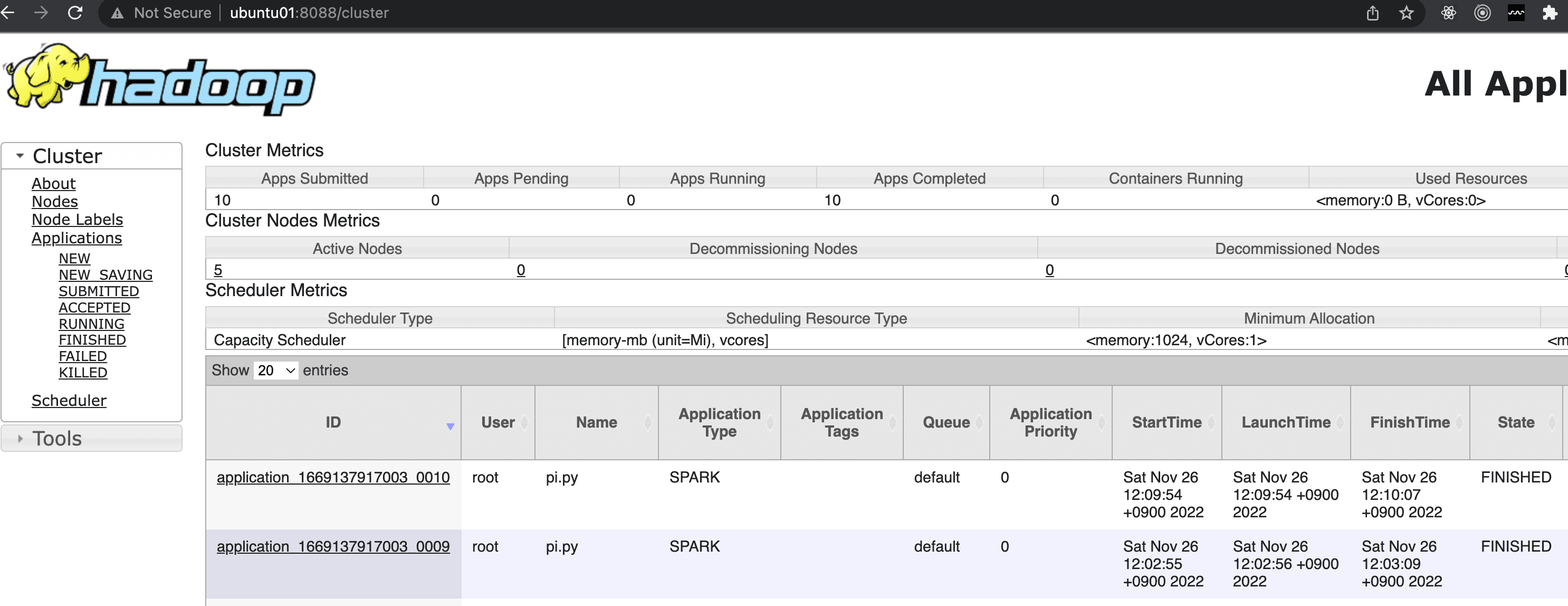
As shown below, you can verify that the job was successfully submitted both in the Spark history server and the Resource Manager Web UI.
Comparing Hive with MapReduce vs SparkSQL
Hive processes queries using MapReduce, but it can also use Spark for processing. Refer to https://cwiki.apache.org/confluence/display/Hive/Hive+on+Spark%3A+Getting+Started. However, recently, instead of using Hive then Spark then YARN, it seems more common to skip Hive and use SparkSQL then YARN directly.
I will run the query select movieid, avg(rating) as avg_rating from u_data group by movieid sort by avg_rating DESC; on the u_data table from the MovieLens dataset in Hive to measure how much faster Spark (which runs in memory) is compared to MapReduce (which uses HDFS).
Hive (MapReduce Engine)
Hive took 33.699 seconds.
hive> select movieid, avg(rating) as avg_rating from u_data group by movieid sort by avg_rating DESC;
Time taken: 33.699 seconds, Fetched: 1682 row(s)
Spark SQL
preparation
To use Spark SQL, you need the mysql-connector, just like when installing Hive. Refer to the link for mysql-connector installation instructions.
Then, place the mysql-connector-java-*.jar file under $SPARK_HOME/jars/.
Running pyspark
Run $SPARK_HOME/bin/pyspark and enter the following code.
from pyspark.sql import SparkSession
import time
start = time.time()
math.factorial(100000)

spark = SparkSession \
    .builder \
    .appName("Python Spark SQL basic example") \
    .config("spark.some.config.option", "some-value") \
    .getOrCreate()
spark.sql("select movieid, avg(rating) as avg_rating from u_data group by movieid sort by avg_rating DESC").show()
end = time.time()
print(f"{end - start:.5f} sec")
The execution took only about 6 seconds. This is remarkable. Compared to the 33 seconds taken by Hive running through MapReduce, the speed improvement is significant.
6.07104 sec
Reference
- https://spark.apache.org/docs/latest/running-on-yarn.html
- https://www.youtube.com/watch?v=znBa13Earms
- https://m.blog.naver.com/PostView.naver?isHttpsRedirect=true&blogId=rix962&logNo=220835606224
- https://cwiki.apache.org/confluence/display/Hive/Hive+on+Spark%3A+Getting+Started
- https://community.cloudera.com/t5/Support-Questions/Hive-on-Spark-Queries-are-not-working/td-p/58199
spark-submit --master yarn --deploy-mode cluster --num-executors 4 wordcount.py hdfs:///tmp/input/sample.txt