- Authors
- Name
Pre-checking
Phoenix runs on top of HBase, so HBase must already be installed. For installation, refer to this document. Version compatibility between Phoenix and HBase is important. The HBase version I previously installed is 2.5.3. To check the HBase version, you can access the HMaster Web UI and find the HBase version at the bottom of the page.
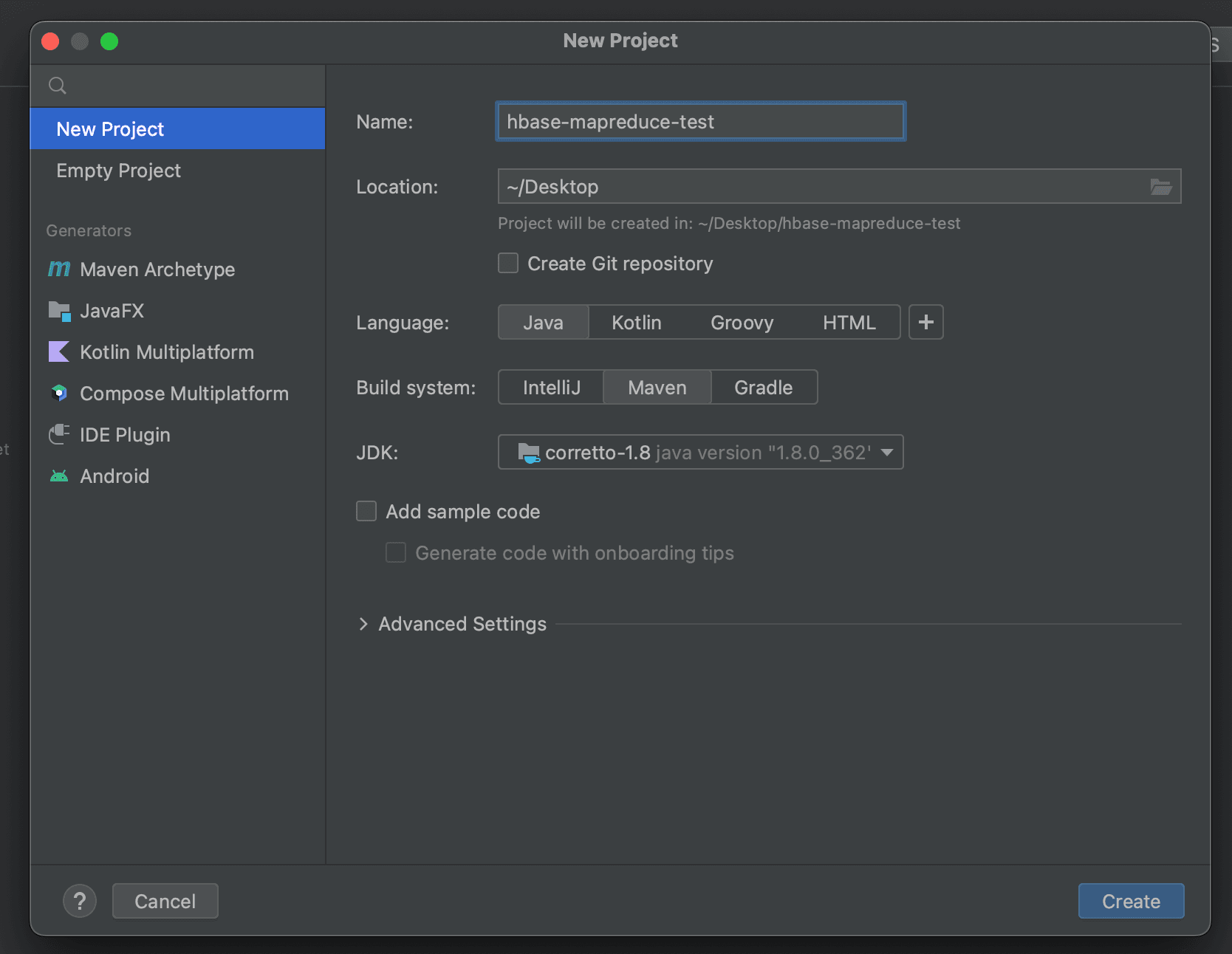
For HBase version 2.5.x, you need to install Phoenix Version 5.1.3. For other versions, refer to the Phoenix download site to find the appropriate version.
Apache Phoenix Installation
The installation is relatively straightforward once HBase is set up. Download and untar the Phoenix binary on all servers using the commands below.
wget https://dlcdn.apache.org/phoenix/phoenix-5.1.3/phoenix-hbase-2.5-5.1.3-bin.tar.gz

tar -zxvf phoenix-hbase-2.5-5.1.3-bin.tar.gz
Then, copy the phoenix-server-hbase-2.5-5.1.3.jar file from the phoenix-hbase-2.5-5.1.3-bin folder into the lib directory of all servers where HMaster and RegionServer are installed.
cd phoenix-hbase-2.5-5.1.3-bin
cp phoenix-server-hbase-2.5.jar /usr/local/hbase/lib/
cp phoenix-server-hbase-2.5-5.1.3.jar /usr/local/hbase/lib/
Then restart HBase.
After Restarting HBase
Connecting via Phoenix sqlline.py
Replace the hbase-site.xml file inside the phoenix-hbase-2.5-5.1.3-bin/bin folder with the hbase-site.xml of the HBase you want to connect to. Then run the following to connect to Phoenix via JDBC.
./sqlline.py
If the connection is successful, you can confirm that various meta-tables used by Phoenix have been created in the HBase tables, as shown below.
Running the stock_symbol.sql Example
python sqlline.py latte01,latte02,latte03 ../examples/STOCK_SYMBOL.sql
If you query with !tables in SQLLine, you can confirm that a table called STOCK_SYMBOL has been created.
CRUD Examples
Run describe to see the table schema.
0: jdbc:phoenix:> !describe STOCK_SYMBOL
+-----------+-------------+--------------+-------------+-----------+-----------+-------------+---------------+----------------+----------------+----------+---------+------------+---------------+------------------+-------------------+--------+
| TABLE_CAT | TABLE_SCHEM |  TABLE_NAME  | COLUMN_NAME | DATA_TYPE | TYPE_NAME | COLUMN_SIZE | BUFFER_LENGTH | DECIMAL_DIGITS | NUM_PREC_RADIX | NULLABLE | REMARKS | COLUMN_DEF | SQL_DATA_TYPE | SQL_DATETIME_SUB | CHAR_OCTET_LENGTH | ORDINA |
+-----------+-------------+--------------+-------------+-----------+-----------+-------------+---------------+----------------+----------------+----------+---------+------------+---------------+------------------+-------------------+--------+
|           |             | STOCK_SYMBOL | SYMBOL      | 12        | VARCHAR   | null        | null          | null           | null           | 0        |         |            | null          | null             | null              | 1      |
|           |             | STOCK_SYMBOL | COMPANY     | 12        | VARCHAR   | null        | null          | null           | null           | 1        |         |            | null          | null             | null              | 2      |
+-----------+-------------+--------------+-------------+-----------+-----------+-------------+---------------+----------------+----------------+----------+---------+------------+---------------+------------------+-------------------+--------+
To find the PK, enter !primarykeys table_name.
0: jdbc:phoenix:> !primarykeys STOCK_SYMBOL
+-----------+-------------+--------------+-------------+---------+---------+-------------+-----------+-----------+-------------+---------+---------------+
| TABLE_CAT | TABLE_SCHEM |  TABLE_NAME  | COLUMN_NAME | KEY_SEQ | PK_NAME | ASC_OR_DESC | DATA_TYPE | TYPE_NAME | COLUMN_SIZE | TYPE_ID | VIEW_CONSTANT |
+-----------+-------------+--------------+-------------+---------+---------+-------------+-----------+-----------+-------------+---------+---------------+
|           |             | STOCK_SYMBOL | SYMBOL      | 1       |         | A        | 12        | VARCHAR   | null        | 12      |               |
+-----------+-------------+--------------+-------------+---------+---------+-------------+-----------+-----------+-------------+---------+---------------+
SELECT
0: jdbc:phoenix:> select * from STOCK_SYMBOL;
+--------+----------------+
| SYMBOL |    COMPANY     |
+--------+----------------+
| CRM    | SalesForce.com |
+--------+----------------+
UPSERT
A key point when performing UPSERT in SQLLine is that double quotes cause errors, so you must use single quotes.
0: jdbc:phoenix:> UPSERT INTO STOCK_SYMBOL  VALUES ('CRM2', 'youngju.dev');
1 row affected (0.1 seconds)
0: jdbc:phoenix:> UPSERT INTO STOCK_SYMBOL (SYMBOL, COMPANY) VALUES ('CRM3', 'chaos.and.order');
1 row affected (0.036 seconds)
0: jdbc:phoenix:> select * from STOCK_SYMBOL;
+--------+-----------------+
| SYMBOL |     COMPANY     |
+--------+-----------------+
| CRM    | SalesForce.com  |
| CRM2   | youngju.dev     |
| CRM3   | chaos.and.order |
+--------+-----------------+
3 rows selected (0.054 seconds)
Running a SELECT confirms that the inserted data is retrieved correctly.
JOIN
Native HBase does not support joins, but using Phoenix, you can use joins. However, it is not as fast as RDBMS.
user table
CREATE TABLE IF NOT EXISTS users (
    user_id INTEGER NOT NULL,
    first_name VARCHAR,
    last_name VARCHAR,
    age INTEGER,
    CONSTRAINT pk_users PRIMARY KEY (user_id)
);
orders table
CREATE TABLE IF NOT EXISTS orders (
    order_id INTEGER NOT NULL,
    user_id INTEGER,
    product_name VARCHAR,
    order_date DATE,
    CONSTRAINT pk_orders PRIMARY KEY (order_id)
);
SELECT users.first_name, users.last_name, orders.product_name, orders.order_date
FROM users
JOIN orders ON users.user_id = orders.user_id;