Split View: ArgoCD + Argo Rollouts로 구현하는 GitOps 배포 전략 — Blue-Green, Canary 완벽 가이드
ArgoCD + Argo Rollouts로 구현하는 GitOps 배포 전략 — Blue-Green, Canary 완벽 가이드
- 들어가며
- GitOps 핵심 원칙
- ArgoCD 기본 구성
- Argo Rollouts 설치
- Blue-Green 배포
- Canary 배포
- AnalysisTemplate — 자동 분석
- Git 저장소 구조
- 알림 설정
- 운영 베스트 프랙티스
- 퀴즈
- 마무리
- 이 시리즈에서 다음에 읽을 글
- 참고 자료
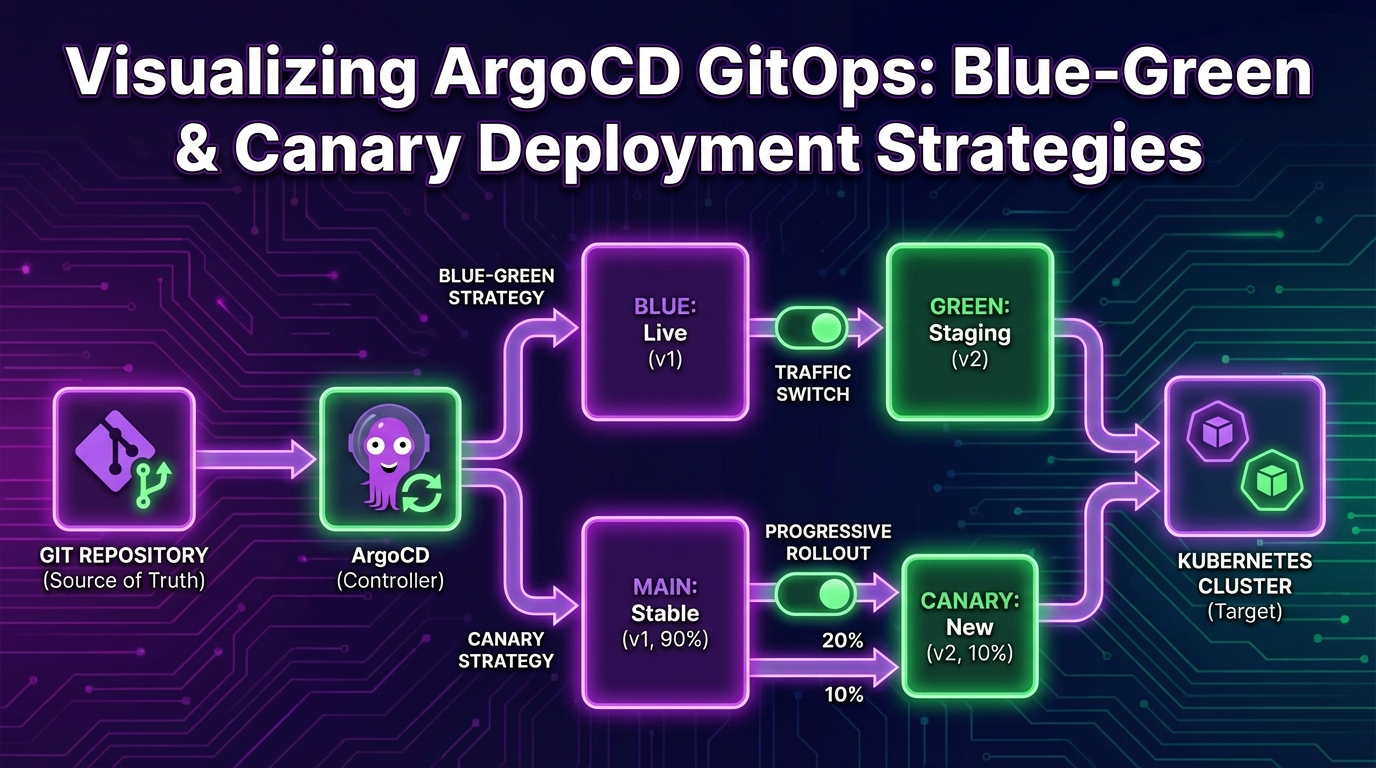
이 글은 이 시리즈의 허브 글이다. Blue-Green과 Canary의 선택 기준, Rollouts 운영 모델, 분석 기반 자동 롤백까지 한 번에 이해하고 싶다면 여기서 시작하면 된다. 멀티클러스터 템플릿화, Generator 설계, Progressive Sync 중심 운영은 ArgoCD ApplicationSet과 Progressive Rollout: GitOps 멀티클러스터 배포 실전 가이드에서 더 깊게 다룬다.
들어가며
GitOps는 Git을 Single Source of Truth로 사용하여 인프라와 애플리케이션의 원하는 상태를 선언적으로 관리하는 운영 패러다임입니다. ArgoCD는 Kubernetes 환경에서 GitOps를 구현하는 가장 널리 사용되는 도구이며, Argo Rollouts는 여기에 점진적 배포 전략을 추가합니다.
이 글에서는 ArgoCD + Argo Rollouts 조합으로 Blue-Green과 Canary 배포를 구현하는 방법을 실전 코드와 함께 살펴봅니다.
GitOps 핵심 원칙
GitOps의 4가지 원칙:
- 선언적(Declarative): 시스템의 원하는 상태를 선언적으로 기술
- 버전 관리(Versioned): 모든 상태가 Git에 저장되고 버전 관리
- 자동 적용(Automated): 승인된 변경사항이 자동으로 시스템에 적용
- 지속적 조정(Continuously Reconciled): 에이전트가 실제 상태와 원하는 상태를 지속 비교/조정
ArgoCD 기본 구성
Application 리소스
apiVersion: argoproj.io/v1alpha1
kind: Application
metadata:
  name: my-app
  namespace: argocd
spec:
  project: default
  source:
    repoURL: https://github.com/myorg/k8s-manifests.git
    targetRevision: main
    path: apps/my-app/overlays/production
  destination:
    server: https://kubernetes.default.svc
    namespace: production
  syncPolicy:
    automated:
      prune: true
      selfHeal: true
      allowEmpty: false
    syncOptions:
      - CreateNamespace=true
      - PrunePropagationPolicy=foreground
    retry:
      limit: 5
      backoff:
        duration: 5s
        factor: 2
        maxDuration: 3m
ApplicationSet으로 멀티 클러스터 관리
여기서는 ApplicationSet을 GitOps 배포 전략 안의 한 구성 요소로만 짧게 다룬다. Generator 선택, 클러스터 fan-out, Progressive Sync를 이용한 환경별 단계 배포가 핵심 관심사라면 ApplicationSet 실전 가이드 쪽이 더 직접적인 운영 문서다.
apiVersion: argoproj.io/v1alpha1
kind: ApplicationSet
metadata:
  name: my-app-set
  namespace: argocd
spec:
  generators:
    - clusters:
        selector:
          matchLabels:
            env: production
  template:
    metadata:
      name: 'my-app-{{name}}'
    spec:
      project: default
      source:
        repoURL: https://github.com/myorg/k8s-manifests.git
        targetRevision: main
        path: 'apps/my-app/overlays/{{metadata.labels.region}}'
      destination:
        server: '{{server}}'
        namespace: production
Argo Rollouts 설치
# Argo Rollouts Controller 설치
kubectl create namespace argo-rollouts
kubectl apply -n argo-rollouts -f https://github.com/argoproj/argo-rollouts/releases/latest/download/install.yaml

# kubectl 플러그인 설치
brew install argoproj/tap/kubectl-argo-rollouts

# 대시보드 실행
kubectl argo rollouts dashboard -n argo-rollouts
Blue-Green 배포
개념
Blue-Green 배포 플로우:

[사용자] → [Active Service] → [Blue (v1)] ← 현재 프로덕션
                               [Green (v2)] ← 새 버전 대기

전환 후:
[사용자] → [Active Service] → [Green (v2)] ← 새 프로덕션
                               [Blue (v1)] ← 이전 버전 (롤백 대비)
Rollout 리소스
apiVersion: argoproj.io/v1alpha1
kind: Rollout
metadata:
  name: my-app
  namespace: production
spec:
  replicas: 5
  revisionHistoryLimit: 3
  selector:
    matchLabels:
      app: my-app
  template:
    metadata:
      labels:
        app: my-app
    spec:
      containers:
        - name: my-app
          image: myorg/my-app:v2.0.0
          ports:
            - containerPort: 8080
          readinessProbe:
            httpGet:
              path: /health
              port: 8080
            initialDelaySeconds: 10
            periodSeconds: 5
          resources:
            requests:
              cpu: 200m
              memory: 256Mi
            limits:
              cpu: 500m
              memory: 512Mi
  strategy:
    blueGreen:
      activeService: my-app-active
      previewService: my-app-preview
      autoPromotionEnabled: false
      scaleDownDelaySeconds: 300
      prePromotionAnalysis:
        templates:
          - templateName: smoke-test
        args:
          - name: service-name
            value: my-app-preview
      postPromotionAnalysis:
        templates:
          - templateName: success-rate
        args:
          - name: service-name
            value: my-app-active
---
apiVersion: v1
kind: Service
metadata:
  name: my-app-active
spec:
  selector:
    app: my-app
  ports:
    - port: 80
      targetPort: 8080
---
apiVersion: v1
kind: Service
metadata:
  name: my-app-preview
spec:
  selector:
    app: my-app
  ports:
    - port: 80
      targetPort: 8080
배포 관리 명령어
# 배포 상태 확인
kubectl argo rollouts get rollout my-app -n production -w

# 수동 프로모션 (Blue → Green 전환)
kubectl argo rollouts promote my-app -n production

# 롤백
kubectl argo rollouts undo my-app -n production

# 특정 리비전으로 롤백
kubectl argo rollouts undo my-app --to-revision=2 -n production

# 배포 중단
kubectl argo rollouts abort my-app -n production
Canary 배포
단계별 Canary 전략
apiVersion: argoproj.io/v1alpha1
kind: Rollout
metadata:
  name: my-app-canary
spec:
  replicas: 10
  selector:
    matchLabels:
      app: my-app
  template:
    metadata:
      labels:
        app: my-app
    spec:
      containers:
        - name: my-app
          image: myorg/my-app:v2.0.0
          ports:
            - containerPort: 8080
  strategy:
    canary:
      canaryService: my-app-canary
      stableService: my-app-stable
      steps:
        # 5% 트래픽으로 시작
        - setWeight: 5
        - pause:
            duration: 5m
        # 자동 분석 실행
        - analysis:
            templates:
              - templateName: error-rate-check
            args:
              - name: service-name
                value: my-app-canary
        # 20%로 확대
        - setWeight: 20
        - pause:
            duration: 10m
        - analysis:
            templates:
              - templateName: latency-check
        # 50%로 확대
        - setWeight: 50
        - pause:
            duration: 10m
        - analysis:
            templates:
              - templateName: comprehensive-check
        # 80%로 확대
        - setWeight: 80
        - pause:
            duration: 5m
        # 100% (프로모션 완료)
      maxSurge: '25%'
      maxUnavailable: 0
Istio와 연동한 트래픽 관리
apiVersion: argoproj.io/v1alpha1
kind: Rollout
metadata:
  name: my-app-istio
spec:
  replicas: 10
  selector:
    matchLabels:
      app: my-app
  template:
    metadata:
      labels:
        app: my-app
    spec:
      containers:
        - name: my-app
          image: myorg/my-app:v2.0.0
  strategy:
    canary:
      canaryService: my-app-canary
      stableService: my-app-stable
      trafficRouting:
        istio:
          virtualServices:
            - name: my-app-vsvc
              routes:
                - primary
          destinationRule:
            name: my-app-destrule
            canarySubsetName: canary
            stableSubsetName: stable
      steps:
        - setWeight: 10
        - pause: { duration: 5m }
        - setWeight: 30
        - pause: { duration: 5m }
        - setWeight: 60
        - pause: { duration: 5m }
---
apiVersion: networking.istio.io/v1beta1
kind: VirtualService
metadata:
  name: my-app-vsvc
spec:
  hosts:
    - my-app.example.com
  http:
    - name: primary
      route:
        - destination:
            host: my-app-stable
          weight: 100
        - destination:
            host: my-app-canary
          weight: 0
---
apiVersion: networking.istio.io/v1beta1
kind: DestinationRule
metadata:
  name: my-app-destrule
spec:
  host: my-app
  subsets:
    - name: stable
      labels:
        app: my-app
    - name: canary
      labels:
        app: my-app
AnalysisTemplate — 자동 분석
Prometheus 기반 분석
apiVersion: argoproj.io/v1alpha1
kind: AnalysisTemplate
metadata:
  name: error-rate-check
spec:
  args:
    - name: service-name
  metrics:
    - name: error-rate
      interval: 60s
      count: 5
      successCondition: result[0] < 0.05
      failureLimit: 3
      provider:
        prometheus:
          address: http://prometheus.monitoring:9090
          query: |
            sum(rate(http_requests_total{service="{{args.service-name}}",status=~"5.."}[5m]))
            /
            sum(rate(http_requests_total{service="{{args.service-name}}"}[5m]))
---
apiVersion: argoproj.io/v1alpha1
kind: AnalysisTemplate
metadata:
  name: latency-check
spec:
  metrics:
    - name: p99-latency
      interval: 60s
      count: 5
      successCondition: result[0] < 500
      failureLimit: 2
      provider:
        prometheus:
          address: http://prometheus.monitoring:9090
          query: |
            histogram_quantile(0.99,
              sum(rate(http_request_duration_milliseconds_bucket{service="my-app"}[5m]))
              by (le)
            )
Webhook 기반 분석
apiVersion: argoproj.io/v1alpha1
kind: AnalysisTemplate
metadata:
  name: smoke-test
spec:
  args:
    - name: service-name
  metrics:
    - name: smoke-test
      count: 1
      successCondition: result.status == "pass"
      provider:
        web:
          url: 'http://test-runner.ci/api/v1/smoke-test'
          method: POST
          headers:
            - key: Content-Type
              value: application/json
          body: |
            {
              "service": "{{args.service-name}}",
              "tests": ["health", "basic-crud", "auth"]
            }
          jsonPath: '{$.result}'
          timeoutSeconds: 120
Git 저장소 구조
k8s-manifests/
├── apps/
│   └── my-app/
│       ├── base/
│       │   ├── kustomization.yaml
│       │   ├── rollout.yaml
│       │   ├── service.yaml
│       │   └── analysis-templates.yaml
│       └── overlays/
│           ├── staging/
│           │   ├── kustomization.yaml
│           │   └── patches/
│           │       └── rollout-strategy.yaml
│           └── production/
│               ├── kustomization.yaml
│               └── patches/
│                   ├── rollout-strategy.yaml
│                   └── replicas.yaml
├── infrastructure/
│   ├── argocd/
│   │   ├── argocd-cm.yaml
│   │   └── projects/
│   └── argo-rollouts/
│       └── install.yaml
└── applicationsets/
    └── my-app.yaml
Kustomize 패치 예시
# overlays/production/patches/rollout-strategy.yaml
apiVersion: argoproj.io/v1alpha1
kind: Rollout
metadata:
  name: my-app
spec:
  replicas: 20
  strategy:
    canary:
      steps:
        - setWeight: 5
        - pause: { duration: 10m }
        - analysis:
            templates:
              - templateName: error-rate-check
        - setWeight: 25
        - pause: { duration: 15m }
        - setWeight: 50
        - pause: { duration: 15m }
        - setWeight: 75
        - pause: { duration: 10m }
알림 설정
# ArgoCD Notification ConfigMap
apiVersion: v1
kind: ConfigMap
metadata:
  name: argocd-notifications-cm
  namespace: argocd
data:
  service.slack: |
    token: $slack-token
  template.app-sync-status: |
    message: |
      Application {{.app.metadata.name}} sync status: {{.app.status.sync.status}}
      Health: {{.app.status.health.status}}
      Revision: {{.app.status.sync.revision}}
  trigger.on-sync-failed: |
    - when: app.status.sync.status == 'OutOfSync' and app.status.health.status == 'Degraded'
      send: [app-sync-status]
  trigger.on-health-degraded: |
    - when: app.status.health.status == 'Degraded'
      send: [app-sync-status]
운영 베스트 프랙티스
1. Sync Wave로 배포 순서 제어
# ConfigMap 먼저 배포
apiVersion: v1
kind: ConfigMap
metadata:
  annotations:
    argocd.argoproj.io/sync-wave: '-1'
---
# 그 다음 Rollout 배포
apiVersion: argoproj.io/v1alpha1
kind: Rollout
metadata:
  annotations:
    argocd.argoproj.io/sync-wave: '0'
---
# 마지막으로 HPA 배포
apiVersion: autoscaling/v2
kind: HorizontalPodAutoscaler
metadata:
  annotations:
    argocd.argoproj.io/sync-wave: '1'
2. 긴급 롤백 프로세스
# 방법 1: Argo Rollouts CLI
kubectl argo rollouts undo my-app -n production

# 방법 2: Git Revert (GitOps 방식)
git revert HEAD
git push origin main
# ArgoCD가 자동으로 이전 상태로 동기화

# 방법 3: ArgoCD UI에서 이전 리비전으로 Sync
argocd app sync my-app --revision <previous-commit-sha>
3. 시크릿 관리
# Sealed Secrets 사용
apiVersion: bitnami.com/v1alpha1
kind: SealedSecret
metadata:
  name: my-app-secrets
  namespace: production
spec:
  encryptedData:
    DATABASE_URL: AgBy3i4OJSWK+PiTySYZZA9rO...
    API_KEY: AgBy3i4OJSWK+PiTySYZZA9rO...
퀴즈
Q1. GitOps의 4가지 핵심 원칙은 무엇인가요?
선언적(Declarative), 버전 관리(Versioned), 자동 적용(Automated), 지속적 조정(Continuously Reconciled)입니다.
Q2. Blue-Green 배포에서 autoPromotionEnabled: false의 의미는?
새 버전(Green)이 준비되어도 자동으로 트래픽을 전환하지 않습니다. kubectl argo rollouts promote로 수동 승인이 필요합니다.
Q3. Canary 배포에서 AnalysisTemplate의 역할은?
각 Canary 단계에서 자동으로 메트릭(에러율, 레이턴시 등)을 분석하여 성공/실패를 판단합니다. 실패 시 자동 롤백됩니다.
Q4. ArgoCD의 selfHeal 옵션은 어떤 동작을 하나요?
누군가 kubectl로 직접 클러스터 리소스를 변경하면, ArgoCD가 이를 감지하고 Git에 정의된 상태로 자동 복원합니다.
Q5. Argo Rollouts에서 Istio와 연동하면 어떤 장점이 있나요?
Pod 수가 아닌 트래픽 비율로 정밀하게 Canary 트래픽을 제어할 수 있습니다. VirtualService의 weight를 Argo Rollouts가 자동 조정합니다.
Q6. Sync Wave 어노테이션의 용도는?
리소스 배포 순서를 제어합니다. 낮은 숫자가 먼저 배포됩니다 (예: ConfigMap(-1) → Rollout(0) → HPA(1)).
Q7. GitOps에서 시크릿을 안전하게 관리하는 방법은?
Sealed Secrets, SOPS, External Secrets Operator 등을 사용하여 암호화된 시크릿만 Git에 저장합니다. 평문 시크릿은 절대 커밋하지 않습니다.
마무리
이 시리즈에서 다음에 읽을 글
- ArgoCD ApplicationSet과 Progressive Rollout: GitOps 멀티클러스터 배포 실전 가이드 클러스터 수가 늘어나면서 템플릿 기반 생성, 환경 fan-out, Progressive Sync 순차 배포가 핵심 문제가 되기 시작했다면 이 글이 다음 단계다.
ArgoCD와 Argo Rollouts의 조합은 Kubernetes 환경에서 가장 강력한 GitOps 배포 파이프라인을 제공합니다. Git을 기반으로 한 선언적 관리, 자동 분석 기반 프로모션/롤백, 그리고 Istio 연동을 통한 정밀한 트래픽 제어까지 — 프로덕션 배포의 안정성과 속도를 동시에 확보할 수 있습니다.
참고 자료
GitOps Deployment Strategies with ArgoCD + Argo Rollouts — Complete Guide to Blue-Green and Canary
- Introduction
- Core Principles of GitOps
- ArgoCD Basic Configuration
- Installing Argo Rollouts
- Blue-Green Deployment
- Canary Deployment
- AnalysisTemplate — Automated Analysis
- Git Repository Structure
- Notification Configuration
- Operational Best Practices
- Quiz
- Read Next in This GitOps Series
- Conclusion
- References
This post is the hub article in the series. Start here if you want the full decision framework for Blue-Green versus Canary, the Rollouts operating model, and analysis-driven rollback. If your main problem is multi-cluster templating, generator design, and Progressive Sync across environments, continue with ArgoCD ApplicationSet and Progressive Rollout: A Practical Guide to GitOps Multi-Cluster Deployment.
Introduction
GitOps is an operational paradigm that uses Git as the Single Source of Truth to declaratively manage the desired state of infrastructure and applications. ArgoCD is the most widely used tool for implementing GitOps in Kubernetes environments, and Argo Rollouts adds progressive delivery strategies on top of it.
This article walks through implementing Blue-Green and Canary deployments with the ArgoCD + Argo Rollouts combination, complete with production-ready code.
Core Principles of GitOps
The four principles of GitOps:
- Declarative: Describe the desired state of the system declaratively
- Versioned: All states are stored in Git and version-controlled
- Automated: Approved changes are automatically applied to the system
- Continuously Reconciled: Agents continuously compare and reconcile actual state with desired state
ArgoCD Basic Configuration
Application Resource
apiVersion: argoproj.io/v1alpha1
kind: Application
metadata:
  name: my-app
  namespace: argocd
spec:
  project: default
  source:
    repoURL: https://github.com/myorg/k8s-manifests.git
    targetRevision: main
    path: apps/my-app/overlays/production
  destination:
    server: https://kubernetes.default.svc
    namespace: production
  syncPolicy:
    automated:
      prune: true
      selfHeal: true
      allowEmpty: false
    syncOptions:
      - CreateNamespace=true
      - PrunePropagationPolicy=foreground
    retry:
      limit: 5
      backoff:
        duration: 5s
        factor: 2
        maxDuration: 3m
Multi-Cluster Management with ApplicationSet
This section only introduces ApplicationSet as one part of the broader GitOps deployment story. If you need a deeper operations guide for generator selection, cluster fan-out, and Progressive Sync across multiple environments, read the dedicated ApplicationSet multi-cluster guide.
apiVersion: argoproj.io/v1alpha1
kind: ApplicationSet
metadata:
  name: my-app-set
  namespace: argocd
spec:
  generators:
    - clusters:
        selector:
          matchLabels:
            env: production
  template:
    metadata:
      name: 'my-app-{{name}}'
    spec:
      project: default
      source:
        repoURL: https://github.com/myorg/k8s-manifests.git
        targetRevision: main
        path: 'apps/my-app/overlays/{{metadata.labels.region}}'
      destination:
        server: '{{server}}'
        namespace: production
Installing Argo Rollouts
# Install Argo Rollouts Controller
kubectl create namespace argo-rollouts
kubectl apply -n argo-rollouts -f https://github.com/argoproj/argo-rollouts/releases/latest/download/install.yaml

# Install kubectl plugin
brew install argoproj/tap/kubectl-argo-rollouts

# Launch dashboard
kubectl argo rollouts dashboard -n argo-rollouts
Blue-Green Deployment
Concept
Blue-Green Deployment Flow:

[Users] --> [Active Service] --> [Blue (v1)] <-- Current Production
                                 [Green (v2)] <-- New Version Standby

After Switch:
[Users] --> [Active Service] --> [Green (v2)] <-- New Production
                                 [Blue (v1)] <-- Previous Version (Rollback Ready)
Rollout Resource
apiVersion: argoproj.io/v1alpha1
kind: Rollout
metadata:
  name: my-app
  namespace: production
spec:
  replicas: 5
  revisionHistoryLimit: 3
  selector:
    matchLabels:
      app: my-app
  template:
    metadata:
      labels:
        app: my-app
    spec:
      containers:
        - name: my-app
          image: myorg/my-app:v2.0.0
          ports:
            - containerPort: 8080
          readinessProbe:
            httpGet:
              path: /health
              port: 8080
            initialDelaySeconds: 10
            periodSeconds: 5
          resources:
            requests:
              cpu: 200m
              memory: 256Mi
            limits:
              cpu: 500m
              memory: 512Mi
  strategy:
    blueGreen:
      activeService: my-app-active
      previewService: my-app-preview
      autoPromotionEnabled: false
      scaleDownDelaySeconds: 300
      prePromotionAnalysis:
        templates:
          - templateName: smoke-test
        args:
          - name: service-name
            value: my-app-preview
      postPromotionAnalysis:
        templates:
          - templateName: success-rate
        args:
          - name: service-name
            value: my-app-active
---
apiVersion: v1
kind: Service
metadata:
  name: my-app-active
spec:
  selector:
    app: my-app
  ports:
    - port: 80
      targetPort: 8080
---
apiVersion: v1
kind: Service
metadata:
  name: my-app-preview
spec:
  selector:
    app: my-app
  ports:
    - port: 80
      targetPort: 8080
Deployment Management Commands
# Check deployment status
kubectl argo rollouts get rollout my-app -n production -w

# Manual promotion (Blue to Green switch)
kubectl argo rollouts promote my-app -n production

# Rollback
kubectl argo rollouts undo my-app -n production

# Rollback to a specific revision
kubectl argo rollouts undo my-app --to-revision=2 -n production

# Abort deployment
kubectl argo rollouts abort my-app -n production
Canary Deployment
Step-by-Step Canary Strategy
apiVersion: argoproj.io/v1alpha1
kind: Rollout
metadata:
  name: my-app-canary
spec:
  replicas: 10
  selector:
    matchLabels:
      app: my-app
  template:
    metadata:
      labels:
        app: my-app
    spec:
      containers:
        - name: my-app
          image: myorg/my-app:v2.0.0
          ports:
            - containerPort: 8080
  strategy:
    canary:
      canaryService: my-app-canary
      stableService: my-app-stable
      steps:
        # Start with 5% traffic
        - setWeight: 5
        - pause:
            duration: 5m
        # Run automated analysis
        - analysis:
            templates:
              - templateName: error-rate-check
            args:
              - name: service-name
                value: my-app-canary
        # Scale to 20%
        - setWeight: 20
        - pause:
            duration: 10m
        - analysis:
            templates:
              - templateName: latency-check
        # Scale to 50%
        - setWeight: 50
        - pause:
            duration: 10m
        - analysis:
            templates:
              - templateName: comprehensive-check
        # Scale to 80%
        - setWeight: 80
        - pause:
            duration: 5m
        # 100% (promotion complete)
      maxSurge: '25%'
      maxUnavailable: 0
Traffic Management with Istio Integration
apiVersion: argoproj.io/v1alpha1
kind: Rollout
metadata:
  name: my-app-istio
spec:
  replicas: 10
  selector:
    matchLabels:
      app: my-app
  template:
    metadata:
      labels:
        app: my-app
    spec:
      containers:
        - name: my-app
          image: myorg/my-app:v2.0.0
  strategy:
    canary:
      canaryService: my-app-canary
      stableService: my-app-stable
      trafficRouting:
        istio:
          virtualServices:
            - name: my-app-vsvc
              routes:
                - primary
          destinationRule:
            name: my-app-destrule
            canarySubsetName: canary
            stableSubsetName: stable
      steps:
        - setWeight: 10
        - pause: { duration: 5m }
        - setWeight: 30
        - pause: { duration: 5m }
        - setWeight: 60
        - pause: { duration: 5m }
---
apiVersion: networking.istio.io/v1beta1
kind: VirtualService
metadata:
  name: my-app-vsvc
spec:
  hosts:
    - my-app.example.com
  http:
    - name: primary
      route:
        - destination:
            host: my-app-stable
          weight: 100
        - destination:
            host: my-app-canary
          weight: 0
---
apiVersion: networking.istio.io/v1beta1
kind: DestinationRule
metadata:
  name: my-app-destrule
spec:
  host: my-app
  subsets:
    - name: stable
      labels:
        app: my-app
    - name: canary
      labels:
        app: my-app
AnalysisTemplate — Automated Analysis
Prometheus-Based Analysis
apiVersion: argoproj.io/v1alpha1
kind: AnalysisTemplate
metadata:
  name: error-rate-check
spec:
  args:
    - name: service-name
  metrics:
    - name: error-rate
      interval: 60s
      count: 5
      successCondition: result[0] < 0.05
      failureLimit: 3
      provider:
        prometheus:
          address: http://prometheus.monitoring:9090
          query: |
            sum(rate(http_requests_total{service="{{args.service-name}}",status=~"5.."}[5m]))
            /
            sum(rate(http_requests_total{service="{{args.service-name}}"}[5m]))
---
apiVersion: argoproj.io/v1alpha1
kind: AnalysisTemplate
metadata:
  name: latency-check
spec:
  metrics:
    - name: p99-latency
      interval: 60s
      count: 5
      successCondition: result[0] < 500
      failureLimit: 2
      provider:
        prometheus:
          address: http://prometheus.monitoring:9090
          query: |
            histogram_quantile(0.99,
              sum(rate(http_request_duration_milliseconds_bucket{service="my-app"}[5m]))
              by (le)
            )
Webhook-Based Analysis
apiVersion: argoproj.io/v1alpha1
kind: AnalysisTemplate
metadata:
  name: smoke-test
spec:
  args:
    - name: service-name
  metrics:
    - name: smoke-test
      count: 1
      successCondition: result.status == "pass"
      provider:
        web:
          url: 'http://test-runner.ci/api/v1/smoke-test'
          method: POST
          headers:
            - key: Content-Type
              value: application/json
          body: |
            {
              "service": "{{args.service-name}}",
              "tests": ["health", "basic-crud", "auth"]
            }
          jsonPath: '{$.result}'
          timeoutSeconds: 120
Git Repository Structure
k8s-manifests/
├── apps/
│   └── my-app/
│       ├── base/
│       │   ├── kustomization.yaml
│       │   ├── rollout.yaml
│       │   ├── service.yaml
│       │   └── analysis-templates.yaml
│       └── overlays/
│           ├── staging/
│           │   ├── kustomization.yaml
│           │   └── patches/
│           │       └── rollout-strategy.yaml
│           └── production/
│               ├── kustomization.yaml
│               └── patches/
│                   ├── rollout-strategy.yaml
│                   └── replicas.yaml
├── infrastructure/
│   ├── argocd/
│   │   ├── argocd-cm.yaml
│   │   └── projects/
│   └── argo-rollouts/
│       └── install.yaml
└── applicationsets/
    └── my-app.yaml
Kustomize Patch Example
# overlays/production/patches/rollout-strategy.yaml
apiVersion: argoproj.io/v1alpha1
kind: Rollout
metadata:
  name: my-app
spec:
  replicas: 20
  strategy:
    canary:
      steps:
        - setWeight: 5
        - pause: { duration: 10m }
        - analysis:
            templates:
              - templateName: error-rate-check
        - setWeight: 25
        - pause: { duration: 15m }
        - setWeight: 50
        - pause: { duration: 15m }
        - setWeight: 75
        - pause: { duration: 10m }
Notification Configuration
# ArgoCD Notification ConfigMap
apiVersion: v1
kind: ConfigMap
metadata:
  name: argocd-notifications-cm
  namespace: argocd
data:
  service.slack: |
    token: $slack-token
  template.app-sync-status: |
    message: |
      Application {{.app.metadata.name}} sync status: {{.app.status.sync.status}}
      Health: {{.app.status.health.status}}
      Revision: {{.app.status.sync.revision}}
  trigger.on-sync-failed: |
    - when: app.status.sync.status == 'OutOfSync' and app.status.health.status == 'Degraded'
      send: [app-sync-status]
  trigger.on-health-degraded: |
    - when: app.status.health.status == 'Degraded'
      send: [app-sync-status]
Operational Best Practices
1. Control Deployment Order with Sync Waves
# Deploy ConfigMap first
apiVersion: v1
kind: ConfigMap
metadata:
  annotations:
    argocd.argoproj.io/sync-wave: '-1'
---
# Then deploy the Rollout
apiVersion: argoproj.io/v1alpha1
kind: Rollout
metadata:
  annotations:
    argocd.argoproj.io/sync-wave: '0'
---
# Finally deploy the HPA
apiVersion: autoscaling/v2
kind: HorizontalPodAutoscaler
metadata:
  annotations:
    argocd.argoproj.io/sync-wave: '1'
2. Emergency Rollback Process
# Method 1: Argo Rollouts CLI
kubectl argo rollouts undo my-app -n production

# Method 2: Git Revert (GitOps approach)
git revert HEAD
git push origin main
# ArgoCD automatically syncs to the previous state

# Method 3: Sync to previous revision from ArgoCD UI
argocd app sync my-app --revision <previous-commit-sha>
3. Secrets Management
# Using Sealed Secrets
apiVersion: bitnami.com/v1alpha1
kind: SealedSecret
metadata:
  name: my-app-secrets
  namespace: production
spec:
  encryptedData:
    DATABASE_URL: AgBy3i4OJSWK+PiTySYZZA9rO...
    API_KEY: AgBy3i4OJSWK+PiTySYZZA9rO...
Quiz
Q1. What are the four core principles of GitOps?
Declarative, Versioned, Automated, and Continuously Reconciled.
Q2. What does autoPromotionEnabled: false mean in Blue-Green deployment?
Even when the new version (Green) is ready, traffic is not automatically switched. Manual approval via kubectl argo rollouts promote is required.
Q3. What is the role of AnalysisTemplate in Canary deployment?
It automatically analyzes metrics (error rate, latency, etc.) at each Canary step to determine success or failure. On failure, it triggers an automatic rollback.
Q4. What does the selfHeal option in ArgoCD do?
If someone directly modifies cluster resources via kubectl, ArgoCD detects the change and automatically restores the state defined in Git.
Q5. What advantage does Istio integration provide with Argo Rollouts?
It enables precise control of Canary traffic by traffic ratio rather than by Pod count. Argo Rollouts automatically adjusts the VirtualService weights.
Q6. What is the purpose of the Sync Wave annotation?
It controls the order of resource deployment. Lower numbers are deployed first (e.g., ConfigMap(-1) then Rollout(0) then HPA(1)).
Q7. How can secrets be safely managed in GitOps?
Use tools like Sealed Secrets, SOPS, or External Secrets Operator to store only encrypted secrets in Git. Plaintext secrets should never be committed.
Read Next in This GitOps Series
- ArgoCD ApplicationSet and Progressive Rollout: A Practical Guide to GitOps Multi-Cluster Deployment Read this next if cluster growth, environment fan-out, generator templates, and staged multi-environment promotion are the next operational bottlenecks after you understand the strategy layer.
Conclusion
The combination of ArgoCD and Argo Rollouts provides the most powerful GitOps deployment pipeline for Kubernetes environments. Declarative management based on Git, automated analysis-driven promotion and rollback, and precise traffic control through Istio integration -- you can achieve both stability and speed in production deployments simultaneously.