Split View: Redis 캐싱 전략 완벽 가이드 — Cache-Aside부터 Write-Behind까지 실전 패턴 6가지
Redis 캐싱 전략 완벽 가이드 — Cache-Aside부터 Write-Behind까지 실전 패턴 6가지
- 들어가며
- 캐싱 전략 개요
- 1. Cache-Aside (Lazy Loading)
- 2. Read-Through
- 3. Write-Through
- 4. Write-Behind (Write-Back)
- 5. Refresh-Ahead
- 6. Cache Stampede 방지
- TTL 전략
- Redis 데이터 구조 활용
- 캐시 모니터링
- 전략 선택 가이드
- 퀴즈
- 마무리
- 참고 자료
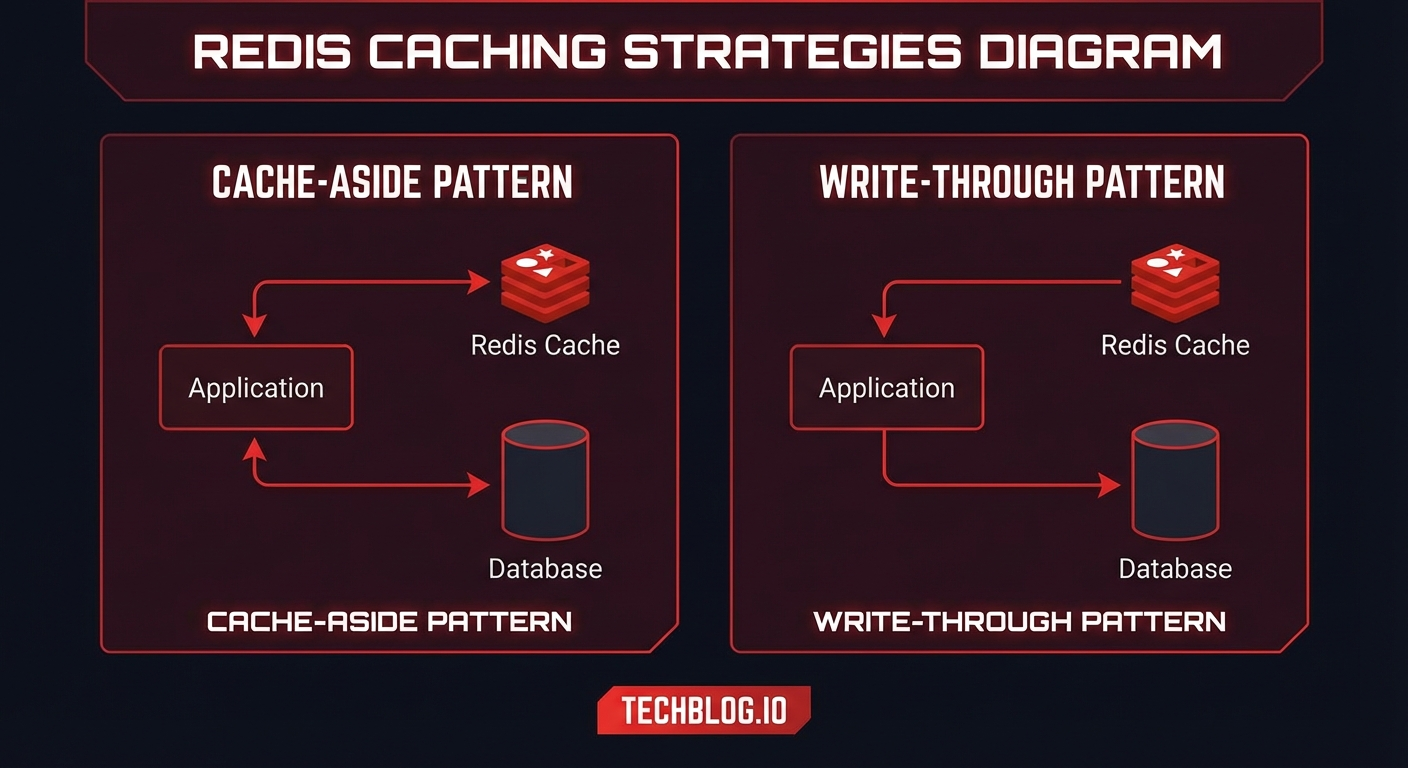
들어가며
캐싱은 애플리케이션 성능 최적화의 핵심 전략입니다. 하지만 "캐시를 쓰면 빨라진다" 정도의 이해만으로는 프로덕션에서 다양한 문제에 직면하게 됩니다. 캐시 일관성, 캐시 스탬피드, 메모리 관리 등 실전에서 마주하는 과제들을 해결하려면 올바른 캐싱 전략 선택이 필수입니다.
캐싱 전략 개요
┌─────────────────────────────────────────────────────┐
│                    캐싱 전략 분류                      │
├──────────────────┬──────────────────────────────────┤
│   읽기 전략       │   쓰기 전략                       │
├──────────────────┼──────────────────────────────────┤
│ Cache-Aside      │ Write-Through                    │
│ Read-Through     │ Write-Behind (Write-Back)        │
│ Refresh-Ahead    │ Write-Around                     │
└──────────────────┴──────────────────────────────────┘
1. Cache-Aside (Lazy Loading)
가장 널리 사용되는 패턴으로, 애플리케이션이 캐시를 직접 관리합니다.
읽기 플로우:
[App] → Cache hit? → [Redis] → 데이터 반환
  ↓ miss
[App] → [Database] → 데이터 반환
  ↓
[App] → [Redis] 캐시 저장
import redis
import json
from typing import Optional

r = redis.Redis(host='localhost', port=6379, decode_responses=True)

class UserService:
    def get_user(self, user_id: int) -> Optional[dict]:
        cache_key = f"user:{user_id}"

        # 1. 캐시 확인
        cached = r.get(cache_key)
        if cached:
            return json.loads(cached)

        # 2. Cache Miss → DB 조회
        user = self.db.query("SELECT * FROM users WHERE id = %s", user_id)
        if not user:
            # Negative caching: 없는 데이터도 캐시 (짧은 TTL)
            r.setex(cache_key, 60, json.dumps(None))
            return None

        # 3. 캐시 저장
        r.setex(cache_key, 3600, json.dumps(user))
        return user

    def update_user(self, user_id: int, data: dict):
        # DB 업데이트
        self.db.execute("UPDATE users SET ... WHERE id = %s", user_id)

        # 캐시 무효화 (삭제)
        cache_key = f"user:{user_id}"
        r.delete(cache_key)
        # 주의: 캐시 업데이트가 아닌 삭제!
        # 다음 읽기 시 최신 데이터로 캐시 갱신
장점: 구현 간단, 필요한 데이터만 캐시, 캐시 장애 시 DB로 폴백 단점: 최초 요청은 항상 느림 (Cold Start), 데이터 불일치 가능
2. Read-Through
캐시가 데이터 로딩을 담당합니다. 애플리케이션은 항상 캐시만 바라봅니다.
class ReadThroughCache:
    """
    캐시가 DB 조회를 대행
    애플리케이션은 캐시만 호출
    """

    def __init__(self, redis_client, db, default_ttl=3600):
        self.redis = redis_client
        self.db = db
        self.ttl = default_ttl

    def get(self, key: str, loader_fn=None) -> Optional[dict]:
        # 캐시 확인
        cached = self.redis.get(key)
        if cached:
            return json.loads(cached)

        # Cache Miss → loader 함수로 데이터 로드
        if loader_fn:
            data = loader_fn()
            if data is not None:
                self.redis.setex(key, self.ttl, json.dumps(data))
            return data

        return None


# 사용 예시
cache = ReadThroughCache(r, db)

def get_product(product_id: int):
    return cache.get(
        f"product:{product_id}",
        loader_fn=lambda: db.query(
            "SELECT * FROM products WHERE id = %s", product_id
        )
    )
3. Write-Through
쓰기가 캐시를 거쳐 DB로 동기적으로 전파됩니다.
class WriteThroughCache:
    """
    쓰기: App → Cache → DB (동기)
    읽기: App → Cache (항상 최신)
    """

    def write(self, key: str, data: dict, db_writer_fn=None):
        # 1. 캐시에 먼저 쓰기
        self.redis.setex(key, self.ttl, json.dumps(data))

        # 2. DB에 동기적으로 쓰기
        if db_writer_fn:
            db_writer_fn(data)

        return data

    def get(self, key: str) -> Optional[dict]:
        # 캐시가 항상 최신이므로 캐시에서만 읽기
        cached = self.redis.get(key)
        if cached:
            return json.loads(cached)
        return None


# 사용 예시
cache = WriteThroughCache(r, db)

def update_inventory(product_id: int, quantity: int):
    data = {"product_id": product_id, "quantity": quantity}
    cache.write(
        f"inventory:{product_id}",
        data,
        db_writer_fn=lambda d: db.execute(
            "UPDATE inventory SET quantity = %s WHERE product_id = %s",
            d["quantity"], d["product_id"]
        )
    )
장점: 캐시와 DB 일관성 보장 단점: 쓰기 레이턴시 증가 (캐시 + DB 두 번), 사용하지 않는 데이터도 캐시
4. Write-Behind (Write-Back)
쓰기를 캐시에만 하고, DB 반영은 비동기로 지연합니다.
import threading
from collections import defaultdict

class WriteBehindCache:
    """
    쓰기: App → Cache (즉시) → DB (비동기, 배치)
    높은 쓰기 처리량이 필요한 경우
    """

    def __init__(self, redis_client, db, flush_interval=5):
        self.redis = redis_client
        self.db = db
        self.dirty_keys = set()
        self.flush_interval = flush_interval
        self._start_flusher()

    def write(self, key: str, data: dict):
        # 캐시에만 즉시 쓰기
        self.redis.setex(key, 7200, json.dumps(data))
        # Dirty 표시 (DB 반영 필요)
        self.redis.sadd("dirty_keys", key)

    def _start_flusher(self):
        """주기적으로 Dirty 데이터를 DB에 배치 반영"""
        def flush():
            while True:
                try:
                    # Dirty 키 가져오기
                    dirty_keys = self.redis.smembers("dirty_keys")
                    if dirty_keys:
                        pipe = self.db.pipeline()
                        for key in dirty_keys:
                            data = self.redis.get(key)
                            if data:
                                pipe.add_to_batch(key, json.loads(data))
                        pipe.execute()  # 배치 DB 쓰기

                        # Dirty 표시 제거
                        self.redis.srem("dirty_keys", *dirty_keys)
                except Exception as e:
                    print(f"Flush error: {e}")

                threading.Event().wait(self.flush_interval)

        thread = threading.Thread(target=flush, daemon=True)
        thread.start()
장점: 매우 빠른 쓰기 성능, DB 부하 감소 단점: 데이터 유실 위험 (캐시 장애 시), 복잡한 구현
5. Refresh-Ahead
TTL 만료 전에 미리 캐시를 갱신합니다.
import time

class RefreshAheadCache:
    """
    TTL의 특정 비율 지점에서 백그라운드로 캐시 갱신
    예: TTL 3600초, factor 0.8 → 2880초(80%) 지점에서 갱신 시작
    """

    def __init__(self, redis_client, refresh_factor=0.8):
        self.redis = redis_client
        self.refresh_factor = refresh_factor

    def get(self, key: str, ttl: int, loader_fn=None):
        cached = self.redis.get(key)

        if cached:
            # 남은 TTL 확인
            remaining_ttl = self.redis.ttl(key)
            threshold = ttl * (1 - self.refresh_factor)

            if remaining_ttl < threshold:
                # 백그라운드에서 미리 갱신
                self._async_refresh(key, ttl, loader_fn)

            return json.loads(cached)

        # Cache Miss
        if loader_fn:
            data = loader_fn()
            self.redis.setex(key, ttl, json.dumps(data))
            return data

        return None

    def _async_refresh(self, key, ttl, loader_fn):
        """비동기로 캐시 갱신 (락으로 중복 방지)"""
        lock_key = f"refresh_lock:{key}"
        if self.redis.set(lock_key, "1", nx=True, ex=30):
            # 락 획득 성공 → 갱신
            threading.Thread(
                target=self._refresh,
                args=(key, ttl, loader_fn, lock_key),
                daemon=True
            ).start()

    def _refresh(self, key, ttl, loader_fn, lock_key):
        try:
            data = loader_fn()
            self.redis.setex(key, ttl, json.dumps(data))
        finally:
            self.redis.delete(lock_key)
6. Cache Stampede 방지
TTL 만료 시 대량 요청이 동시에 DB를 때리는 Cache Stampede 문제 해결:
class StampedeProtectedCache:

    def get_with_lock(self, key: str, ttl: int, loader_fn):
        """분산 락으로 하나의 요청만 DB 조회"""
        cached = self.redis.get(key)
        if cached:
            return json.loads(cached)

        lock_key = f"lock:{key}"

        # 분산 락 시도
        if self.redis.set(lock_key, "1", nx=True, ex=10):
            try:
                # 락 획득 → DB 조회 & 캐시 갱신
                data = loader_fn()
                self.redis.setex(key, ttl, json.dumps(data))
                return data
            finally:
                self.redis.delete(lock_key)
        else:
            # 락 실패 → 잠시 대기 후 캐시 재확인
            time.sleep(0.1)
            cached = self.redis.get(key)
            if cached:
                return json.loads(cached)
            # 여전히 없으면 직접 DB 조회
            return loader_fn()

    def get_with_probabilistic_refresh(self, key: str, ttl: int, loader_fn, beta=1.0):
        """확률적 조기 갱신 (XFetch 알고리즘)"""
        cached = self.redis.get(key)
        if cached:
            data = json.loads(cached)
            remaining_ttl = self.redis.ttl(key)
            delta = ttl - remaining_ttl  # 경과 시간

            # 확률적으로 조기 갱신
            # TTL 만료에 가까울수록 갱신 확률 증가
            import random, math
            if delta > 0:
                prob = math.exp(-remaining_ttl / (beta * delta))
                if random.random() < prob:
                    # 조기 갱신
                    new_data = loader_fn()
                    self.redis.setex(key, ttl, json.dumps(new_data))
                    return new_data

            return data

        # Cache Miss
        data = loader_fn()
        self.redis.setex(key, ttl, json.dumps(data))
        return data
TTL 전략
# 데이터 유형별 TTL 가이드
TTL_STRATEGIES = {
    # 자주 변경되는 데이터
    "session": 1800,          # 30분
    "rate_limit": 60,         # 1분
    "realtime_stats": 10,     # 10초

    # 가끔 변경되는 데이터
    "user_profile": 3600,     # 1시간
    "product_detail": 1800,   # 30분
    "api_response": 300,      # 5분

    # 거의 변경되지 않는 데이터
    "config": 86400,          # 24시간
    "country_list": 604800,   # 7일
    "static_content": 2592000, # 30일

    # Negative cache (존재하지 않는 데이터)
    "not_found": 60,          # 1분 (짧게!)
}

# TTL에 약간의 랜덤성 추가 (Stampede 방지)
import random

def ttl_with_jitter(base_ttl: int, jitter_pct: float = 0.1) -> int:
    """TTL에 ±10% 랜덤 편차 추가"""
    jitter = int(base_ttl * jitter_pct)
    return base_ttl + random.randint(-jitter, jitter)

# 사용: r.setex(key, ttl_with_jitter(3600), value)
Redis 데이터 구조 활용
# 1. String — 단순 캐시
r.setex("user:123", 3600, json.dumps(user_data))

# 2. Hash — 부분 업데이트가 필요한 경우
r.hset("user:123", mapping={
    "name": "Youngju",
    "email": "yj@example.com",
    "login_count": 42
})
r.hincrby("user:123", "login_count", 1)  # 부분 업데이트

# 3. Sorted Set — 순위/리더보드
r.zadd("leaderboard", {"player1": 100, "player2": 85, "player3": 92})
top_3 = r.zrevrange("leaderboard", 0, 2, withscores=True)

# 4. List — 최근 활동 피드
r.lpush("feed:user:123", json.dumps(activity))
r.ltrim("feed:user:123", 0, 99)  # 최근 100개만 유지

# 5. Set — 중복 제거
r.sadd("online_users", "user:123", "user:456")
online_count = r.scard("online_users")

# 6. Stream — 이벤트 로그
r.xadd("events:orders", {"action": "created", "order_id": "ORD-123"})
캐시 모니터링
# Redis INFO 명령으로 캐시 효율 확인
info = r.info("stats")
hits = info["keyspace_hits"]
misses = info["keyspace_misses"]
hit_rate = hits / (hits + misses) * 100

print(f"Cache Hit Rate: {hit_rate:.1f}%")
# 목표: 95% 이상

# 메모리 사용량 확인
memory_info = r.info("memory")
print(f"Used Memory: {memory_info['used_memory_human']}")
print(f"Peak Memory: {memory_info['used_memory_peak_human']}")
print(f"Fragmentation Ratio: {memory_info['mem_fragmentation_ratio']}")
# Redis CLI로 모니터링
redis-cli info stats | grep -E "keyspace_hits|keyspace_misses"
redis-cli info memory | grep "used_memory_human"

# 느린 쿼리 확인
redis-cli slowlog get 10

# 실시간 명령 모니터링
redis-cli monitor
전략 선택 가이드
┌─────────────────────────────────────────────────┐
│              어떤 캐싱 전략을 쓸까?                │
├─────────────────────────────────────────────────┤
│                                                 │
│  읽기 중심?  ──YES──> Cache-Aside              │
│     │                 (가장 범용적)              │
│     NO                                         │
│     │                                          │
│  쓰기 중심?  ──YES──> Write-Behind             │
│     │                 (높은 쓰기 처리량)          │
│     NO                                         │
│     │                                          │
│  일관성 중요? ──YES──> Write-Through            │
│     │                 (캐시-DB 항상 동기)         │
│     NO                                         │
│     │                                          │
│  지연 민감?  ──YES──> Refresh-Ahead            │
│                       (Cache Miss 최소화)       │
└─────────────────────────────────────────────────┘
퀴즈
Q1. Cache-Aside 패턴에서 데이터 업데이트 시 캐시를 "업데이트"하지 않고 "삭제"하는 이유는?
Race Condition 방지를 위해서입니다. 두 요청이 동시에 업데이트하면 캐시에 오래된 데이터가 남을 수 있습니다. 삭제하면 다음 읽기 시 최신 데이터를 DB에서 가져와 캐시합니다.
Q2. Cache Stampede란 무엇이며 어떻게 방지하나요?
인기 있는 캐시 키의 TTL이 만료될 때 대량의 요청이 동시에 DB를 조회하는 현상입니다. 분산 락, 확률적 조기 갱신(XFetch), Refresh-Ahead 패턴으로 방지합니다.
Q3. Write-Behind 패턴의 최대 위험은?
캐시(Redis) 장애 시 아직 DB에 반영되지 않은 데이터가 유실될 수 있습니다. AOF/RDB 지속성 설정과 Write-Ahead Log로 위험을 줄일 수 있습니다.
Q4. Negative Caching이란?
DB에 존재하지 않는 데이터도 캐시하는 것입니다. 동일한 존재하지 않는 키에 대한 반복 조회가 DB를 때리는 것을 방지합니다. 짧은 TTL(예: 60초)을 사용합니다.
Q5. TTL에 Jitter를 추가하는 이유는?
같은 시간에 생성된 캐시들이 동시에 만료되어 Cache Stampede가 발생하는 것을 방지합니다. TTL에 ±10% 랜덤 편차를 추가합니다.
Q6. Cache Hit Rate의 권장 목표치는?
일반적으로 95% 이상을 목표로 합니다. 80% 미만이면 캐싱 전략을 재검토해야 합니다.
Q7. Redis Hash가 String보다 유리한 상황은?
객체의 일부 필드만 업데이트하는 경우입니다. String은 전체 데이터를 직렬화/역직렬화해야 하지만, Hash는 개별 필드를 독립적으로 읽기/쓰기할 수 있습니다.
마무리
캐싱 전략은 "Redis에 넣으면 끝"이 아닙니다. 데이터의 특성(읽기/쓰기 비율, 일관성 요구사항, 갱신 빈도)에 따라 적절한 전략을 선택하고, TTL 관리, Stampede 방지, 모니터링까지 고려해야 프로덕션에서 안정적으로 운영할 수 있습니다.
참고 자료
Complete Guide to Redis Caching Strategies — 6 Practical Patterns from Cache-Aside to Write-Behind
- Introduction
- Overview of Caching Strategies
- 1. Cache-Aside (Lazy Loading)
- 2. Read-Through
- 3. Write-Through
- 4. Write-Behind (Write-Back)
- 5. Refresh-Ahead
- 6. Cache Stampede Prevention
- TTL Strategy
- Leveraging Redis Data Structures
- Cache Monitoring
- Strategy Selection Guide
- Quiz
- Conclusion
- References
Introduction
Caching is a core strategy for application performance optimization. However, simply understanding that "using cache makes things faster" will lead you to face various problems in production. To solve real-world challenges such as cache consistency, cache stampede, and memory management, choosing the right caching strategy is essential.
Overview of Caching Strategies
┌─────────────────────────────────────────────────────┐
│              Caching Strategy Categories             │
├──────────────────┬──────────────────────────────────┤
│  Read Strategies │  Write Strategies                │
├──────────────────┼──────────────────────────────────┤
│ Cache-Aside      │ Write-Through                    │
│ Read-Through     │ Write-Behind (Write-Back)        │
│ Refresh-Ahead    │ Write-Around                     │
└──────────────────┴──────────────────────────────────┘
1. Cache-Aside (Lazy Loading)
The most widely used pattern where the application manages the cache directly.
Read flow:
[App] → Cache hit? → [Redis] → Return data
  ↓ miss
[App] → [Database] → Return data
  ↓
[App] → [Redis] Store in cache
import redis
import json
from typing import Optional

r = redis.Redis(host='localhost', port=6379, decode_responses=True)

class UserService:
    def get_user(self, user_id: int) -> Optional[dict]:
        cache_key = f"user:{user_id}"

        # 1. Check cache
        cached = r.get(cache_key)
        if cached:
            return json.loads(cached)

        # 2. Cache Miss → Query DB
        user = self.db.query("SELECT * FROM users WHERE id = %s", user_id)
        if not user:
            # Negative caching: cache non-existent data too (short TTL)
            r.setex(cache_key, 60, json.dumps(None))
            return None

        # 3. Store in cache
        r.setex(cache_key, 3600, json.dumps(user))
        return user

    def update_user(self, user_id: int, data: dict):
        # Update DB
        self.db.execute("UPDATE users SET ... WHERE id = %s", user_id)

        # Invalidate cache (delete)
        cache_key = f"user:{user_id}"
        r.delete(cache_key)
        # Note: Delete, not update the cache!
        # Next read will fetch fresh data from DB and re-cache
Pros: Simple implementation, only caches needed data, falls back to DB on cache failure Cons: First request is always slow (Cold Start), possible data inconsistency
2. Read-Through
The cache handles data loading. The application always looks only at the cache.
class ReadThroughCache:
    """
    Cache handles DB queries on behalf of the app
    Application only calls the cache
    """

    def __init__(self, redis_client, db, default_ttl=3600):
        self.redis = redis_client
        self.db = db
        self.ttl = default_ttl

    def get(self, key: str, loader_fn=None) -> Optional[dict]:
        # Check cache
        cached = self.redis.get(key)
        if cached:
            return json.loads(cached)

        # Cache Miss → Load data via loader function
        if loader_fn:
            data = loader_fn()
            if data is not None:
                self.redis.setex(key, self.ttl, json.dumps(data))
            return data

        return None


# Usage example
cache = ReadThroughCache(r, db)

def get_product(product_id: int):
    return cache.get(
        f"product:{product_id}",
        loader_fn=lambda: db.query(
            "SELECT * FROM products WHERE id = %s", product_id
        )
    )
3. Write-Through
Writes propagate synchronously through the cache to the DB.
class WriteThroughCache:
    """
    Write: App → Cache → DB (synchronous)
    Read: App → Cache (always up-to-date)
    """

    def write(self, key: str, data: dict, db_writer_fn=None):
        # 1. Write to cache first
        self.redis.setex(key, self.ttl, json.dumps(data))

        # 2. Write to DB synchronously
        if db_writer_fn:
            db_writer_fn(data)

        return data

    def get(self, key: str) -> Optional[dict]:
        # Cache is always up-to-date, so read from cache only
        cached = self.redis.get(key)
        if cached:
            return json.loads(cached)
        return None


# Usage example
cache = WriteThroughCache(r, db)

def update_inventory(product_id: int, quantity: int):
    data = {"product_id": product_id, "quantity": quantity}
    cache.write(
        f"inventory:{product_id}",
        data,
        db_writer_fn=lambda d: db.execute(
            "UPDATE inventory SET quantity = %s WHERE product_id = %s",
            d["quantity"], d["product_id"]
        )
    )
Pros: Guarantees consistency between cache and DB Cons: Increased write latency (both cache + DB), caches unused data too
4. Write-Behind (Write-Back)
Writes go only to the cache, and DB updates are deferred asynchronously.
import threading
from collections import defaultdict

class WriteBehindCache:
    """
    Write: App → Cache (immediate) → DB (async, batch)
    For cases requiring high write throughput
    """

    def __init__(self, redis_client, db, flush_interval=5):
        self.redis = redis_client
        self.db = db
        self.dirty_keys = set()
        self.flush_interval = flush_interval
        self._start_flusher()

    def write(self, key: str, data: dict):
        # Write to cache only (immediate)
        self.redis.setex(key, 7200, json.dumps(data))
        # Mark as dirty (needs DB sync)
        self.redis.sadd("dirty_keys", key)

    def _start_flusher(self):
        """Periodically batch-flush dirty data to DB"""
        def flush():
            while True:
                try:
                    # Get dirty keys
                    dirty_keys = self.redis.smembers("dirty_keys")
                    if dirty_keys:
                        pipe = self.db.pipeline()
                        for key in dirty_keys:
                            data = self.redis.get(key)
                            if data:
                                pipe.add_to_batch(key, json.loads(data))
                        pipe.execute()  # Batch DB write

                        # Remove dirty marks
                        self.redis.srem("dirty_keys", *dirty_keys)
                except Exception as e:
                    print(f"Flush error: {e}")

                threading.Event().wait(self.flush_interval)

        thread = threading.Thread(target=flush, daemon=True)
        thread.start()
Pros: Very fast write performance, reduced DB load Cons: Risk of data loss (on cache failure), complex implementation
5. Refresh-Ahead
Proactively refreshes the cache before TTL expiration.
import time

class RefreshAheadCache:
    """
    Refreshes cache in background at a certain percentage of TTL
    Example: TTL 3600s, factor 0.8 → starts refresh at 2880s (80%) mark
    """

    def __init__(self, redis_client, refresh_factor=0.8):
        self.redis = redis_client
        self.refresh_factor = refresh_factor

    def get(self, key: str, ttl: int, loader_fn=None):
        cached = self.redis.get(key)

        if cached:
            # Check remaining TTL
            remaining_ttl = self.redis.ttl(key)
            threshold = ttl * (1 - self.refresh_factor)

            if remaining_ttl < threshold:
                # Proactively refresh in background
                self._async_refresh(key, ttl, loader_fn)

            return json.loads(cached)

        # Cache Miss
        if loader_fn:
            data = loader_fn()
            self.redis.setex(key, ttl, json.dumps(data))
            return data

        return None

    def _async_refresh(self, key, ttl, loader_fn):
        """Asynchronously refresh cache (with lock to prevent duplicates)"""
        lock_key = f"refresh_lock:{key}"
        if self.redis.set(lock_key, "1", nx=True, ex=30):
            # Lock acquired → refresh
            threading.Thread(
                target=self._refresh,
                args=(key, ttl, loader_fn, lock_key),
                daemon=True
            ).start()

    def _refresh(self, key, ttl, loader_fn, lock_key):
        try:
            data = loader_fn()
            self.redis.setex(key, ttl, json.dumps(data))
        finally:
            self.redis.delete(lock_key)
6. Cache Stampede Prevention
Solving the Cache Stampede problem where massive requests simultaneously hit the DB when TTL expires:
class StampedeProtectedCache:

    def get_with_lock(self, key: str, ttl: int, loader_fn):
        """Only one request queries DB via distributed lock"""
        cached = self.redis.get(key)
        if cached:
            return json.loads(cached)

        lock_key = f"lock:{key}"

        # Attempt distributed lock
        if self.redis.set(lock_key, "1", nx=True, ex=10):
            try:
                # Lock acquired → query DB and update cache
                data = loader_fn()
                self.redis.setex(key, ttl, json.dumps(data))
                return data
            finally:
                self.redis.delete(lock_key)
        else:
            # Lock failed → wait briefly and recheck cache
            time.sleep(0.1)
            cached = self.redis.get(key)
            if cached:
                return json.loads(cached)
            # Still not cached → query DB directly
            return loader_fn()

    def get_with_probabilistic_refresh(self, key: str, ttl: int, loader_fn, beta=1.0):
        """Probabilistic early refresh (XFetch algorithm)"""
        cached = self.redis.get(key)
        if cached:
            data = json.loads(cached)
            remaining_ttl = self.redis.ttl(key)
            delta = ttl - remaining_ttl  # Elapsed time

            # Probabilistically trigger early refresh
            # Probability increases as TTL approaches expiration
            import random, math
            if delta > 0:
                prob = math.exp(-remaining_ttl / (beta * delta))
                if random.random() < prob:
                    # Early refresh
                    new_data = loader_fn()
                    self.redis.setex(key, ttl, json.dumps(new_data))
                    return new_data

            return data

        # Cache Miss
        data = loader_fn()
        self.redis.setex(key, ttl, json.dumps(data))
        return data
TTL Strategy
# TTL guide by data type
TTL_STRATEGIES = {
    # Frequently changing data
    "session": 1800,          # 30 minutes
    "rate_limit": 60,         # 1 minute
    "realtime_stats": 10,     # 10 seconds

    # Occasionally changing data
    "user_profile": 3600,     # 1 hour
    "product_detail": 1800,   # 30 minutes
    "api_response": 300,      # 5 minutes

    # Rarely changing data
    "config": 86400,          # 24 hours
    "country_list": 604800,   # 7 days
    "static_content": 2592000, # 30 days

    # Negative cache (non-existent data)
    "not_found": 60,          # 1 minute (keep it short!)
}

# Add slight randomness to TTL (Stampede prevention)
import random

def ttl_with_jitter(base_ttl: int, jitter_pct: float = 0.1) -> int:
    """Add ±10% random deviation to TTL"""
    jitter = int(base_ttl * jitter_pct)
    return base_ttl + random.randint(-jitter, jitter)

# Usage: r.setex(key, ttl_with_jitter(3600), value)
Leveraging Redis Data Structures
# 1. String — Simple caching
r.setex("user:123", 3600, json.dumps(user_data))

# 2. Hash — When partial updates are needed
r.hset("user:123", mapping={
    "name": "Youngju",
    "email": "yj@example.com",
    "login_count": 42
})
r.hincrby("user:123", "login_count", 1)  # Partial update

# 3. Sorted Set — Rankings/Leaderboards
r.zadd("leaderboard", {"player1": 100, "player2": 85, "player3": 92})
top_3 = r.zrevrange("leaderboard", 0, 2, withscores=True)

# 4. List — Recent activity feed
r.lpush("feed:user:123", json.dumps(activity))
r.ltrim("feed:user:123", 0, 99)  # Keep only the latest 100

# 5. Set — Deduplication
r.sadd("online_users", "user:123", "user:456")
online_count = r.scard("online_users")

# 6. Stream — Event logs
r.xadd("events:orders", {"action": "created", "order_id": "ORD-123"})
Cache Monitoring
# Check cache efficiency with Redis INFO command
info = r.info("stats")
hits = info["keyspace_hits"]
misses = info["keyspace_misses"]
hit_rate = hits / (hits + misses) * 100

print(f"Cache Hit Rate: {hit_rate:.1f}%")
# Target: 95% or higher

# Check memory usage
memory_info = r.info("memory")
print(f"Used Memory: {memory_info['used_memory_human']}")
print(f"Peak Memory: {memory_info['used_memory_peak_human']}")
print(f"Fragmentation Ratio: {memory_info['mem_fragmentation_ratio']}")
# Monitoring with Redis CLI
redis-cli info stats | grep -E "keyspace_hits|keyspace_misses"
redis-cli info memory | grep "used_memory_human"

# Check slow queries
redis-cli slowlog get 10

# Real-time command monitoring
redis-cli monitor
Strategy Selection Guide
┌─────────────────────────────────────────────────┐
│         Which caching strategy to use?          │
├─────────────────────────────────────────────────┤
│                                                 │
│  Read-heavy?  ──YES──> Cache-Aside             │
│     │                  (Most versatile)         │
│     NO                                         │
│     │                                          │
│  Write-heavy? ──YES──> Write-Behind            │
│     │                  (High write throughput)  │
│     NO                                         │
│     │                                          │
│  Consistency  ──YES──> Write-Through           │
│  matters?              (Cache-DB always in sync)│
│     NO                                         │
│     │                                          │
│  Latency      ──YES──> Refresh-Ahead           │
│  sensitive?            (Minimize Cache Miss)    │
└─────────────────────────────────────────────────┘
Quiz
Q1. In the Cache-Aside pattern, why do we "delete" the cache instead of "updating" it when data changes?
To prevent race conditions. If two requests update simultaneously, stale data can remain in the cache. Deleting ensures the next read fetches fresh data from the DB and re-caches it.
Q2. What is Cache Stampede and how do you prevent it?
It occurs when the TTL of a popular cache key expires and massive requests simultaneously query the DB. It can be prevented using distributed locks, probabilistic early refresh (XFetch), or the Refresh-Ahead pattern.
Q3. What is the biggest risk of the Write-Behind pattern?
Data that has not yet been written to the DB can be lost if the cache (Redis) fails. The risk can be mitigated with AOF/RDB persistence settings and Write-Ahead Logs.
Q4. What is Negative Caching?
It means caching data that does not exist in the DB. This prevents repeated lookups for the same non-existent key from hitting the DB. A short TTL (e.g., 60 seconds) is used.
Q5. Why add Jitter to TTL?
To prevent Cache Stampede caused by caches created at the same time expiring simultaneously. A random deviation of plus or minus 10% is added to the TTL.
Q6. What is the recommended target for Cache Hit Rate?
Generally, the target is 95% or higher. If it falls below 80%, the caching strategy should be re-evaluated.
Q7. When is Redis Hash more advantageous than String?
When you need to update only some fields of an object. String requires serializing/deserializing the entire data, while Hash allows reading/writing individual fields independently.
Conclusion
Caching strategy is not just about "putting data in Redis and calling it a day." You need to select the appropriate strategy based on data characteristics (read/write ratio, consistency requirements, update frequency), and consider TTL management, Stampede prevention, and monitoring to operate reliably in production.