Split View: Apache Phoenix 설치 방법
Apache Phoenix 설치 방법
Overview
Apache Phoenix install guide 설치 방법을 알아보도록 하겠습니다.
Environment
- Zookeeper Version: 3.5.7
- HBase version: 2.4.15
- phoenix version: 5.1.2
공식 홈페이지 가이드는 아래와 같은 방법으로 설치를 안내하고 있습니다.
download and expand our installation binary tar corresponding to your HBase version
copy the phoenix server jar into the lib directory of every region server and master
restart HBase
add the phoenix client jar to the classpath of your JDBC client or application
We have detailed instructions for setting up SQuirreL SQL as your SQL client
설치
binary 다운로드 및 HBase library에 추가
HBase가 설치된 모든 노드(HMaster, Rergion Server)에서 진행한다.
wget https://dlcdn.apache.org/phoenix/phoenix-5.1.2/phoenix-hbase-2.4.0-5.1.2-bin.tar.gz
tar -zxvf phoenix-hbase-2.4.0-5.1.2-bin.tar.gz
cd phoenix-hbase-2.4.0-5.1.2-bin
sudo cp phoenix-server-hbase-2.4.0-5.1.2.jar  /usr/local/hbase/lib/
restart HBase
HMaster와 Region Server를 재시작한다.
master node에서 아래 명령어 실행.
stop-hbase.sh
start-hbase.sh
sqlline.py 실행
bin folder 내부에 hbase-site.xml 에 zookeeper quorum을 잘 기입해준뒤, 아래 명령어로 phoenix sql 쉘을 실행해준다.
python3.10 ./sqlline.py
0: jdbc:phoenix:> 문구가 나오면, 성공적으로 phoenix가 실행된 것이다.
아래와 같이 HBase Web UI의 Table 정보를 확인하면 Phoenix 에서 자동으로 생성된 다수의 테이블을 확인할 수 있다.
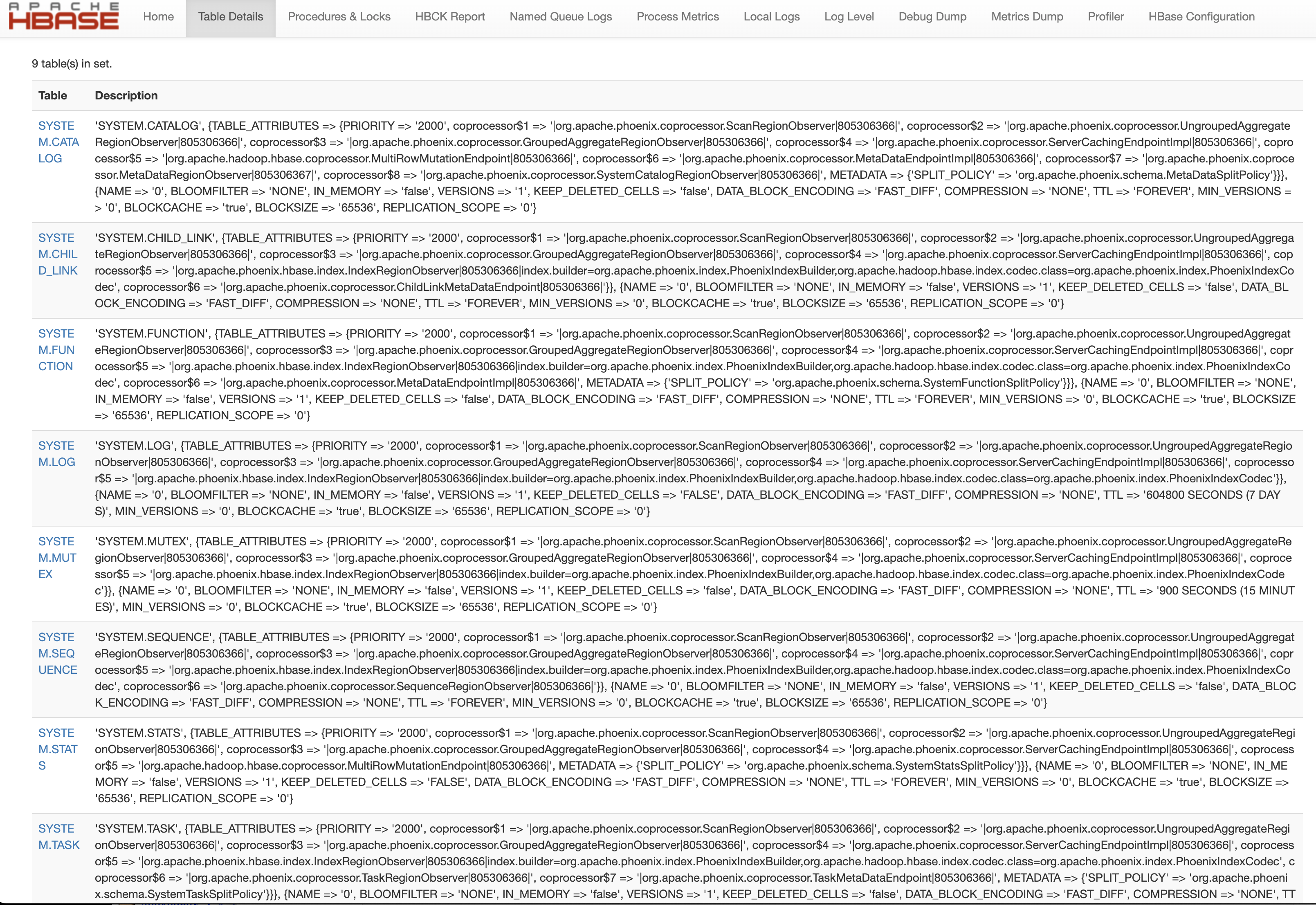
phoenix example
아래처럼 sqlline과 함께 zookeeper quorum 그리고 sql을 넘기면 sql이 실행된다.
python sqlline.py latte01,latte02,latte03 ../examples/STOCK_SYMBOL.sql
Apache Phoenix Installation Guide
Overview
Let us learn how to install Apache Phoenix.
Environment
- Zookeeper Version: 3.5.7
- HBase version: 2.4.15
- phoenix version: 5.1.2
The official website guide recommends the following installation steps:
download and expand our installation binary tar corresponding to your HBase version
copy the phoenix server jar into the lib directory of every region server and master
restart HBase
add the phoenix client jar to the classpath of your JDBC client or application
We have detailed instructions for setting up SQuirreL SQL as your SQL client
Installation
Download Binary and Add to HBase Library
Perform this on all nodes where HBase is installed (HMaster, Region Server).
wget https://dlcdn.apache.org/phoenix/phoenix-5.1.2/phoenix-hbase-2.4.0-5.1.2-bin.tar.gz
tar -zxvf phoenix-hbase-2.4.0-5.1.2-bin.tar.gz
cd phoenix-hbase-2.4.0-5.1.2-bin
sudo cp phoenix-server-hbase-2.4.0-5.1.2.jar  /usr/local/hbase/lib/
Restart HBase
Restart the HMaster and Region Server.
Execute the following commands on the master node.
stop-hbase.sh
start-hbase.sh
Run sqlline.py
After properly filling in the Zookeeper quorum in the hbase-site.xml inside the bin folder, run the Phoenix SQL shell with the following command.
python3.10 ./sqlline.py
If the prompt 0: jdbc:phoenix:> appears, Phoenix has been successfully launched.
You can verify the automatically created Phoenix tables by checking the table information in the HBase Web UI as shown below.
Phoenix Example
As shown below, pass the Zookeeper quorum and a SQL file along with sqlline to execute the SQL.
python sqlline.py latte01,latte02,latte03 ../examples/STOCK_SYMBOL.sql
Quiz
Q1: What is the main topic covered in "Apache Phoenix Installation Guide"?
Learn how to install Apache Phoenix
Q2: What is Download Binary and Add to HBase Library?
Perform this on all nodes where HBase is installed (HMaster, Region Server).
Q3: Explain the core concept of Restart HBase.
Restart the HMaster and Region Server. Execute the following commands on the master node.
Q4: What are the key aspects of Run sqlline.py?
After properly filling in the Zookeeper quorum in the hbase-site.xml inside the bin folder, run
the Phoenix SQL shell with the following command. If the prompt 0: jdbc:phoenix:> appears, Phoenix
has been successfully launched.
Q5: How does Phoenix Example work?
As shown below, pass the Zookeeper quorum and a SQL file along with sqlline to execute the SQL.