- Authors
- Name
Overview
When you install Hadoop, security is not applied by default. To apply security to Hadoop, you need to use an authentication system called Kerberos, and setting it up can be quite challenging, so I decided to document the process.
This guide was written based on the Secured Hadoop official documentation.
- Building a Hadoop Cluster
- Creating Linux Users
- Creating Directories on Linux
- Creating Kerberos Principals
- Installing jsvc
- Modifying Configuration
- Starting JournalNode, NameNode, and DataNode
Building a Hadoop Cluster
Before applying Kerberos security, it is assumed that a Hadoop cluster is already set up. It is also assumed that there are 2 NameNodes and 3 JournalNodes for High Availability (H/A). ZooKeeper is required for this setup.
Creating Linux Users
A hadoop group and an hdfs account must exist on Linux. This is because, to apply Kerberos, you need to start the NameNode and DataNode under that account.
Creating Directories on Linux
The NameNode data storage location /dfs/nn, the JournalNode storage location /dfs/jn, and the DataNode storage location /dfs/dn must be created in advance, and appropriate permissions must be granted.
Creating Kerberos Principals
Create hdfs/{fqdn}@{realm} and HTTP/{fqdn}@{realm} principals on the Kerberos Server, and download the keytab that allows login with those principals. To log in using this keytab, the /etc/krb5.conf file must be properly configured.
Installing jsvc
In a secured environment, running the DataNode is the most challenging part because it must be executed using jsvc.
yum install jsvcwhich jsvc
which jsvc
Modifying Configuration
The configurations below must be identical across all servers.
<configuration>
	<property>
		<name>dfs.nameservices</name>
		<value>mycluster</value>
	</property>
	<property>
		<name>dfs.ha.namenodes.mycluster</name>
		<value>nn1,nn2</value>
	</property>
	<property>
		<name>dfs.namenode.rpc-address.mycluster.nn1</name>
		<value>hadoop1.mysite.com:8020</value>
	</property>
	<property>
		<name>dfs.namenode.rpc-address.mycluster.nn2</name>
		<value>hadoop2.mysite.com:8020</value>
	</property>
	<property>
		<name>dfs.namenode.http-address.mycluster.nn1</name>
		<value>hadoop1.mysite.com:9870</value>
	</property>
	<property>
		<name>dfs.namenode.http-address.mycluster.nn2</name>
		<value>hadoop2.mysite.com:9870</value>
	</property>
	<property>
		<name>dfs.namenode.shared.edits.dir</name>
		<value>qjournal://hadoop1.mysite.com:8485;hadoop2.mysite.com:8485;hadoop3.mysite.com:8485/mycluster</value>
	</property>
	<property>
		<name>dfs.client.failover.proxy.provider.mycluster</name>
		<value>org.apache.hadoop.hdfs.server.namenode.ha.ConfiguredFailoverProxyProvider</value>
	</property>
	<property>
		<name>dfs.ha.automatic-failover.enabled</name>
		<value>true</value>
	</property>
	<property>
		<name>ha.zookeeper.quorum</name>
		<value>hadoop1.mysite.com:2181,hadoop2.mysite.com:2181,hadoop3.mysite.com:2181</value>
	</property>
	<property>
		<name>dfs.ha.fencing.methods</name>
		<value>shell(/bin/true)</value>
	</property>
	<property>
		<name>dfs.ha.fencing.ssh.private-key-files</name>
		<value>/root/.ssh/id_rsa</value>
	</property>
	<property>
		<name>dfs.namenode.name.dir</name>
		<value>/dfs/nn</value>
	</property>
	<property>
		<name>dfs.datanode.data.dir</name>
		<value>/dfs/dn</value>
	</property>
	<property>
		<name>dfs.blocksize</name>
		<value>134217728</value>
	</property>
	<property>
		<name>dfs.journalnode.edits.dir</name>
		<value>/dfs/jn</value>
	</property>
	<!-- JournalNode -->
	<property>
		<name>dfs.journalnode.keytab.file</name>
		<value>/etc/hdfs.keytab</value>
	</property>
	<property>
		<name>dfs.journalnode.kerberos.principal</name>
		<value>hdfs/_HOST@{CHAOS.ORDER.COM}</value>
	</property>
	<property>
		<name>dfs.journalnode.kerberos.internal.spnego.principal</name>
		<value>HTTP/_HOST@CHAOS.ORDER.COM</value>
	</property>
	<!-- NameNode -->
	<property>
		<name>dfs.namenode.keytab.file</name>
		<value>/etc/hdfs.keytab</value>
	</property>
	<property>
		<name>dfs.namenode.kerberos.principal</name>
		<value>hdfs/_HOST@CHAOS.ORDER.COM</value>
	</property>
	<property>
		<name>dfs.namenode.kerberos.internal.spnego.principal</name>
		<value>${dfs.web.authentication.kerberos.principal}</value>
	</property>
	<!-- DataNode -->
	<property>
		<name>dfs.datanode.keytab.file</name>
		<value>/etc/hdfs.keytab</value>
	</property>
	<property>
		<name>dfs.datanode.kerberos.principal</name>
		<value>hdfs/_HOST@CHAOS.ORDER.COM</value>
	</property>
	<property>
		<name>dfs.datanode.address</name>
		<value>0.0.0.0:1004</value>
	</property>
	<property>
		<name>dfs.datanode.http.address</name>
		<value>0.0.0.0:1006</value>
	</property>
	<!-- Web -->
	<property>
		<name>dfs.web.authentication.kerberos.keytab</name>
		<value>/etc/hdfs.keytab</value>
	</property>
	<property>
		<name>dfs.web.authentication.kerberos.principal</name>
		<value>HTTP/_HOST@CHAOS.ORDER.COM</value>
	</property>
	<property>
		<name>dfs.block.access.token.enable</name>
		<value>true</value>
	</property>
	<property>
		<name>dfs.namenode.secondary.http-address</name>
		<value>0.0.0.0:50090</value>
	</property>
	<property>
		<name>dfs.namenode.secondary.https-address</name>
		<value>0.0.0.0:50091</value>
	</property>
</configuration>
<configuration>
	<property>
		<name>fs.defaultFS</name>
		<value>hdfs://mycluster</value>
	</property>
	<property>
		<name>ha.zookeeper.quorum</name>
		<value>hadoop1.mysite.com:2181,hadoop2.mysite.com:2181,hadoop3.mysite.com:2181</value>
	</property>
	<property>
		<name>hadoop.rpc.protection</name>
		<value>authentication</value>
	</property>
	<property>
		<name>hadoop.security.authentication</name>
		<value>kerberos</value>
	</property>
	<property>
		<name>hadoop.security.authorization</name>
		<value>true</value>
	</property>
</configuration>
Uncomment the JSVC_HOME and HADOOP_SECURE_DN_USER sections that are commented out in the file below.
Set the value from which jsvc to JSVC_HOME, and set hdfs for HADOOP_SECURE_DN_USER.
# The jsvc implementation to use. Jsvc is required to run secure datanodes
# that bind to privileged ports to provide authentication of data transfer
# protocol.  Jsvc is not required if SASL is configured for authentication of
# data transfer protocol using non-privileged ports.
export JSVC_HOME=/usr/bin
# On secure datanodes, user to run the datanode as after dropping privileges.
# This **MUST** be uncommented to enable secure HDFS if using privileged ports
# to provide authentication of data transfer protocol.  This **MUST NOT** be
# defined if SASL is configured for authentication of data transfer protocol
# using non-privileged ports.

export HADOOP_SECURE_DN_USER=hdfs
Starting JournalNode, NameNode, and DataNode
If this is the initial cluster setup, the following steps are required.
- Start ZooKeepers:
zookeeper/bin/zkServer.sh start(on all 3 nodes). - Format ZKFC:
hdfs zkfc -formatZK(run only once). - Start JournalNodes:
hdfs journalnode(on all 3 nodes). - Format active NameNode:
hdfs namenode -format(run only once on the active NameNode) - Start active NameNode:
hdfs namenode(run on the active NameNode) - Format standby NameNode:
hdfs namenode -bootstrapStandby(run only once on the standby NameNode) - Start standby NameNode:
hdfs namenode(run on the standby NameNode) - Start ZKFC:
hdfs zkfc(run on the nodes where the active and standby NameNodes reside) - Start DataNodes:
hdfs datanode(run on the data nodes)
Important note: JournalNode, NameNode, and ZKFC should be started with the hdfs account, while DataNode and ZooKeeper should be started with the root account.
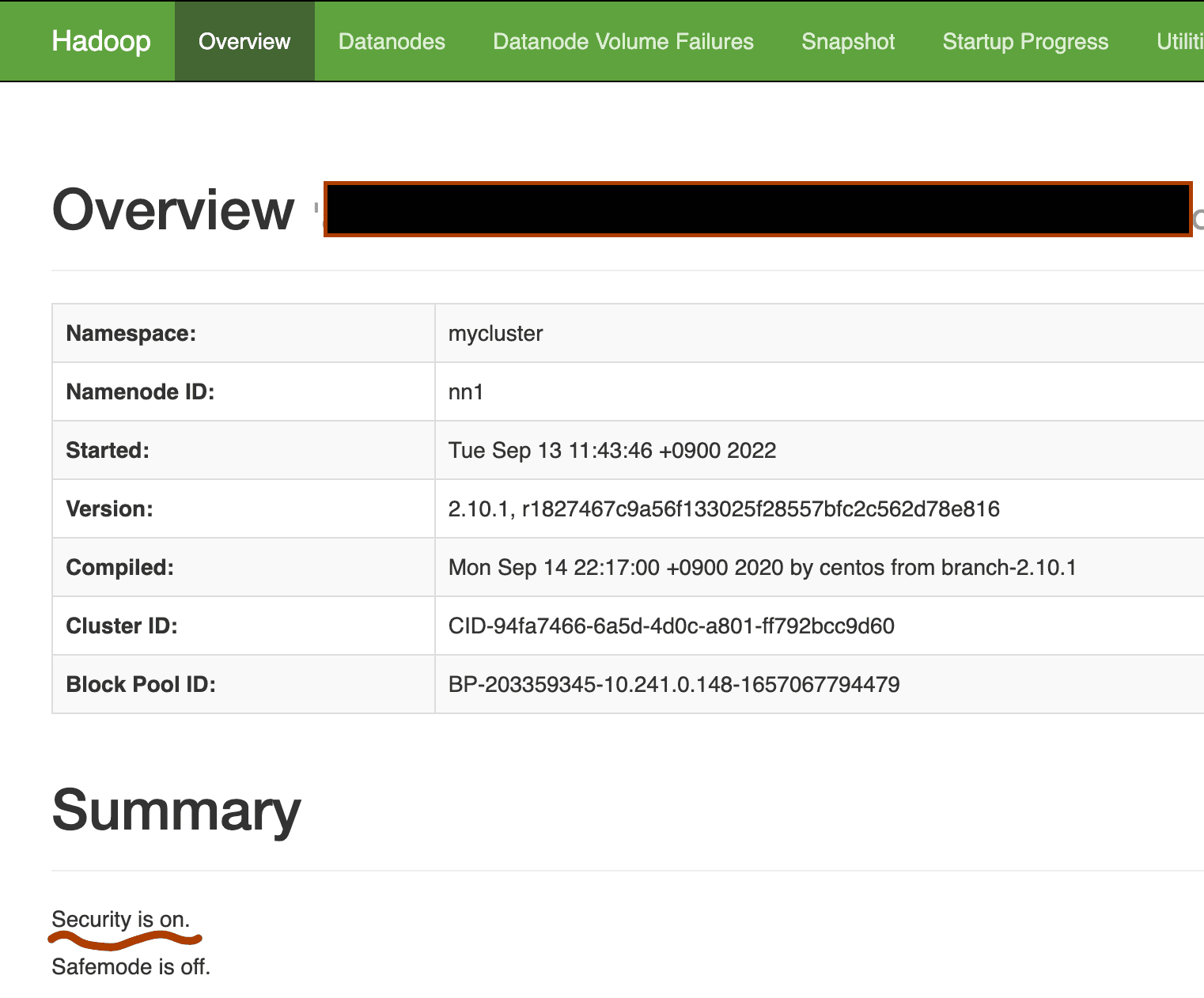
If the installation is successful,
you can access the NameNode Web UI at http://namenode_ip_address:9870. The security section should be displayed as on as shown below.