- Authors
- Name
Overview
Hadoop 2.6.0をJava Clientライブラリを使って操作する方法を解説します。 hdfs_skimはhdfs://{active_namenode_url}:{port}形式のString型の変数です。
Hadoop Clientのインストール方法
hadoop-client Maven RepositoryでHadoopバージョンに合ったMavenリポジトリを見つけます。
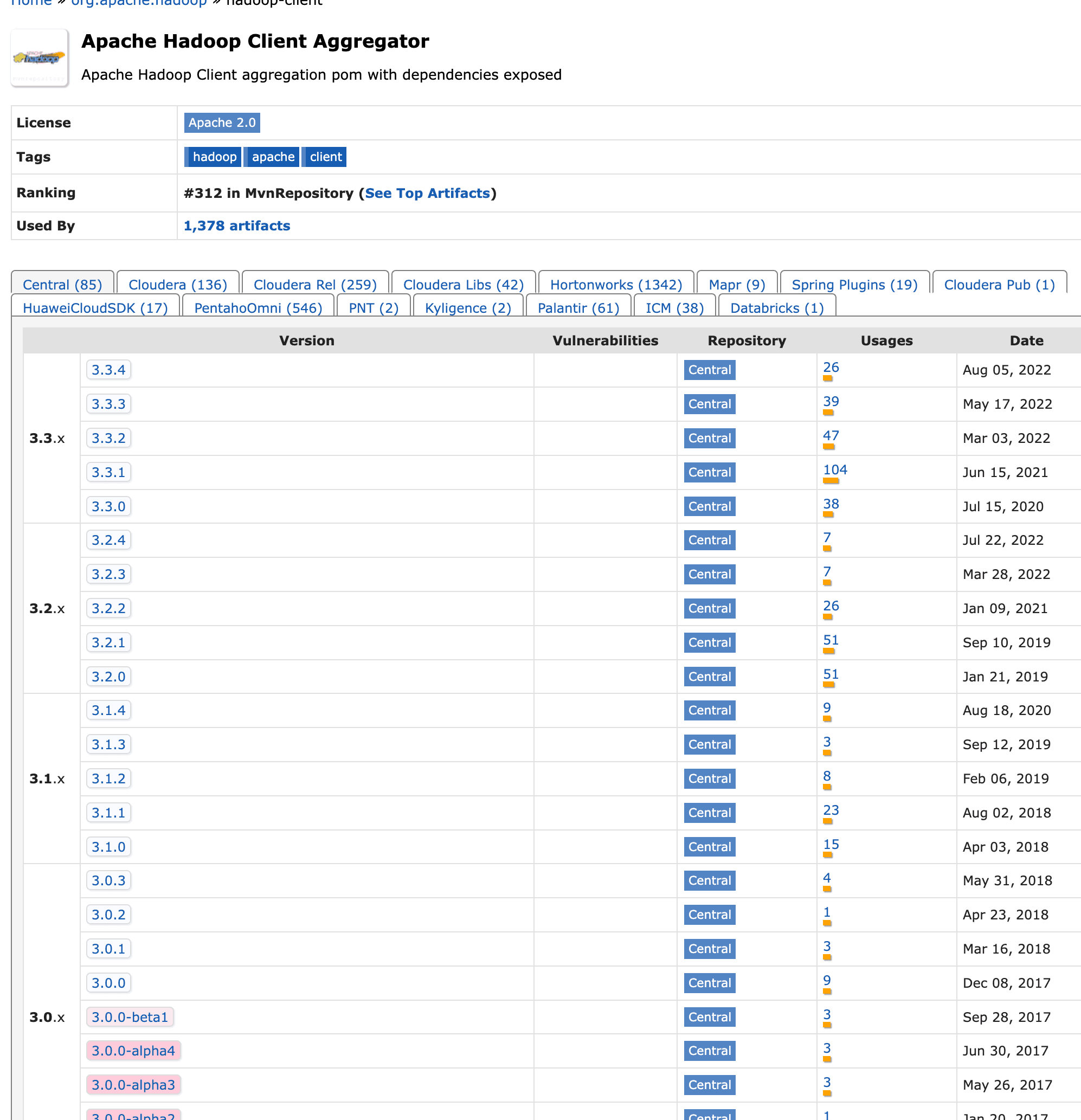
プロジェクトのpom.xmlにhadoop-clientをdependencyとして登録します。
pom.xml
    <dependencies>
        <dependency>
            <groupId>org.apache.hadoop</groupId>
            <artifactId>hadoop-client</artifactId>
            <version>2.6.0</version>
        </dependency>
    </dependencies>
hadoop-client
create directory
hdfsの/tmp/ディレクトリ配下にtestという名前のフォルダを作成します。
create_directory
import org.apache.hadoop.fs.FileSystem;
import org.apache.hadoop.conf.Configuration;

    public static void createDirectory() throws IOException {
        // create directory
        Configuration configuration = new Configuration();
        configuration.set("fs.defaultFS", hdfs_skim);
        FileSystem fileSystem = FileSystem.get(configuration);
        String directoryName = "/tmp/test";
        Path path = new Path(directoryName);
        fileSystem.mkdirs(path);
    }
new_directory_check
 hdfs dfs -ls /tmp
 drwxr-xr-x   - user   supergroup          0 2022-10-03 19:04 /tmp/test
create file
hdfsの/tmp/testディレクトリ配下にread_write_hdfs_example.txtという名前のテキストファイルを作成します。
add
import org.apache.hadoop.fs.FSDataOutputStream;
import java.io.BufferedWriter;

    public static void writeFileToHDFS() throws IOException {
        Configuration configuration = new Configuration();
        configuration.set("fs.defaultFS", hdfs_skim);
        FileSystem fileSystem = FileSystem.get(configuration);
        //Create a path
        String fileName = "read_write_hdfs_example.txt";
        Path hdfsWritePath = new Path("/tmp/test/" + fileName);
        FSDataOutputStream fsDataOutputStream = fileSystem.create(hdfsWritePath,true);

        BufferedWriter bufferedWriter = new BufferedWriter(new OutputStreamWriter(fsDataOutputStream,StandardCharsets.UTF_8));
        bufferedWriter.write("Java API to write data in HDFS");
        bufferedWriter.newLine();
        bufferedWriter.close();
        fileSystem.close();
    }
new_file_check
hdfs dfs -ls /tmp/test
Found 1 items
-rw-r--r--   3 user supergroup         31 2022-10-03 19:40 /tmp/test/read_write_hdfs_example.txt
edit file
hdfsの/tmp/test/read_write_hdfs_example.txtファイルにテキスト行を1行追加します。
edit
import org.apache.hadoop.fs.FSDataOutputStream;
import java.io.BufferedWriter;

    public static void writeFileToHDFS() throws IOException {
        Configuration configuration = new Configuration();
        configuration.set("fs.defaultFS", hdfs_skim);
        FileSystem fileSystem = FileSystem.get(configuration);
        //Create a path
        String fileName = "read_write_hdfs_example.txt";
        Path hdfsWritePath = new Path("/tmp/test/" + fileName);
        FSDataOutputStream fsDataOutputStream = fileSystem.create(hdfsWritePath,true);

        BufferedWriter bufferedWriter = new BufferedWriter(new OutputStreamWriter(fsDataOutputStream,StandardCharsets.UTF_8));
        bufferedWriter.write("Java API to write data in HDFS");
        bufferedWriter.newLine();
        bufferedWriter.close();
        fileSystem.close();
    }
edit_file_check
hdfs dfs -cat /tmp/test/read_write_hdfs_example.txt
Java API to write data in HDFS
Java API to append data in HDFS file
read file
hdfsの/tmp/test/read_write_hdfs_example.txtファイルを読み込みます。
edit
import org.apache.hadoop.fs.FSDataOutputStream;
import org.apache.hadoop.fs.FSDataInputStream;
import org.apache.hadoop.fs.FileSystem;
import java.io.*;

    public static void readFileFromHDFS() throws IOException {
        Configuration configuration = new Configuration();
        configuration.set("fs.defaultFS", hdfs_skim);
        FileSystem fileSystem = FileSystem.get(configuration);
        //Create a path
        String fileName = "read_write_hdfs_example.txt";
        Path hdfsReadPath = new Path("/tmp/test/" + fileName);
        //Init input stream
        FSDataInputStream inputStream = fileSystem.open(hdfsReadPath);
        //Classical input stream usage
//        String out= IOUtils.toString(inputStream, "UTF-8");
//        System.out.println(out);

        BufferedReader bufferedReader = new BufferedReader(
                new InputStreamReader(inputStream, StandardCharsets.UTF_8));

        String line = null;
        while ((line=bufferedReader.readLine())!=null){
            System.out.println(line);
        }

        inputStream.close();
        fileSystem.close();
    }
output
Java API to write data in HDFS
Java API to append data in HDFS file

Process finished with exit code 0